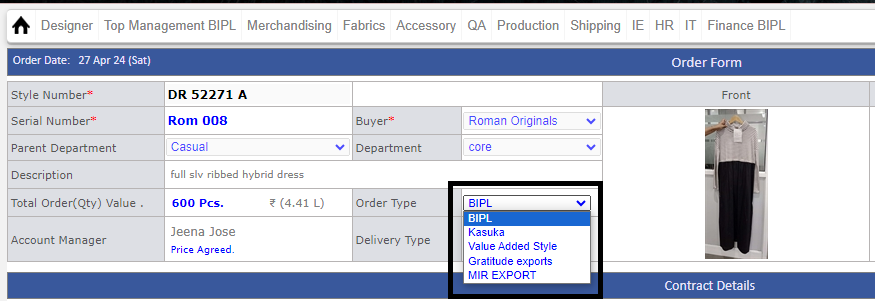
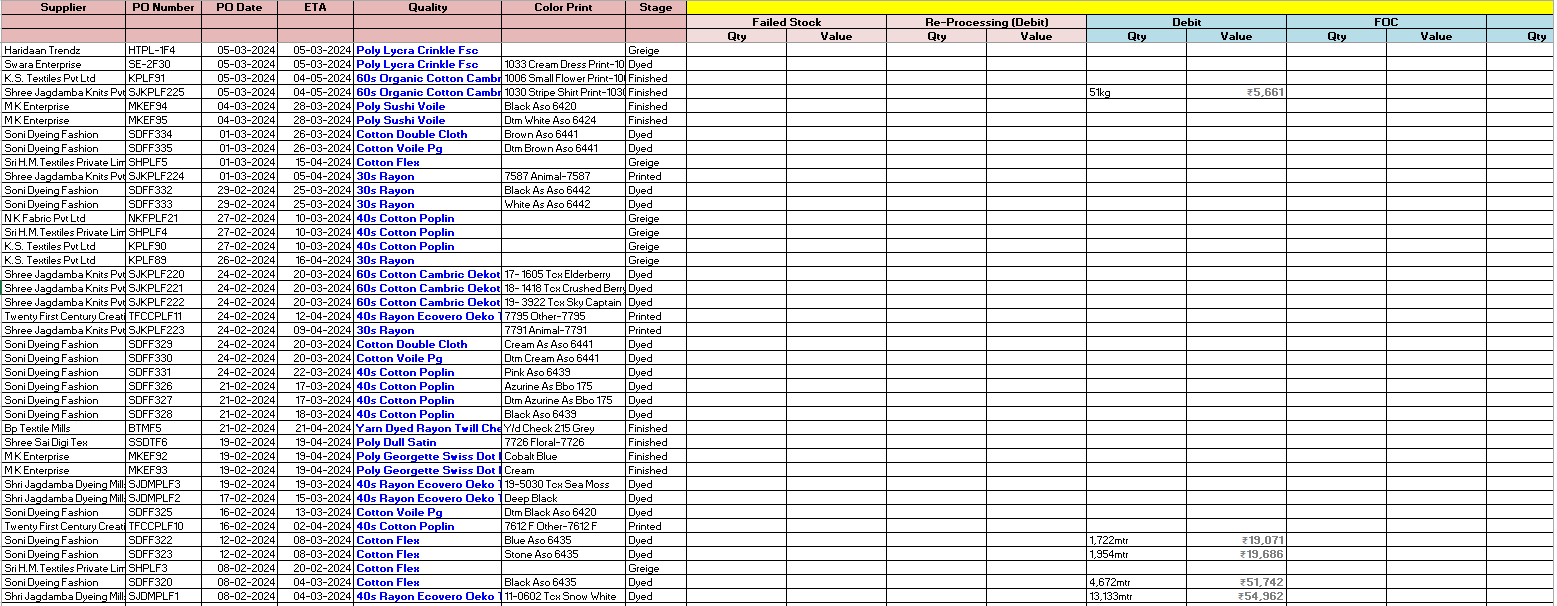
Version 9.6.8
|
Released Date (15th May 2026)
|
Email Content Update
-
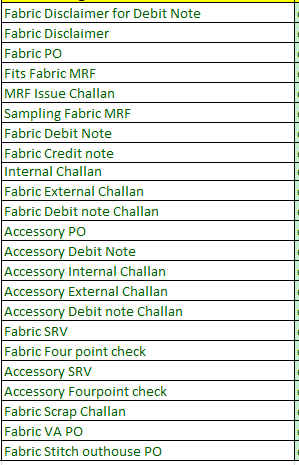
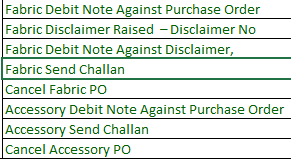
● Telephone number has been removed from emails.
-
● Updated contact message:
-
o “For more details, please contact BIPL Material Team.”
-
-
-
Core Report Alignment Updated
-
● In the Production Performance report:
-
o BIPL line is now displayed in bold format.
-
o KPI Score Policy 2 column has been hidden.
-

-

-
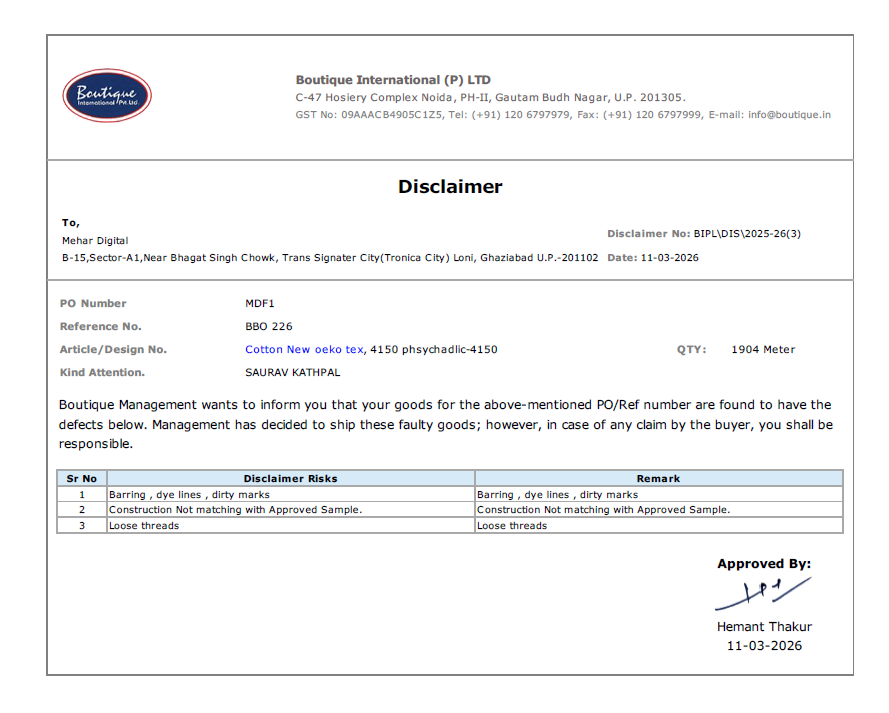
Disclaimer Task Narration Update
-
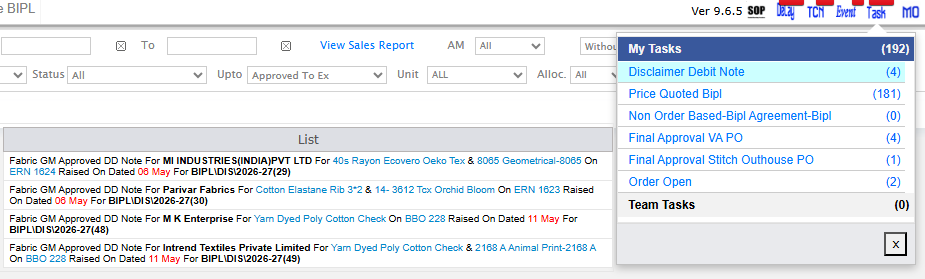
● Disclaimer task narration has been updated as suggested by Samrat Sir.
-
● Pending DD Note for (Supplier) for (Fabric Quality) & (ColorPrint) on (Serial) raised on date (dd-mmm) for (Disclaimer Number)
-
-
MO Reallocation Page – Outhouse Stitch PO Visibility
-
● Resolved the issue related to outhouse stitch PO visibility in the reallocation section of MO.
-
● Users can now create multiple POs as per previous functionality.
-
● Earlier, the system was restricting users to creating only 5 POs.
-

|
Version 9.6.7
|
Released Date (27th Apr 2026)
|
-
Report Updates
-
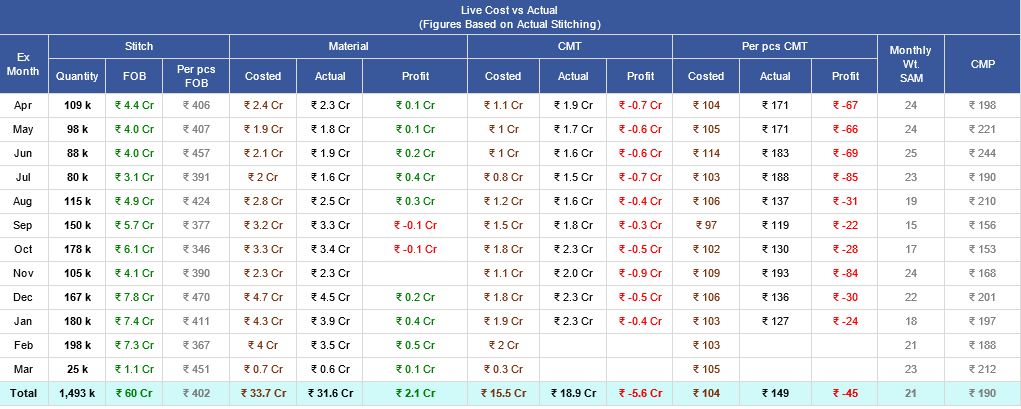
● In the Core Report, the 3rd report from the top will have the column “Monthly Wt. SAM” hidden.
-
● In Quarterly Top 3 CQD / QC Faults (2025-26):
-
o Percentage (%) will now be displayed as:
-
✔ % of Total Faults
-
✔ % of Total Material
-
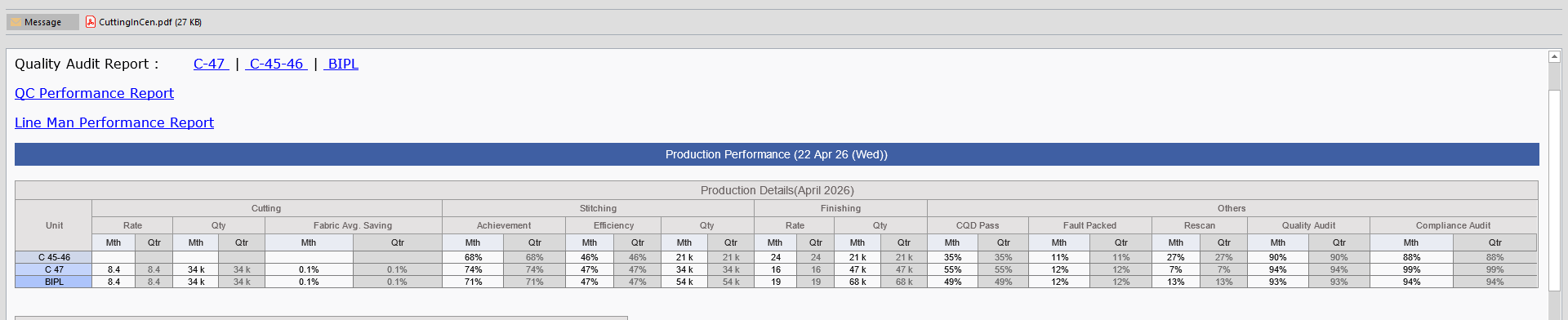
● Monthly and Quarterly Production Performance Reports have been merged into a single report.
-
-
Disclaimer Debit Note Updates
-
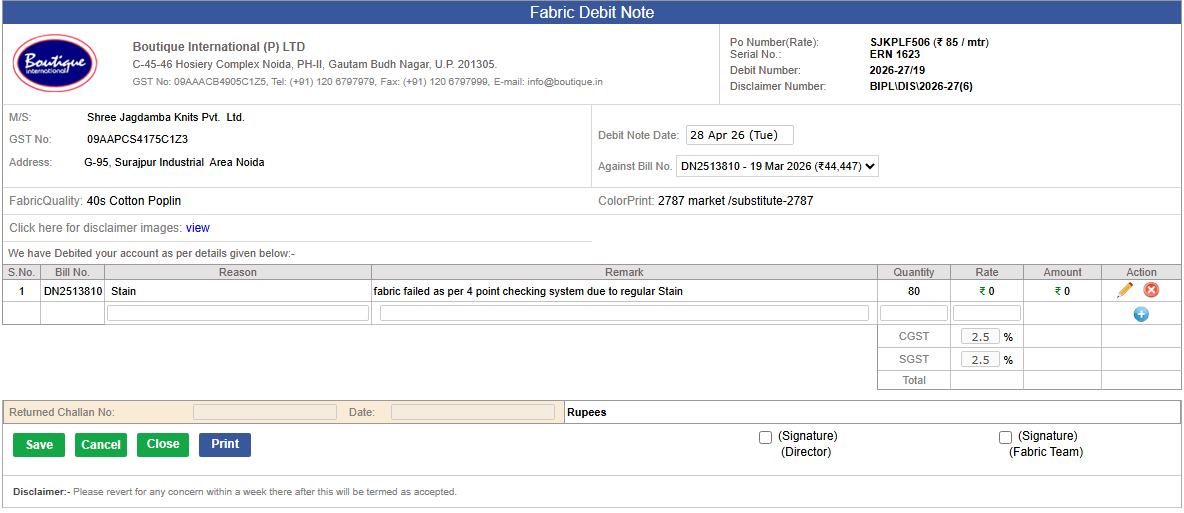
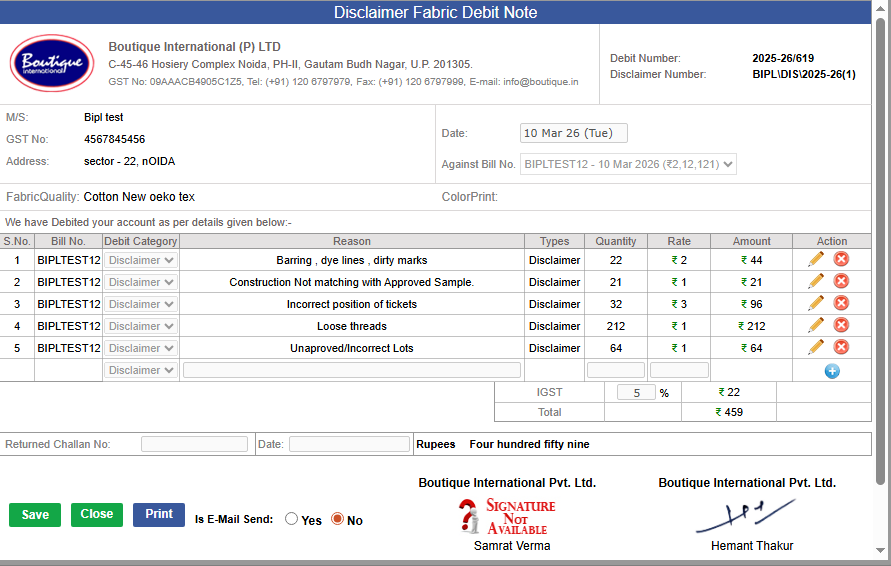
1.) Field Changes
-
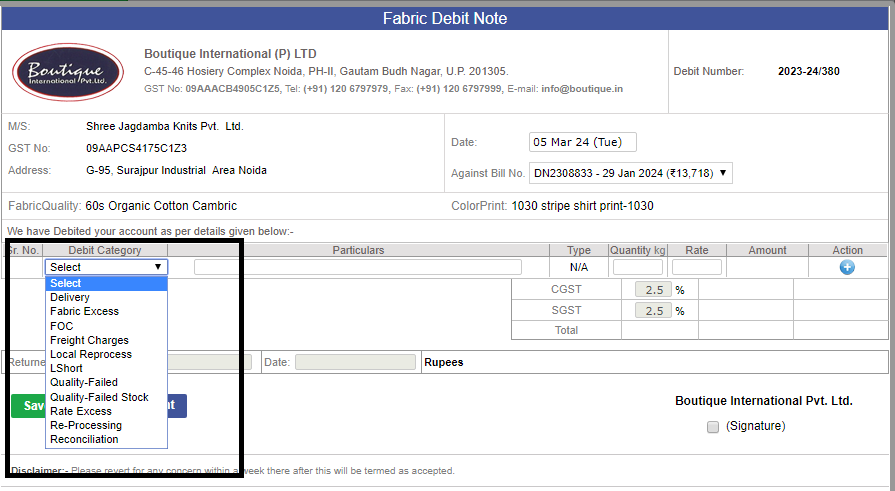
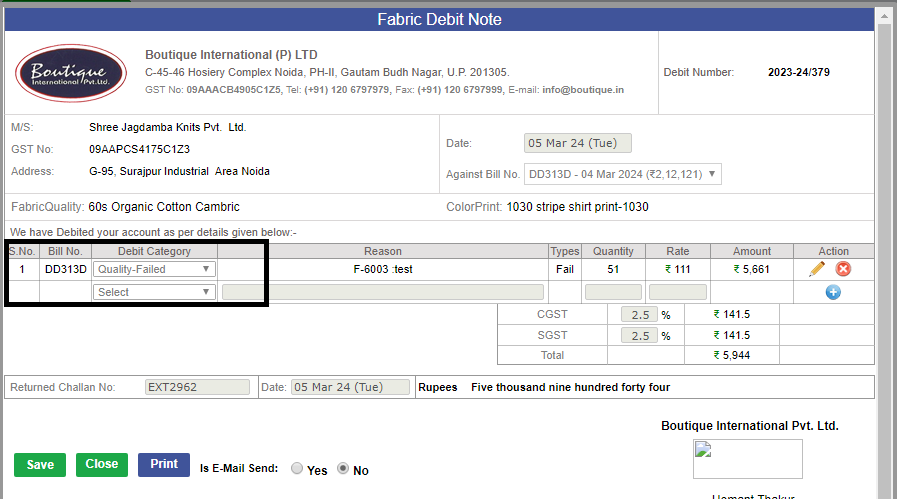
● The “Debit Category” field has been removed from:
-
o Fabric Disclaimer Debit Note (screen & PDF)
-
●The “Type” field has been removed from:
-
o Fabric Disclaimer Debit Note
-
2.) Remark Field Addition
-
● A “Remark” field has been added:
-
o After the Reason section (on screen and PDF)
-
● It will:
-
o Auto-populate with the Admin Remark
-
o Remain editable for users
-
-
Admin Remark Validation
-
● The Admin Remark field is now mandatory in the Disclaimer Admin module
-
● Users cannot save or submit a Disclaimer without entering an Admin Remark
-
Signature & User Details
-
1.) User Designation will now be displayed along with signatures in all applicable modules
-
● Applicable To:
-
o Fabric Disclaimer PDF
-
o Fabric Disclaimer Debit Note / PDF
-
● Signature Format:
-
o Signature (if approved)
-
o Name
-
o (Designation)
-
o Date
-
Note:
-
* If not signed, only Signature (Designation) will be shown
-
PO & Date Enhancements
-
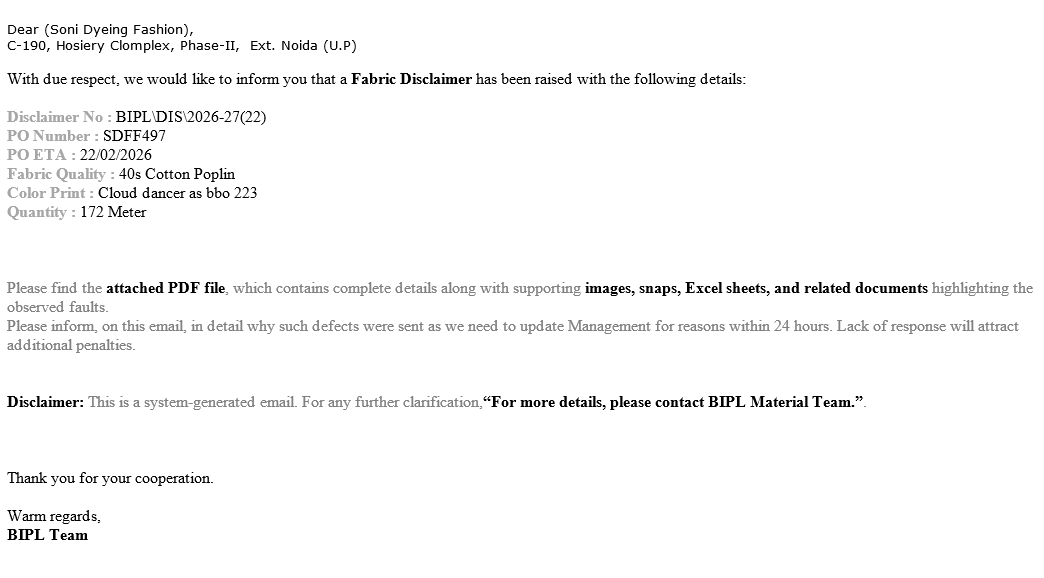
● PO Number will be displayed on:
-
o Fabric Disclaimer Debit Note (screen & PDF)
-
● Date labeling improvements:
-
o Top Date → Debit Note Date
-
o Bottom Date → Return Challan Date
-
o Clear separation of the Return Challan section
-
Naming & Formatting Changes
-
● The word “Disclaimer” has been removed from the header
-
o Final name: Fabric Debit Note
-
● All updates will also reflect in the PDF
-
● Improved CSS formatting to avoid full uppercase:
-
o “M/s” (Party Name)
-
o Address section
-
-
Signature & Email Rules
-
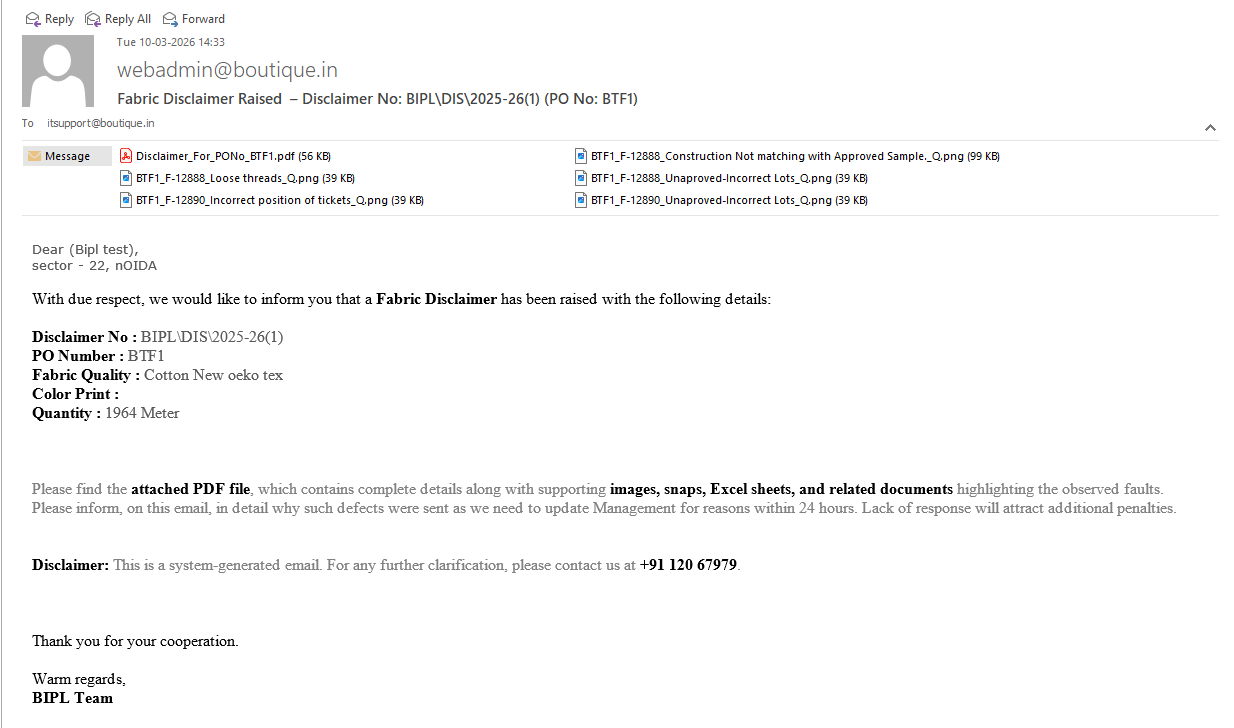
● Disclaimer emails will include Sandip’s signature (Fabric QA only)
-
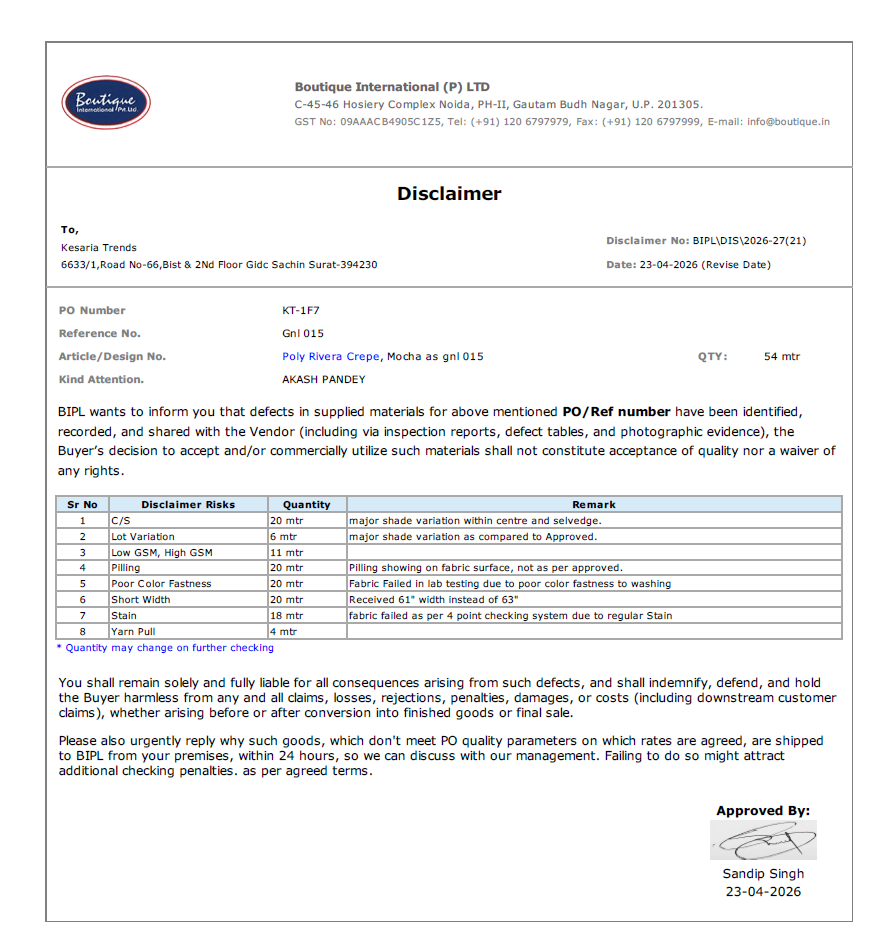
Email Content Update
-
● Telephone number removed from emails
-
● Replaced with:
-
o “For more details, please contact BIPL Material Team.”
-
-
Additional Validations & Enhancements
-
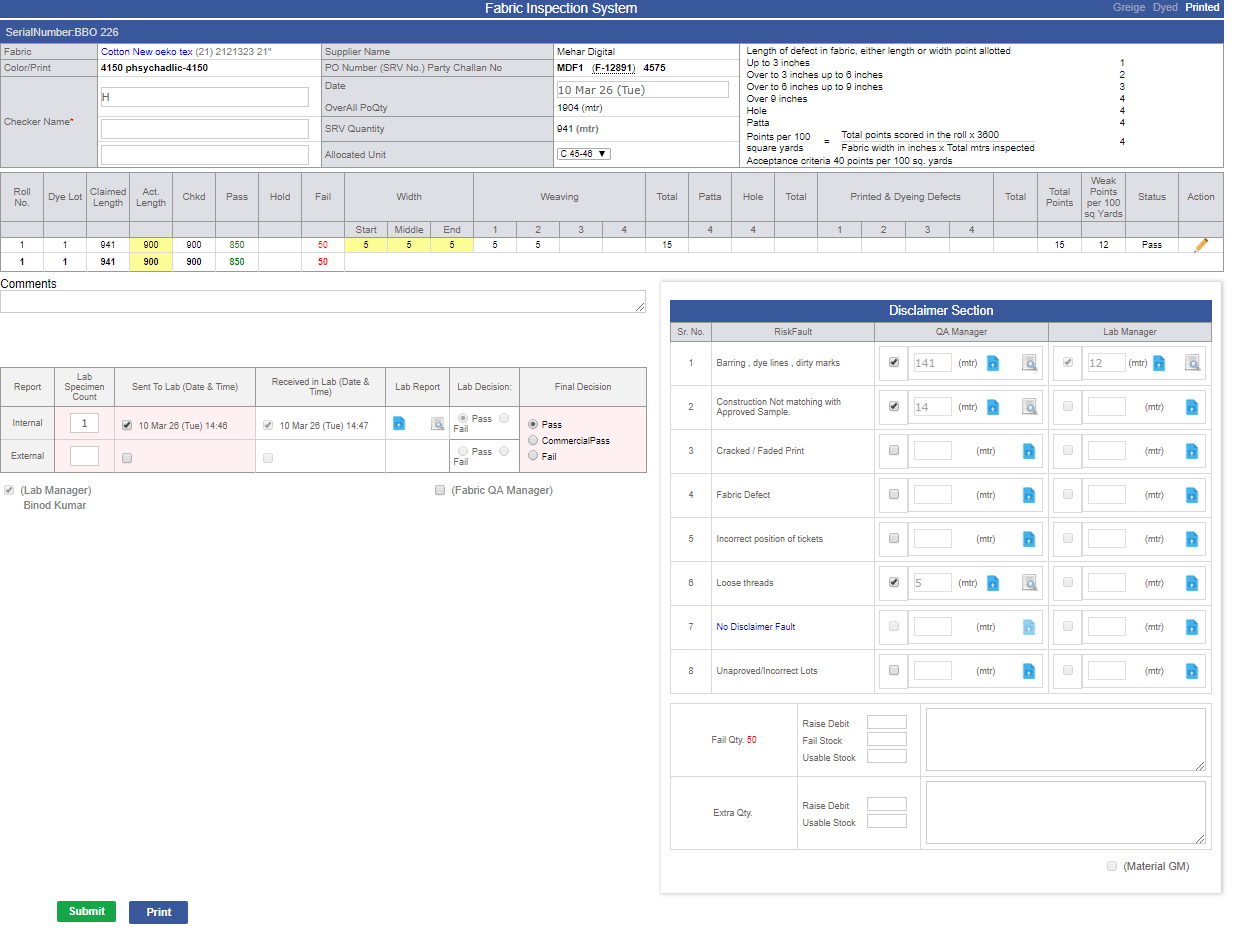
● On the Four Point Check page (Disclaimer section):
-
o For all faults except “No Disclaimer Fault”, supporting documents are mandatory
-
o System validation ensures documents are uploaded before proceeding
-
Other Updates
-
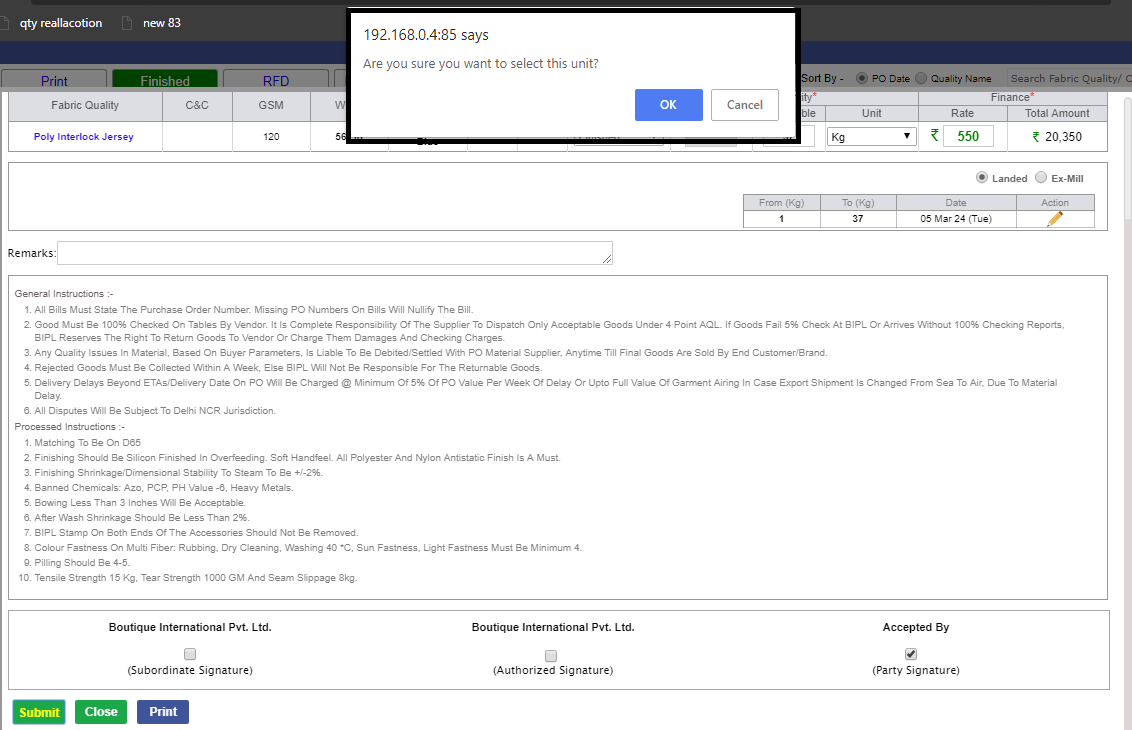
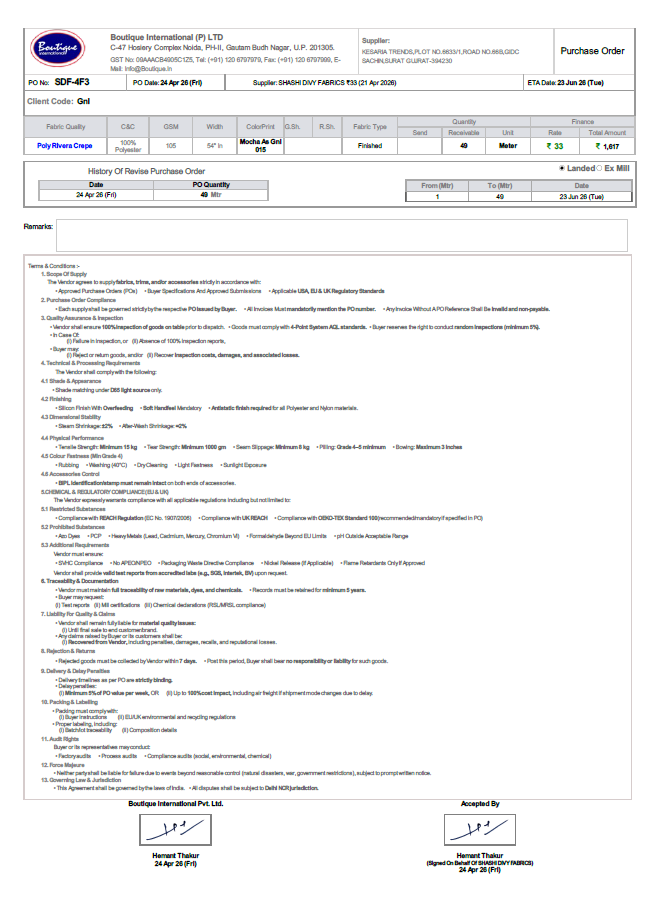
● Fabric PO Terms & Conditions have been updated as per management guidelines
-
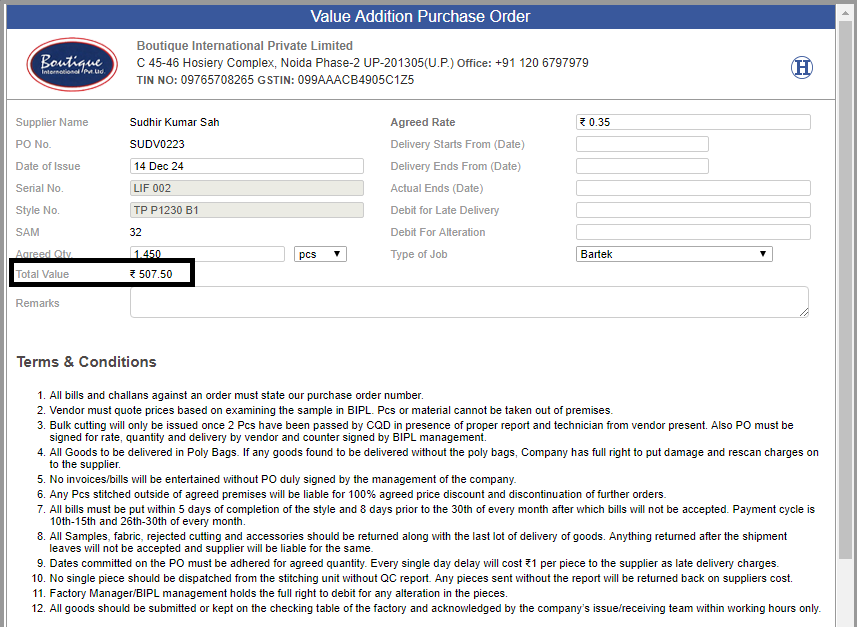
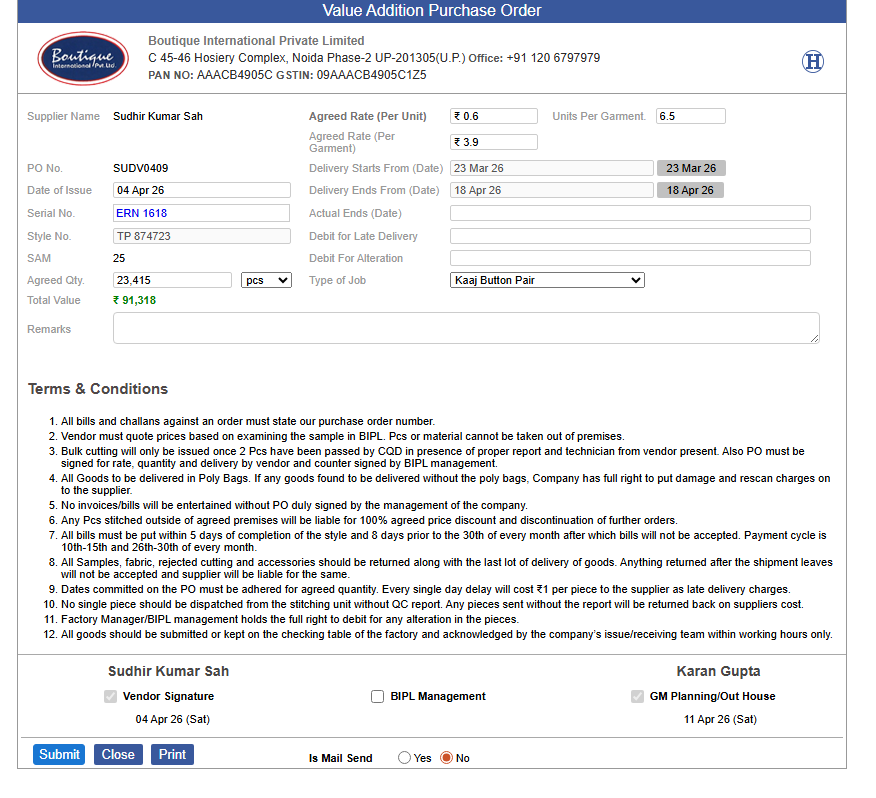
● In Value addition PO and stitch outhouse PO, TIN was removed instead of this PAN number is used.
-
-
|
Version 9.6.6
|
Released Date (12th March 2026)
|
-
Detailed Analysis – Dynamic Disclaimer Implementation.
-
1.) Purpose & Business Context
-
o This document defines the High-Level Design (HLD) for implementing a Dynamic Disclaimer System in the Boutique International Pvt Ltd ERP for the Raw Material Procurement Division.
-
o The primary business objective is to reduce financial penalties and quality disputes by formally communicating known and accepted quality risks to suppliers at the time of procurement.
-
o These disclaimers act as documented acceptance of risks based on managerial decisions, supplier requests, or unavoidable material limitations.
-
o The solution shifts disclaimer handling from a manual, ad-hoc activity to a system-driven, automated, and auditable process integrated with existing QA and procurement workflows.
-
2.) Problem Being Addressed
-
● Before this enhancement:
- o Disclaimers were manually created and managed
- o Risk communication was inconsistent
- o Repeated defects could be missed or duplicated
- o No proper version control or audit trail
- o High dependency on individuals rather than process
-
● This design ensures:
- o Process-driven disclaimer creation
- o Standardized risk communication
- o Reduced operational and compliance risk
-
3.) Scope of the Enhancement
-
● The scope includes:
- o Automatic disclaimer number generation
- o Dynamic disclaimer creation based on PO, supplier, material, and quality risks
- o Editable and admin-controlled defect/risk checklist
- o Integration with Four-Point Check, PO, MO, and Lab workflows
- o Automated PDF generation and email scheduling
- o Approval workflow with role-based permissions
- o Audit trail, versioning, and reporting
- o Support for preview, print, archive, and retrieval
-
4.) Key Stakeholders & Roles
-
● Stakeholders involved:
- o Management
- o Fabric Purchase Team
- o Lab Team
- o Material QA Manager
- o Material GMs
- o IT Team
- o Suppliers
-
● Role responsibilities:
- o Lab Manager & Material QA Manager
-
✔
Select defects/risks from Four-Point Check screen
-
✔
Add remarks and images
- o Admin
-
✔
Manage disclaimer templates and risk master
- o Material GM
-
✔
Review, approve, or reject disclaimers
- o Other GMs & Directors
-
✔
Read-only visibility
-
5.) Functional Modules Breakdown
-
● Disclaimer Master Setup
- o Admin-defined disclaimer templates
- o Dynamic placeholders for PO, supplier, material type, and quality
-
● Fabric Stages vary by:
- o Material type (Greige, Dye/Print, etc.)
- o Quality and PO type
-
● Risks displayed as:
- o Checkbox (selected = accepted risk)
- o Remark text field
- o Image upload support
-
● Default text available but editable per disclaimer
- o Unselected risks shown as ❌, selected as ✔️
- o Approval task auto-created for Material GM
- o Disclaimer Mail generated only after Material GM signature on Fabric Four-point Check.
- o Always there will be one to one mapping between Fabric PO and Fabric Disclaimer.
- o Disclaimer always get revised , if any Risk/Fault newly added.
-
● Approved disclaimer:
- o Sent via email to supplier and stakeholders
- o PDF generated and archived
- o Visible even after shipping from MO screen
-
● Dynamic Input Mapping:
- o Inputs auto-fetched from
-
✔
Purchase Order
-
✔
Supplier Master
-
✔
Disclaimer Risk Master (Admin)
-
✔
Four-Point Check screen
-
● Rule engine ensures:
- o Inputs auto-fetched from
-
✔
Correct disclaimer format selection
-
✔
Risk mapping based on material type and PO type
-
● Defect Entry Panel (Disclaimer Risk Admin)
- o UI for selecting quality defects such as:
-
✔
Lot variation
-
✔
Bowing
-
✔
Third-party testing
-
✔
Crease mark (custom text)
- o Supports:
-
✔
Admin-defined risks
-
✔
Ad-hoc risk addition
-
● Disclaimer Generator
- o Automatically triggered via scheduler
-
✔
Generates:
-
* Disclaimer PDF
-
* Email with attachments (images + PDF+ any document which is uploaded)
-
✔
Pulls data directly from Four-Point Check:
- * Avoids duplication
- * Same PO + same risk not resent
- * Only new risks generate revised disclaimer.
-
● Audit Trail & Versioning
- o Each disclaimer records:
-
✔
Timestamp
-
✔
User details
-
✔
Version number
-
✔
Associated PO, supplier, and serial numbers
- o Features:
-
✔
Historical disclaimer retrieval (Future Endevour)
-
✔
Filter-based disclaimer listing UI (Future Endevour)
-
✔
Supplier-specific visibility (Future Endevour)
-
6.) Automation & Mail Scheduler Logic
-
● Scheduler behavior:
- o Runs daily
- o Checks POs with newly recorded risks
-
● Scenarios handled:
- o First-time disclaimer → New disclaimer number, fresh mail
- o Additional risks added later → Revised disclaimer, same PO with same disclaimer number.
-
● Only selected risks appear in email body (no unnecessary crosses)
-
● Ensures Fabric Team without manual follow-ups
-
7.) ERP Screen Integration
-
● Disclaimers are accessible from:
- o Four-Point Check Screen
- o Manage Fabric PO Screen
- o Fabric Debit note
- o Disclaimer Admin
-
8.) Reports & Analytics (Future Endevour)
-
9.) Security & Permissions
-
● Role-based access control:
- o Lab Manager & Material QA Manager:
-
✔
Create/update risk checklist (restricted to own section)
- o Material GM:
-
✔
Approve/reject disclaimers
- o Others:
-
✔
Read-only access
-
✔
Ensures data integrity, accountability, and compliance.
-
10.) Overall Impact
-
● This release introduces:
- o End-to-end automation of disclaimers
- o Improved quality risk transparency
- o Strong audit and compliance control
- o Reduced dependency on manual intervention
- o Better supplier communication and traceability
-
11.) Disclaimer Fault Management and Disclaimer Debit Flow Enhancement.
-
● Description:
-
o As per the amendments suggested during the demo, enhancements have been implemented to improve the Disclaimer Fault selection process and Disclaimer Debit workflow.
-
o The update introduces a new fault option and separates the Disclaimer Debit process from the existing debit flow to ensure better control and accurate communication with suppliers.
-
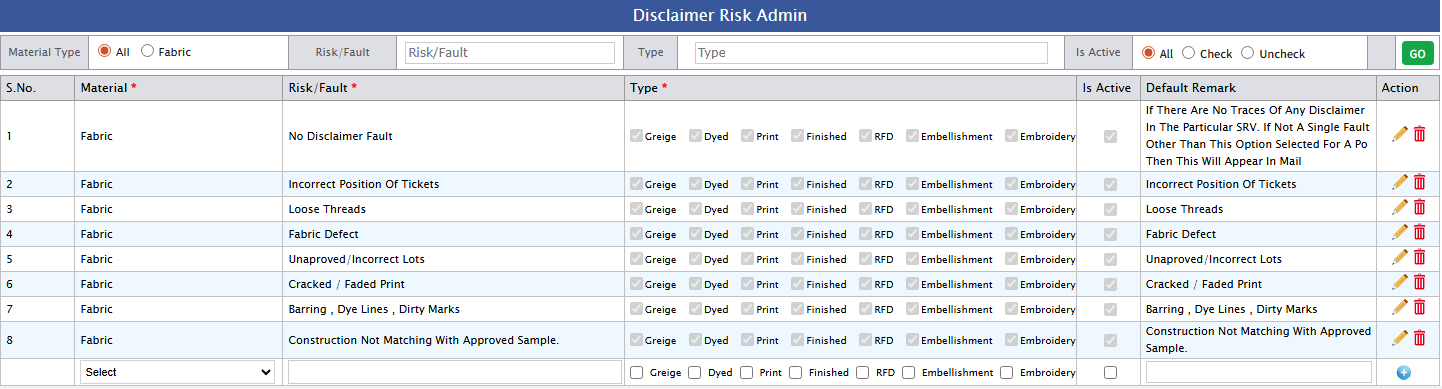
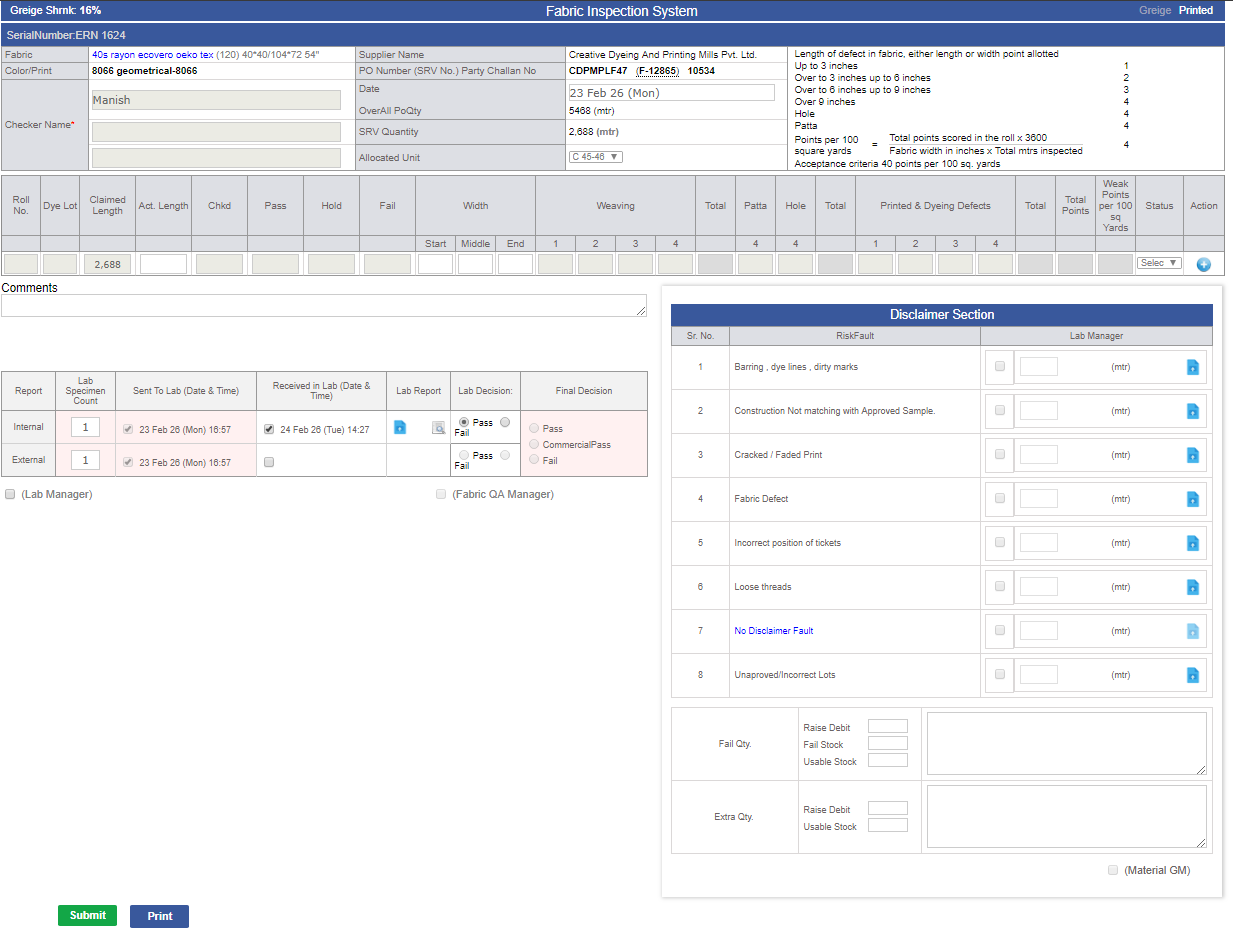
11.1) Implementation of “No Disclaimer Fault” Option
-
o A new fault option “No Disclaimer Fault” has been added in Admin for all disclaimer types.
-
o This option cannot be edited or removed from the system.
-
o If there are no disclaimer faults, Fabric QA must select “No Disclaimer Fault”.
-
o When “No Disclaimer Fault” is selected, no other faults can be added.
-
o Fabric QA can deselect this option and add other faults until the Fabric QA signature is completed.
-
o If any fault other than “No Disclaimer Fault” exists in any SRV of the same PO, the disclaimer mail will be sent with only the actual faults (excluding “No Disclaimer Fault”).
-
o If only “No Disclaimer Fault” is selected, no disclaimer mail will be triggered.
-
o Disclaimer mail will be sent after GM signature.
-
o Debit Note task will be created after or when 90% SRV is received.
-
o This ensures that disclaimer mails are sent to suppliers only when valid faults exist.
-
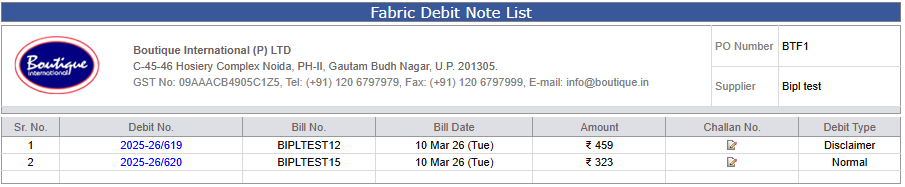
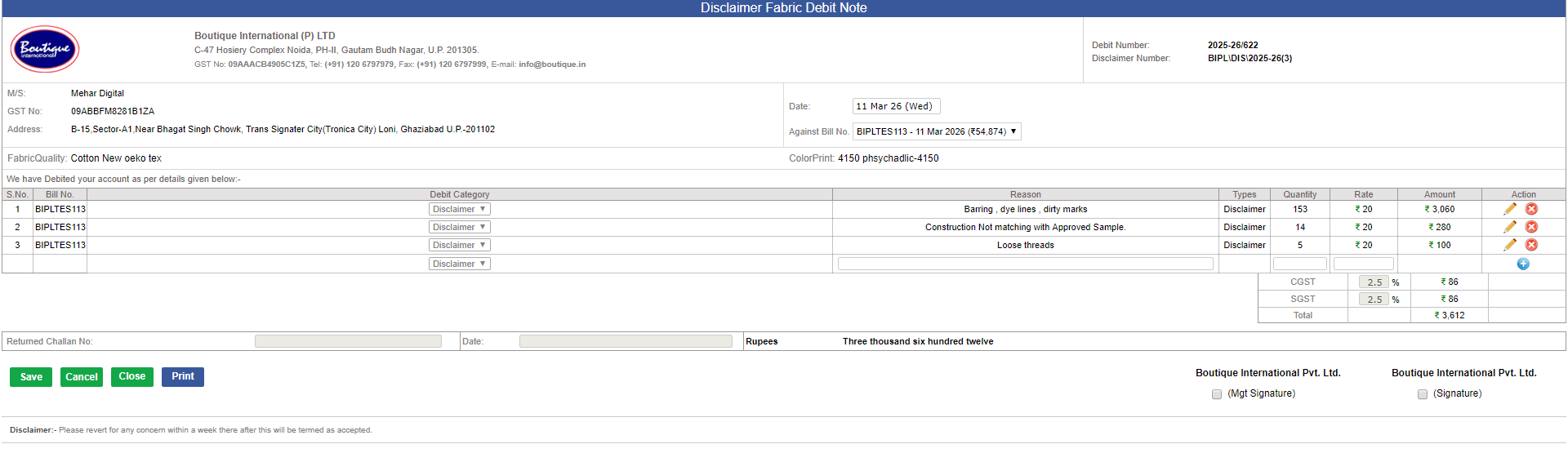
11.2) Segregation of Disclaimer Debit from Existing Flow
- o The Disclaimer Debit process has been separated from the existing debit workflow.
- o A task “Disclaimer Debit for PO "PO Number" will be generated for Hemant Sir and SAM Sir when valid disclaimer faults (other than “No Disclaimer Fault”) are added to the PO.
- o The debit will initially be created by Hemant Sir.
- o After Hemant Sir’s signature, SAM Sir will review and intervene in the process.
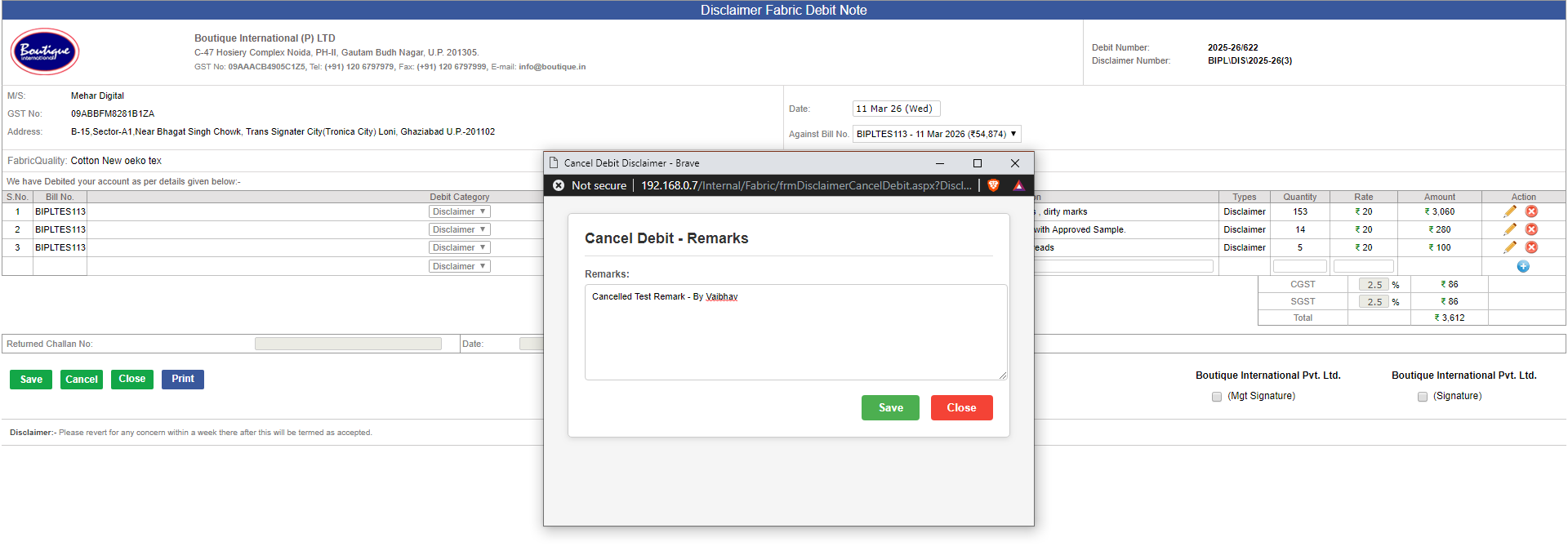
- o Only SAM Sir has the authority to approve or cancel the debit through his signature.
- o The existing debit implementation flow has been removed for disclaimer-related debits.
- o If any disclaimer fault other than the fixed fault exists, the fixed fault will be ignored and will not appear in the debit note.
- o After Hemant Sir’s signature, the task narration will be updated and prioritized.
- o If Hemant Sir does not want to raise the debit, he cannot cancel it directly. He must discuss it with SAM Sir, and SAM Sir will cancel it if agreed.
- o The debit will be confirmed or canceled only after SAM Sir’s signature.
- o Email notifications will be sent only after SAM Sir’s final signature.
-


-
Multiple Email Domain Support in Supplier Admin:
- ● A new enhancement has been implemented in Supplier Admin to support multiple email extensions.
- ● This allows email addresses with different extensions such as .international, .com, .in, etc, to be configured and used in the system for supplier communication.
-
Costing Sheet – VA Edit Access Restriction:
-
●As per the discussion with management, in the Costing Sheet, the VA field will remain editable only through Samrat Sir and Karan Sir’s login after the order is placed. After order placement,
-
● the Account Manager will not be able to edit the process details. Any required changes can be performed only by Samrat Sir or Karan Sir through their respective logins.
-
Website Content Update – About Us & Company Profile:
-
● The About Us page on the 'Boutique.in' website has been updated, and the Company Profile PDF has also been revised as per the discussion with management.
- ● The updated content is now live on the website.
-


-
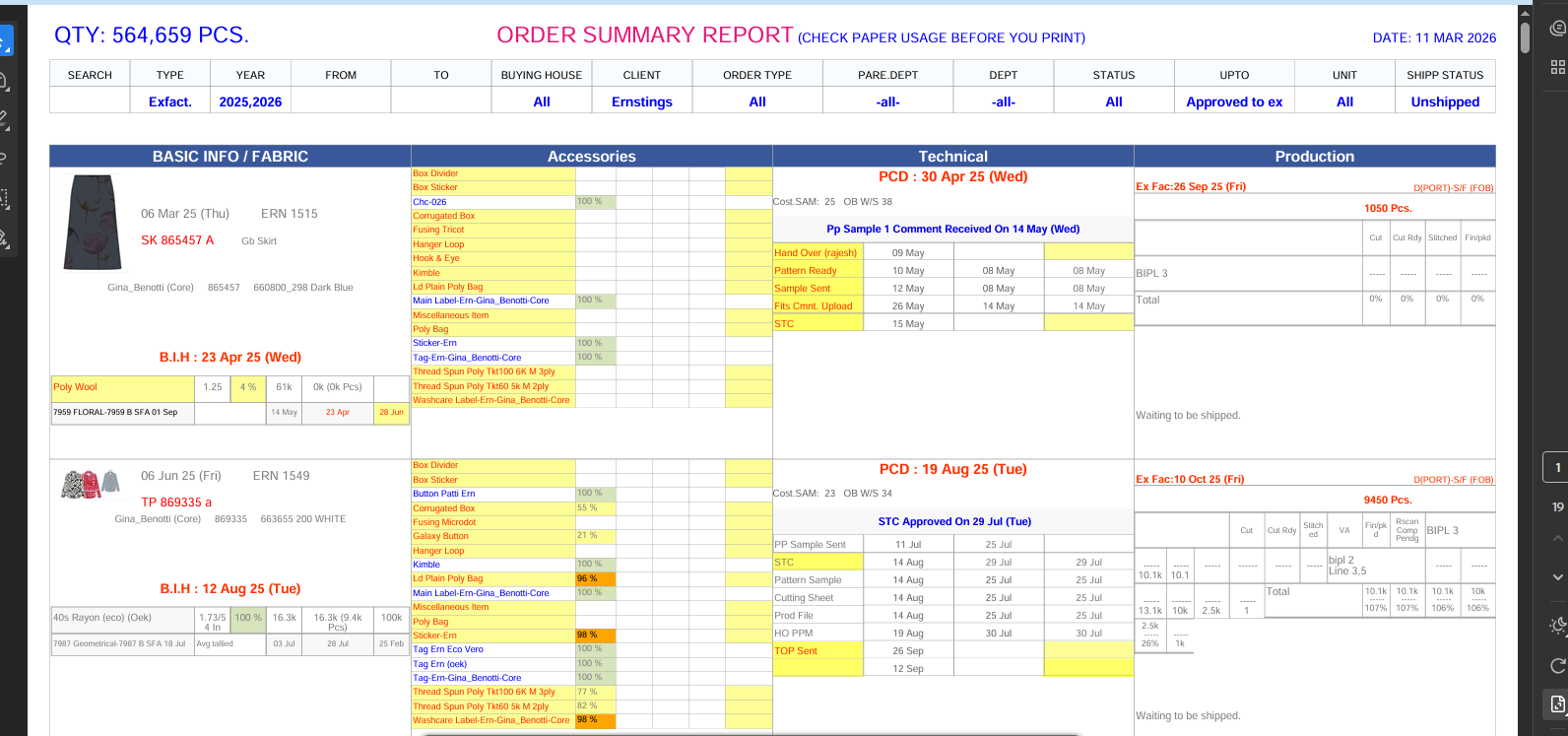
MO Order Summary PDF Modification:
-
● The MO Order Summary PDF format has been updated and modified to improve the presentation and accuracy of the order details.
- ● The revised PDF is now available in the system.
-
|
Version 9.6.5
|
Released Date (29th Dec 2025)
|
-
1.) Major System Upgrade & Optimization
-
● Overview:
-
o This release represents a significant modernization and optimization initiative successfully managed and delivered by the team.
The objective was to improve system performance, scalability, security, and long-term maintainability by upgrading core infrastructure, optimizing applications,
and restructuring the ERP environment.
-
2.) Key Enhancements & Improvements:
-
● Framework Upgrade:
-
o The application framework has been successfully upgraded to Visual Studio Framework 4.5 from the earlier 2.0 version.
This upgrade improves application stability, compatibility with modern tools, enhanced security standards, and better support for future enhancements.
Legacy limitations and performance bottlenecks associated with the older framework have been addressed.
-
● Database Upgrade:
-
o SQL Server has been upgraded to SQL Server 2022 from SQL Server 2014.
This provides improved query performance, enhanced indexing, better security features, advanced monitoring, and long-term vendor support.
Database handling is now more efficient and scalable for increased business data volume.
-
● Operating System Upgrade:
-
o The Windows Server environment has been upgraded to Windows Server 2025 from the legacy Windows Server 2008.
This ensures improved system security, better hardware compatibility, enhanced performance, and compliance with modern IT standards.
The upgrade also reduces risks associated with unsupported legacy systems.
-
● Complete Data Migration:
-
o A full and validated data migration was carried out from the old environment to the new upgraded infrastructure.
Data integrity, accuracy, and consistency were thoroughly ensured during migration.
No data loss was observed, and all critical business data is now aligned with the new system architecture.
-
● Website Optimization:
-
o The website has been optimized to improve load time, responsiveness, and overall user experience.
Backend and frontend optimizations were implemented to reduce latency and improve stability.
This results in better performance for end users and reduced server load.
-
● Report Optimization:
-
o Existing reports were reviewed and optimized to improve execution speed and data accuracy.
Inefficient queries and redundant logic were removed or restructured.
Reports now generate faster and are more reliable for business decision-making.
-
● Scheduler Updates:
-
o System schedulers have been updated and optimized to ensure timely and accurate execution of automated jobs.
Improved scheduling logic reduces failures, delays, and manual intervention.
Overall system automation reliability has been enhanced.
-
● ERP Structural Improvement:
-
o The ERP system has been restructured and standardized, making it more organized and easier to maintain compared to the previous version.
Modules are now better aligned, improving data flow, maintainability, and system clarity.
This structured approach supports future enhancements and scalability.
-
● Server Architecture Optimization:
-
o Previously, the ERP system was distributed across three servers, which increased complexity and maintenance overhead.
The system has now been streamlined to two servers:
-
* Application Server
-
* Database Server
-
o This new architecture improves performance, simplifies monitoring, reduces operational complexity, and enhances system stability.
-
● Conclusion:
-
o The successful completion of this release demonstrates the team’s strong ownership, planning, and execution capabilities.
By modernizing the framework, database, operating system, and ERP architecture, the system is now more secure, scalable, and performance-driven.
This upgrade not only resolves long-standing technical limitations but also positions the platform for future growth, easier maintenance, and improved business efficiency.
The team effectively managed end-to-end execution, including infrastructure upgrades, data migration, optimization, and system restructuring,
ensuring a smooth and stable transition with minimal risk to business operations.
|
Version 9.6.4
|
Released Date (21st Nov 2025)
|
-
1.) Update to Stitching Operation Admin:-
-
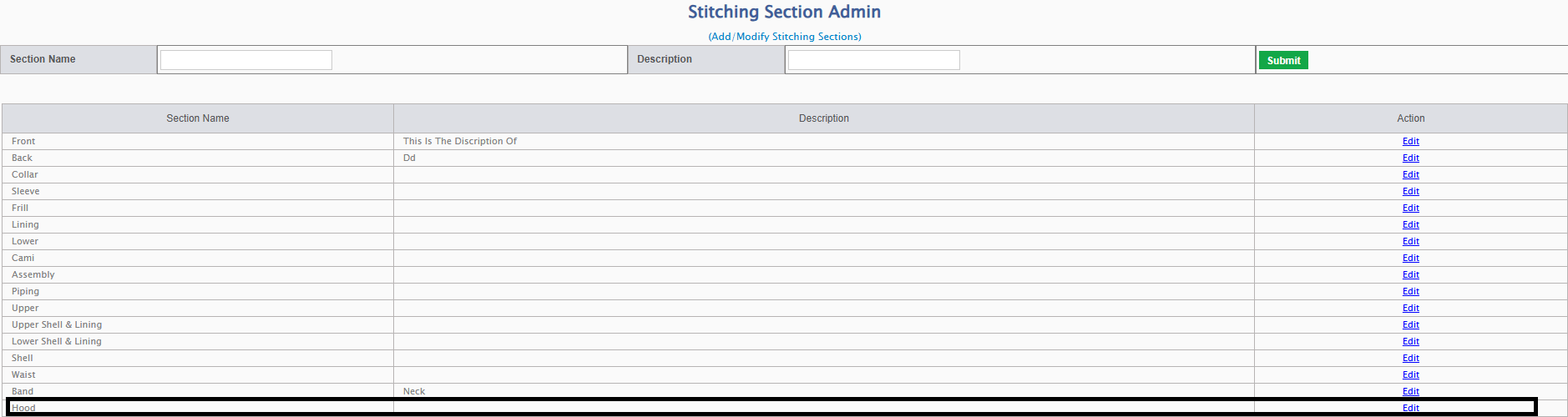
● New Operation Added: Hood:
-
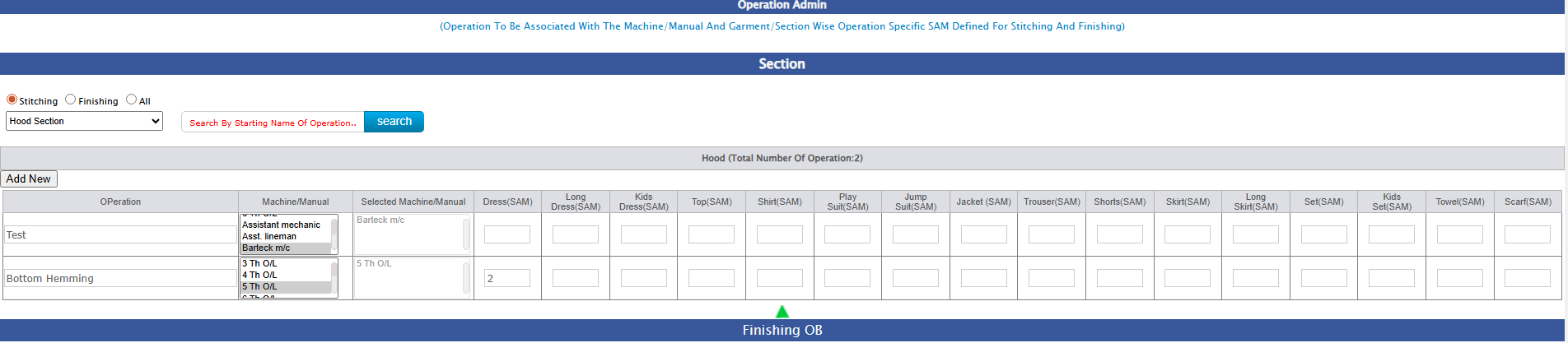
o A new stitching operation named “Hood” has been added to the Stitching Operation Admin module.
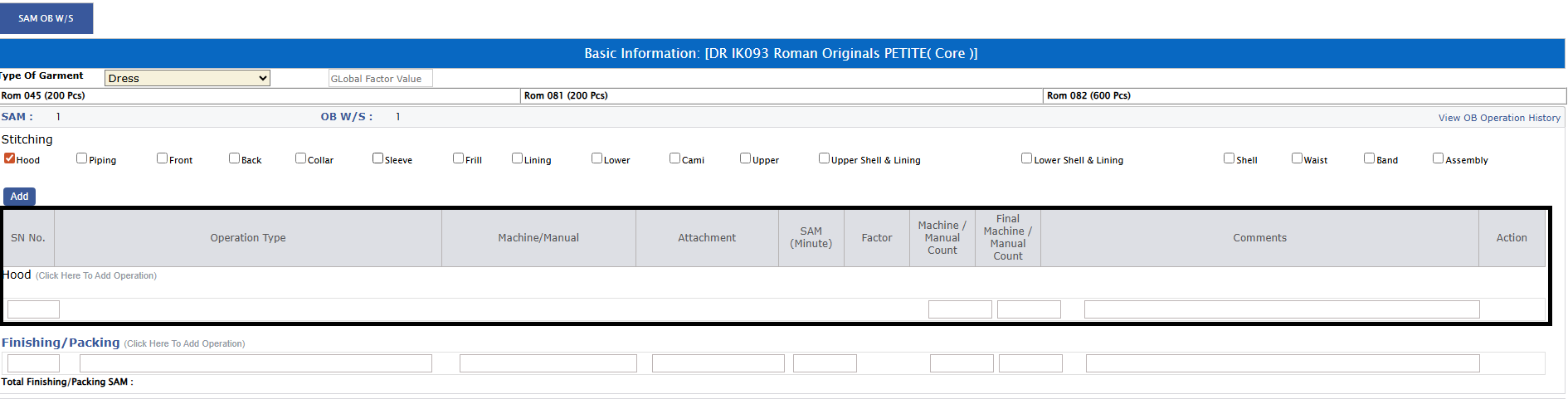
This update ensures that the Hood operation is now fully available and accurately reflected on the OB Sheet.
-
● Impact:
-
o The OB Sheet will now display the Hood operation wherever applicable.
-
o Users can select and manage this operation just like the existing stitching operations.
-
-
2.) Update to OB Sheet – User Remark Visibility Restriction:-
-
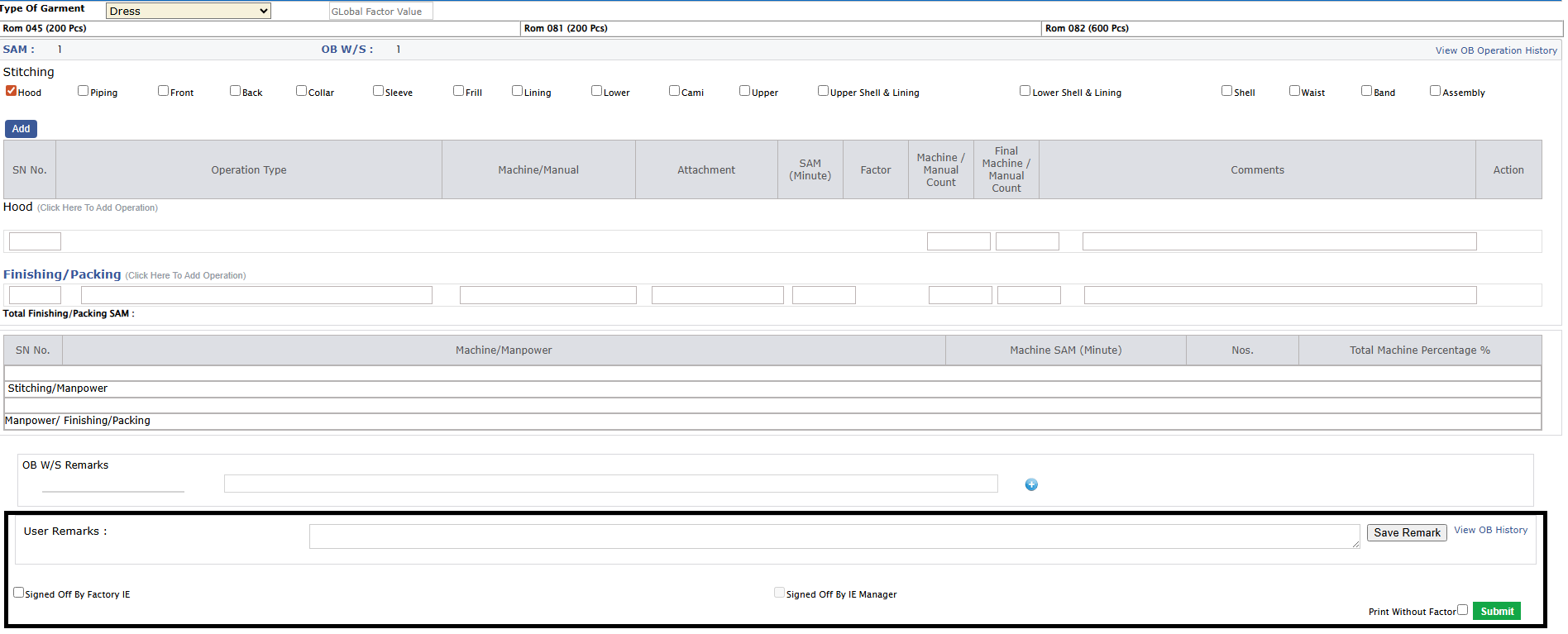
● A new User Remark field has been added to the OB Sheet.
This field allows internal notes to be recorded for review.
-
● Impact:
-
o The User Remark will be visible only to Head Office IE and GM IE users.
-
o Other users will not be able to view this remark, ensuring restricted and confidential communication.
-
o Enhances internal coordination while maintaining controlled information access.
-
-
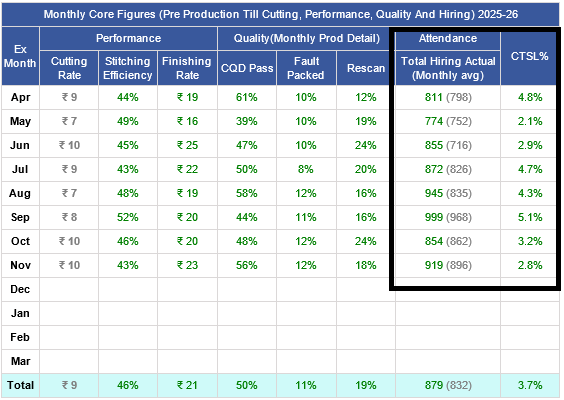
3.) Update to Dashboard Metrics – Attendance & CTSL Improvements:-
-
● The Attendance % metric has been reviewed and determined not to be the most accurate measure for current reporting needs.
It has now been replaced with “Total Hiring Number – Actual (Monthly Average)” to better reflect operational performance.
-
● Impact:
-
o Attendance % will no longer appear in the dashboard metric panel.
-
o The dashboard will now display the average actual hiring number for the month, providing a more reliable and meaningful indicator.
-
o Additionally, CTSL values will now display with 1 decimal place to improve clarity and precision.
-
● Impact:
-
o CTSL figures will show enhanced accuracy, improving interpretation and decision-making.
-
|
Version 9.6.3
|
Released Date (14th Oct 2025)
|
-
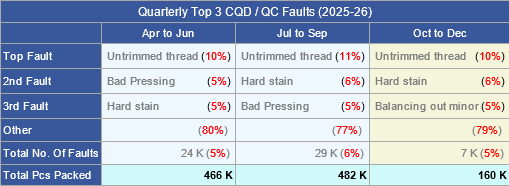
1.1)New Amendment in Monthly Top 3 CQD/QC Faults Report (FY 2025–26):
-
o The report under the BIPL Core Report section has been updated to display the Top 3 CQD/QC Faults on a quarterly basis instead of monthly for the financial year 2025–26.
-
o Helps in identifying recurring and high-impact faults (e.g., Untrimmed Thread, Bad Pressing, Hard Stain, etc.) on a quarterly basis for better process control and quality improvement.
-
o Quantities are now displayed in rounded values (in “K” format) for better readability and standardized presentation.
-
-
1) Monthly Top 3 CQD/QC Faults Report (FY 2025–26):
-
o A new report has been added under the BIPL Core Report section to display the Monthly Top 3 CQD/QC Faults for the financial year 2025–26.
-
o The report highlights the Top 3 Faults, Others, Total Number of Faults, and Total Pcs Packed for each month.
-
o Fault % and Total Fault % are calculated using the following formulas:
-
✔ Fault % = (No. of Faults × 100) / Total No. of Faults
-
✔ Total Fault % = (Total No. of Faults × 100) / Total Pcs Packed
-
o Provides a clear monthly comparison of recurring faults such as Untrimmed Thread, Bad Pressing,
Hard Stain, etc., for better quality tracking and analysis.
-
o Helps in monitoring quality and identifying major fault contributors to improve process efficiency.
-

|
Version 9.6.2
|
Released Date (03rd Oct 2025)
|
-
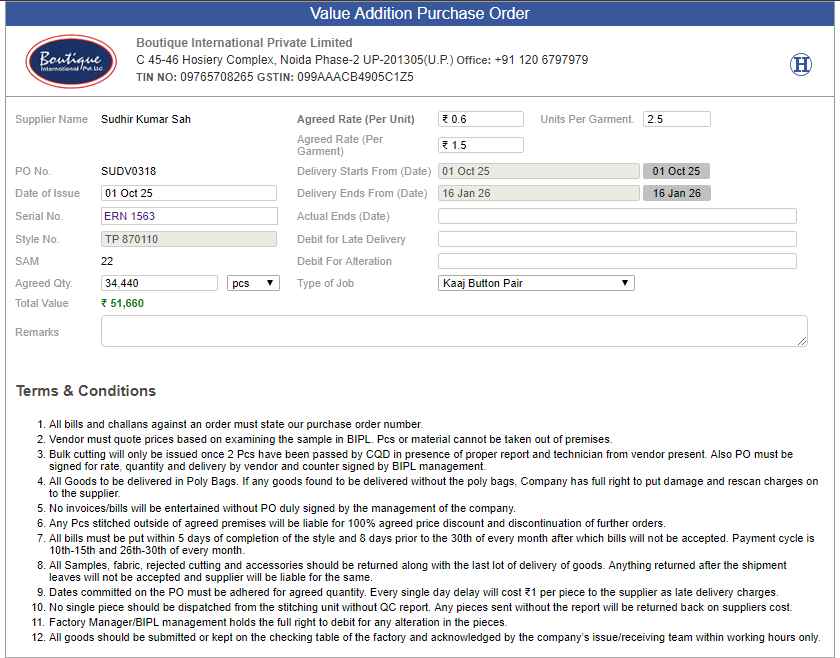
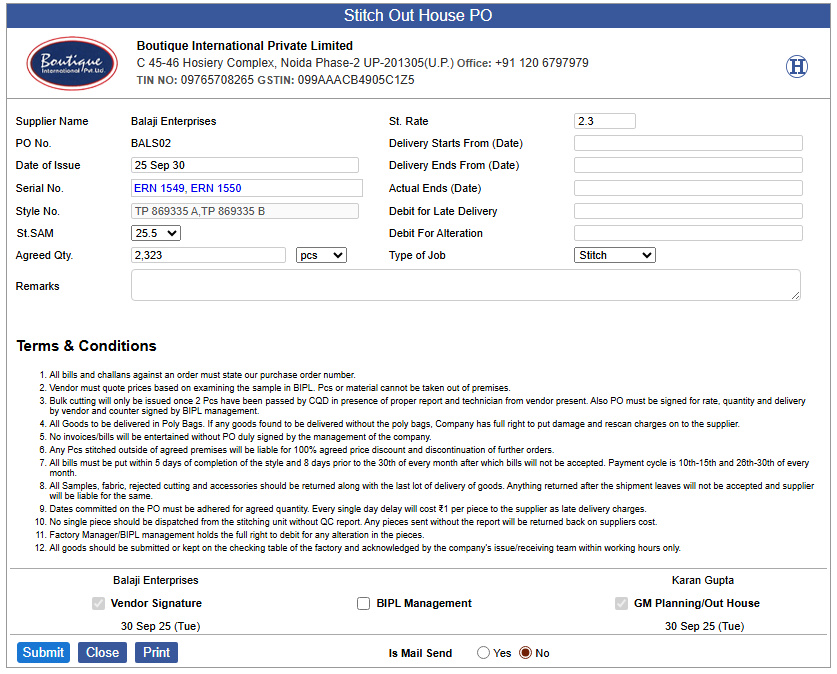
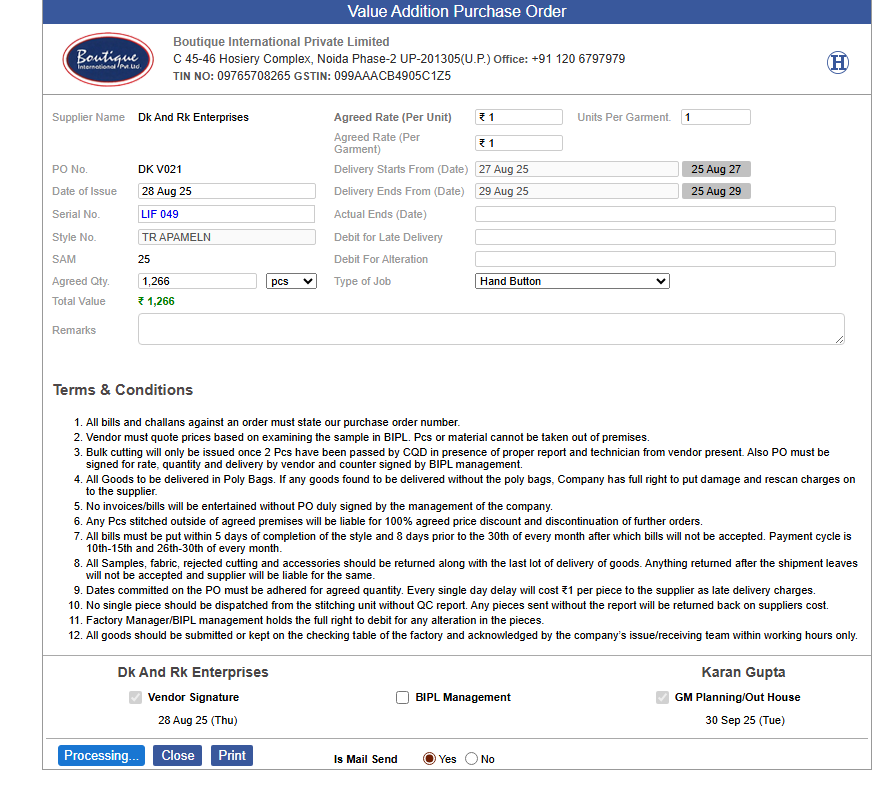
1) Costing Sheet Access via clicking on Serial Number on VA & Stitch Outhouse POs :
-
o The serial number in VA and Stitch Outhouse Purchase Orders is now clickable.
-
o On clicking the serial number, the corresponding cost sheet will open directly for easy access.
-
o The costing link has been enabled to open specifically under Samrat Sir’s login.
-
o Improves efficiency and reduces manual effort to open costing sheet for VA and Stitch Outhouse POs.
-
-
2) VA PO Email Processing Button Enhancement:
-
o A new Processing button has been introduced for sending VA Purchase Orders via email.
-
o This ensures that mails are sent one at a time, preventing duplicate or simultaneous submissions.
-
|
Version 9.6.1
|
Released Date (04th Sep 2025)
|
-
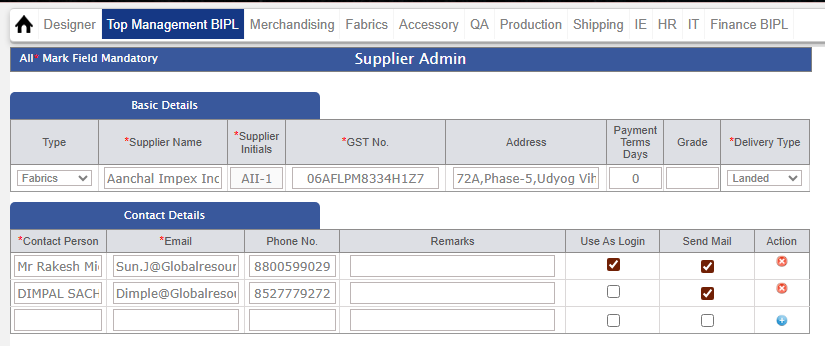
1) Supplier Mail Access Updates:
-
● Multiple User Mail Feature:
-
o A new "Send Mail" checkbox has been added, allowing mails to be sent to multiple users of the same supplier.
-
-
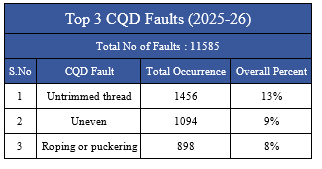
2) Top 3 CQD Faults Report Implementation per Financial Year:
-
● Fault Overview by Financial Year:
-
o The CQD Faults Report is now segmented per financial year for better analysis of faults over time.
-
o It provides a clear overview of the top 3 most recurring faults and their impacts on CQD performance within a specific year.
-
● Fault Breakdown:
-
o Total No of Faults: The report shows the total number of faults recorded per financial year.
-
o CQD Fault Name: Each fault is listed with its specific name, allowing for easy identification of the key areas requiring attention.
-
o Total Occurrence: Displays the total number of times each fault occurred during the financial year.
-
o Overall Percent: Calculates the overall percentage occurrence of each fault in relation to the total CQD faults, providing a weighted impact score for each fault.
-
● Analysis & Insights:
-
o The report highlights trends in fault occurrences, helping to identify areas of focus for improvement.
-
o Key performance metrics allow for data-driven decisions to reduce faults and improve CQD scores in future financial years.
-
-
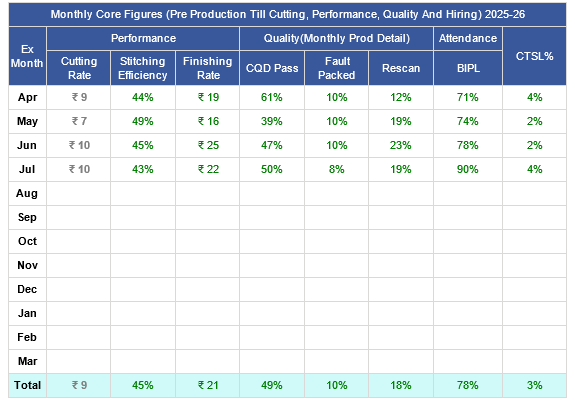
3) Monthly CTSL % Implementation in BIPL Core Report:
-
● CTSL % Integration in Monthly Core Figures Table:
-
o The CTSL % (Cut to Ship Loss Percentage) is now implemented and displayed in the Monthly Core Figures table of the BIPL Core Report.
-
✔ CTSL %=(CUT QTYCUT QTY−SHIP QTY)×100
-
o This formula captures the percentage loss between the quantity cut and the quantity actually shipped.
-
|
Version 9.6.0
|
Released Date (20th Aug 2025)
|
-
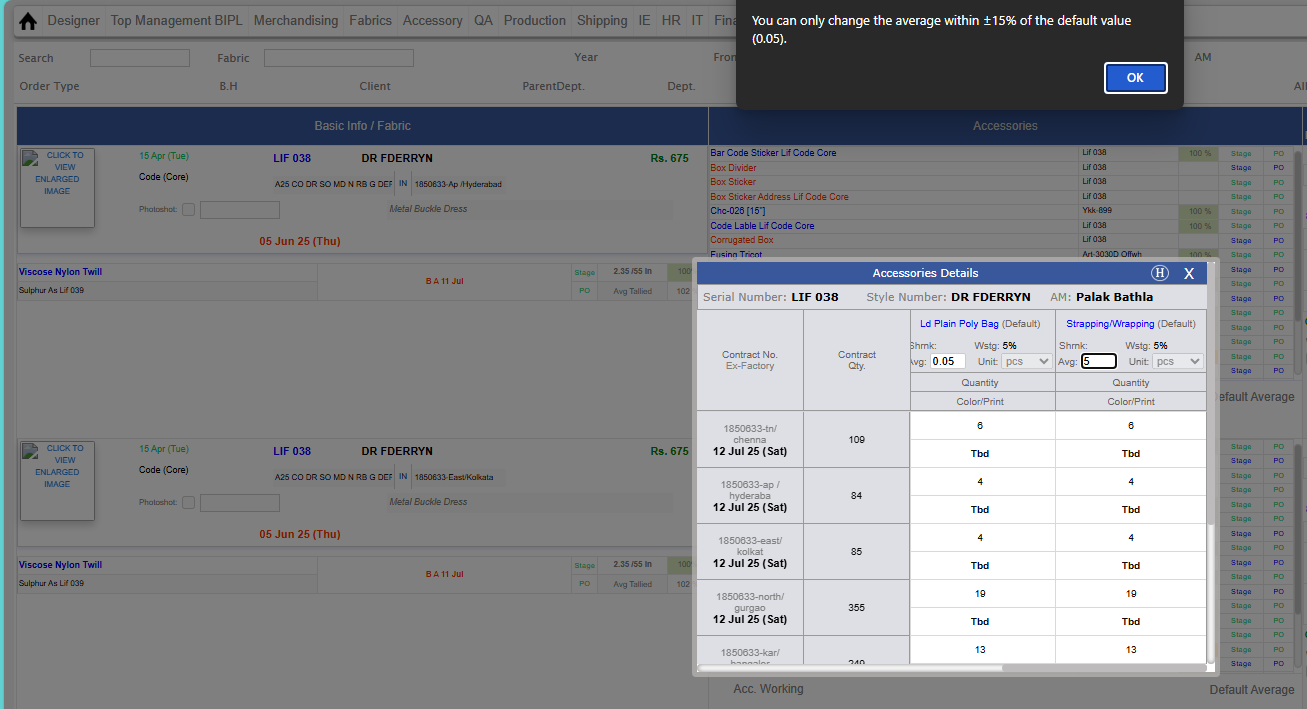
1) Accessory Average Editing Rules Updates:
-
● Pre-shipment Editing Access:
-
o Average can be edited by AM/Karan till the contract is not shipped.
-
o Note: This rule does not apply to Thread Average, which will continue to work as it is.
-
● Editing Range for AM:
-
o AM can change the Average within ±15% of the Base Value (Base Value = Costing Average).
-
o Any change beyond this range will require Karan’s approval.
-
● Post-Approval Changes:
-
o After Karan’s approval, changes can be done by the IT Team through Karan’s login.
-
o No capping will be applied in this case.
-
● Post-shipment Restriction:
-
o After the contract is shipped, no editing of Average is allowed.
-
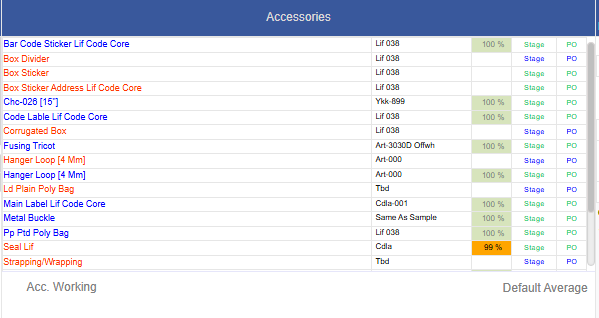
● Accessory-specific Condition:
-
o Average change is only allowed when STC and Production have started for the below accessories:
-
✔ Strapping/Wrapping
-
✔ LD Plain Poly Bag
-
✔ Corrugated Box
-
✔ Box Sticker
-
✔ Box Divider
-
● Thread Average Update:
-
o On MO, the name “Thread Average” has been changed to “Default Average.”
-
-
-
2) Accessory Lab Inspection Checking Updates:
-
● Lab Request Permission:
-
o Lab Request access is now allowed to Accessory QA in addition to Fabric Quality Manager.
-
● Duplicate Entry Restriction:
-
o To avoid duplicate entries (as multiple users work on the same form), the system will now restrict duplicate accessory checking entries.
-
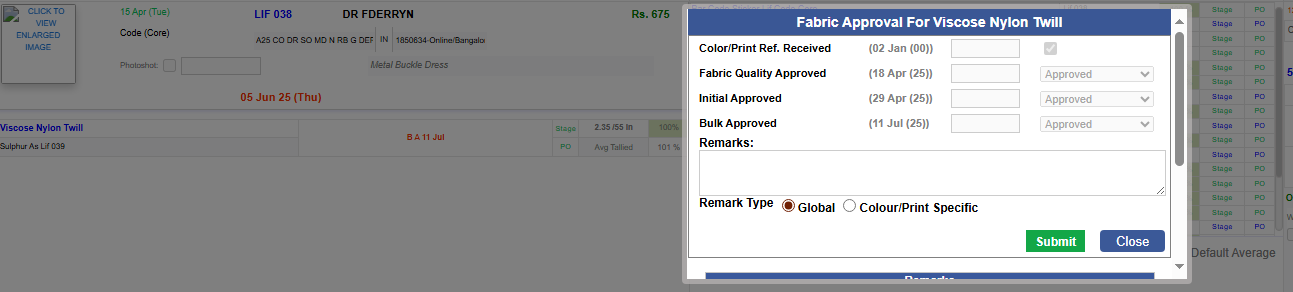
3) Fabric Approval Form Updates:
-
● Comment Type Selection:
-
o A new amendment has been introduced in the fabric approval form to manage comments as either Global or Colour Print Specific.
-
● Global Comments:
-
o If the Global checkbox is selected and the comment is saved, it will be visible to all contracts for particular Fabric Quality.
-
● Colour Print Specific Comments:
-
o If Colour Print Specific is selected and the comment is saved, it will be visible only for that particular colour/print.
-
|
Version 9.5.9
|
Released Date (7th Aug 2025)
|
-
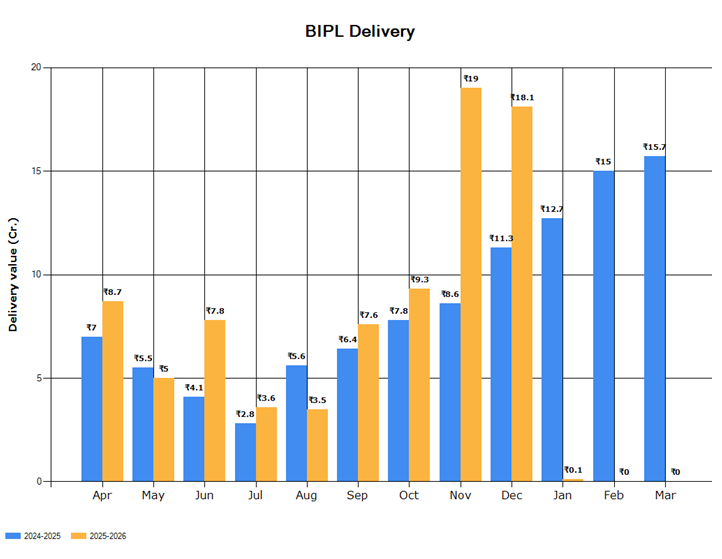
1) BIPL Chart & Report Display Updates: –
-
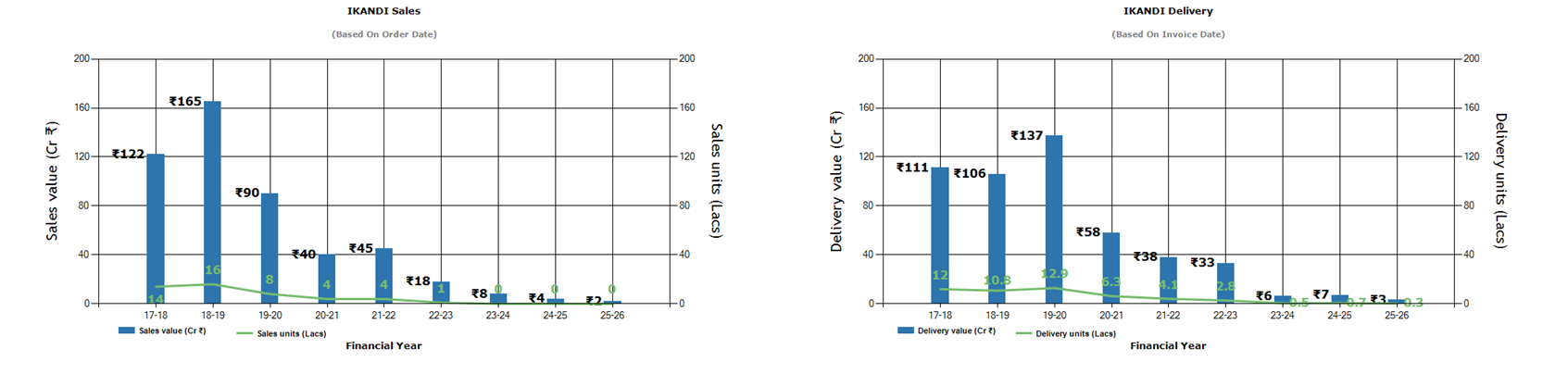
Several updates have been made to the BIPL charts and related sales/delivery figures for enhanced accuracy and presentation.
-
● Delivery Chart Logic Update:
-
o The BIPL DELIVERY chart will now run based on DC dates instead of Ex-factory (EX) dates, aligning it more accurately with actual dispatch timelines.
-
o Similarly, the BIPL DELIVERY Table will also operate based on DC dates rather than EX dates.
-
● IKANDI Sales & Delivery Display Format:
-
o Yearly figures in both IKANDI Sales and IKANDI Delivery will now be shown without any decimals for a cleaner and more consolidated view.
-
o Monthly figures will display up to 1 decimal place for better granularity while maintaining readability.
-
-
-

|
Version 9.5.8
|
Released Date (31st July 2025)
|
-
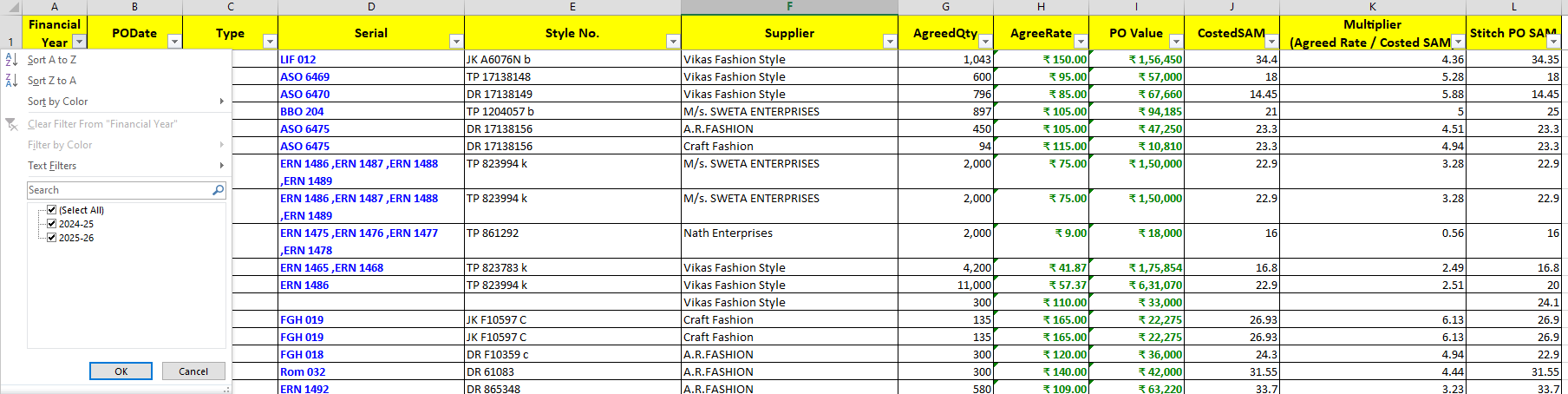
1) Rates Excel Report Structure & Naming Updates: -
-
Several Excel files and sheets under the reporting system have been updated for improved clarity, structure, and alignment with current business practices.
-
● Fabric & Accessories Updates (Having the PO details of the corresponding financial years quality specific):
-
o Now we are having the report for only current 3 financial Years.
-
o Name of the Fabric Sheet is as Fabric 3FY.
-
o Name of the Accessory Sheet is Accessory 3 FY
-
● Value Addition PO (VA POs) Updates:
-
o Sheet name changed from “Value Addition PO” to “VA POs”.
-
o The following columns have been hidden:
-
✔ Item Per Garment Hidden
-
✔ Agree Rate Per Item Hidden
-
o Column Renaming:
-
✔ Costed VA Rate → Costed Rate
-
✔ Actual VA Rate → Actual Rate
-
o New Columns Introduced:
-
✔ Costed Value → Formula: (Costed Rate × Order Qty)
-
✔ Actual Value → Formula:(Actual Rate × Order Qty)
-
o Stitch Outhouse PO → Contractor & Outhouse POs:
-
● Sheet renamed from “Stitch Outhouse PO” to “Contractor & Outhouse POs”.
-
o The following columns have been hidden:
-
✔ Style Code Hidden
-
✔ PO Number Hidden
-
o New Column Introduced:
-
✔ Multiplier → Formula: (Agreed Rate ÷ Costed SAM)
-
● Impact: These changes aim to
-
o Simplify the sheet structure
-
o Ensure naming consistency
-
o Hide irrelevant or sensitive columns
-
o Provide clearer cost insights with the new calculated fields
-
-

-
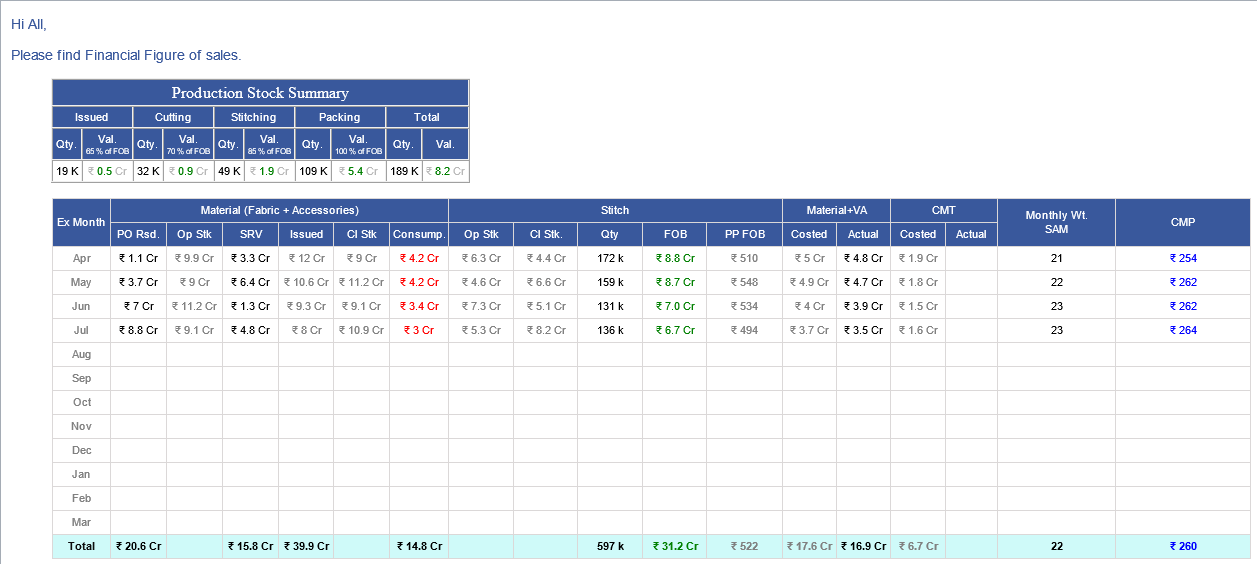
2) BIPL CORE FIGURE REPORT Update: -
-
The BIPL Core Figure Report has been updated to reflect new business requirements and improve reporting clarity.
-
Key modifications include the addition of new headers, updated formulas, and adjustments to the CMP calculation.
-
● Report Changes:-
-
o 1. New Header Added
-
✔ Name: MATERIAL + VA
-
✔ This header contains two sub-columns:
-
✔ Costed Value → Formula: Total Stitched Qty × Costed Rate per Pcs (Fabric + Accessory + VA Process)
-
✔ Actual Value → Formula: Total Stitched Qty × Actual Rate per Pcs (Fabric + Accessory + VA PO Rate + Test) Here Test Rate is considered same as in costing for now as discussed with Karaan
-
o 2. CMP Column Formula Updated:
-
✔ FOB – Actual Material Cost) / Total Stitched Qty
-
o Purpose of Changes:
-
✔ To enhance visibility of value-addition components in costing.
-
✔ To align report structure with the updated cost evaluation standards.
-
✔ To ensure accurate margin calculations through the revised CMP formula.
-
|
Version 9.5.7
|
Released Date (14th July 2025)
|
-
1) Update to BIPL Core Figure Report
-
We have enhanced the BIPL Core Figure Report by introducing two new column sections to provide better visibility and tracking of key operational data:
-
Material (Fabric + Accessories)
-
* PO Rsd. – Purchase Order Residual Quantity
-
* Op Stk – Opening Stock
-
* SRV – Stock Received
-
* Issued – Quantity Issued
-
* Cl Stk – Closing Stock
-
* Consump. – Consumption
-
Stitch
-
* Op Stk – Opening Stock
-
* Cl Stk – Closing Stock
-
* Qty – Quantity Produced
-
* FOB – Free on Board Value
-
* PP FOB – Pre-Production FOB Value
-
Impact:
-
These additions enable improved tracking of material flow and stitching operations,
supporting more informed decision-making for production planning and cost control.
-

-
2) Update to BIPL Core Figure Report – Rates Excel
-
We have updated the Rates Excel section of the BIPL Core Figure Report with the addition of two new sheets to enhance visibility on key order data over the past year.
-
Value Added POs
-
* Displays all Value Addition Purchase Orders from the past 1 year for reference and analysis.
-
Stitch Reallocation POs
-
* Lists all Stitch Reallocation Purchase Orders from the past 1 year to support production planning and tracking.
-
Impact:
-
These additions will help teams quickly access and analyze historic PO data related to value addition and stitch reallocations,
improving transparency and decision-making.
-

-

-
3) Formula PDF for BIPL Core Figure Report
-
To improve clarity and transparency, a Formula PDF has been created as a separate document outlining the key calculations and logic used in the BIPL Core Figure Report.
-
* A dedicated Formula PDF containing detailed explanations of all formulas used in the report.
-
* This document will be attached along with the BIPL Core Figure Report email going forward.
-
Stitch Reallocation POs
-
* Lists all Stitch Reallocation Purchase Orders from the past 1 year to support production planning and tracking.
-
Impact:
-
This will help users better understand the data calculations and improve confidence in report interpretation and analysis.
|
Version 9.5.6
|
Released Date (18th June 2025)
|
-
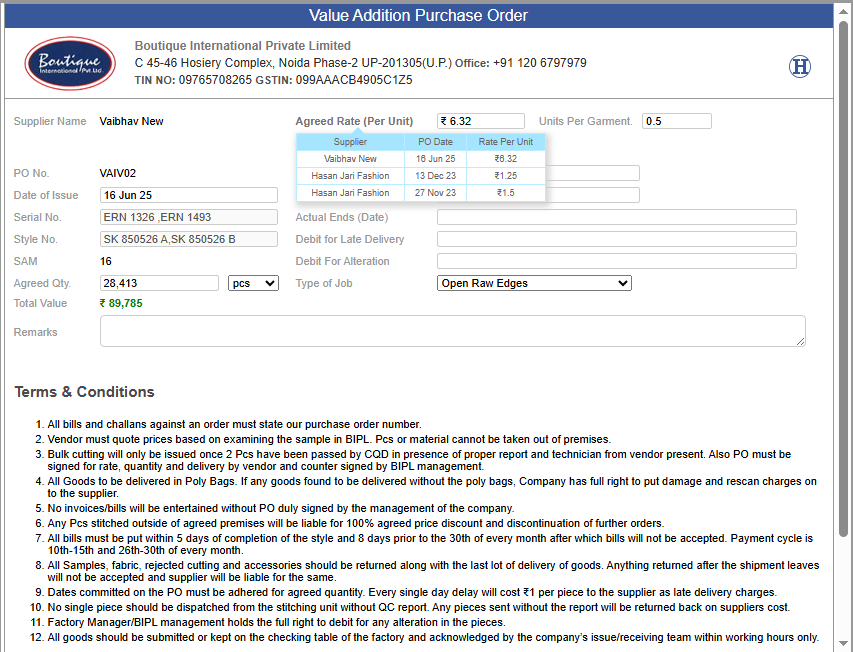
1)Value Addition PO – Per Unit Agreed Rate Enhancement
-
* This release updates Value Addition POs to show the agreed rate per unit, addressing variations in garment quantities.
-
Key Features:
-
* Hover Tooltip: Hovering over the agreed rate displays a breakdown of the rate calculation for clarity.
-
* Agreed rate will now appear per unit on Value Addition POs.
-
* Hover over the rate for a detailed breakdown.
-
-
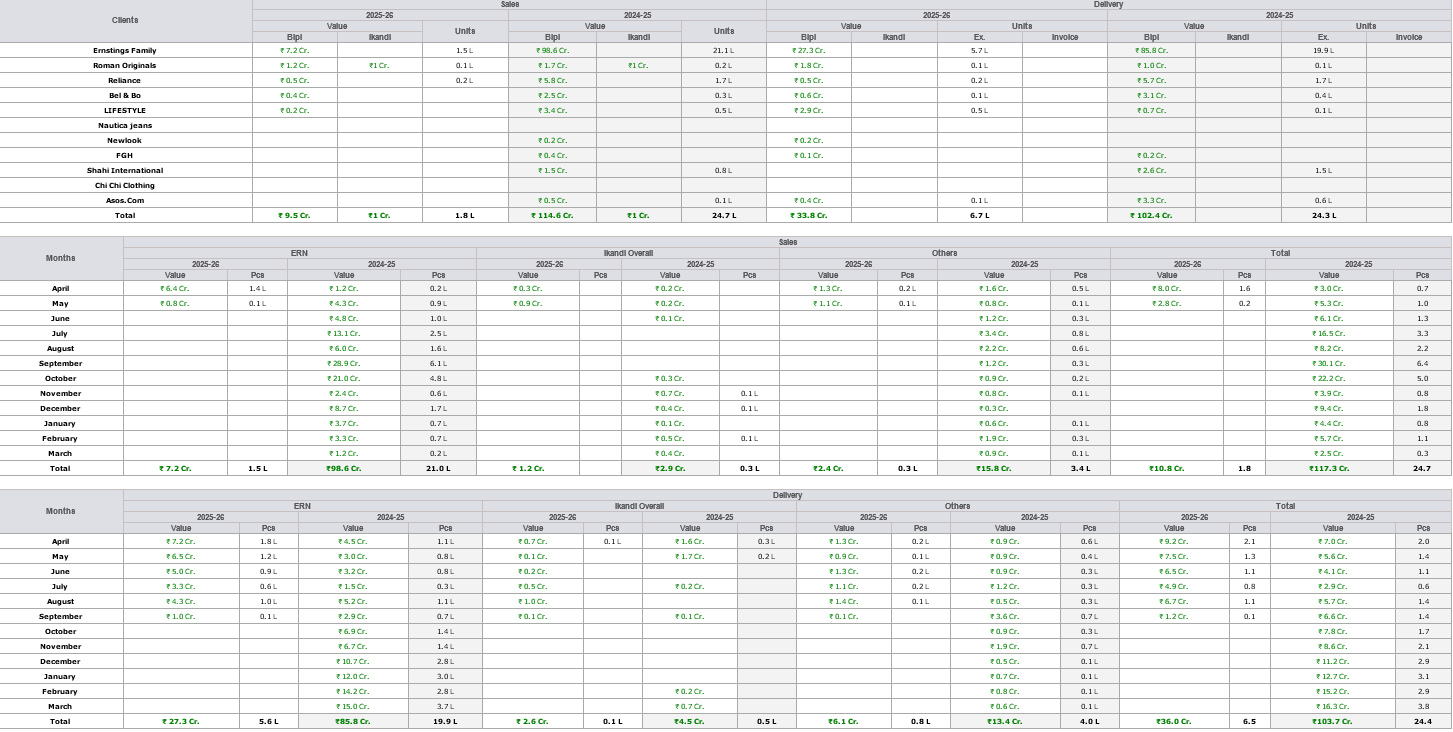
2)Sales Revenue Report – Decimal Precision Update
-
* This release updates the Sales Revenue Report to display all values and pieces with one decimal place for improved clarity and precision in financial reporting.
-
Key Features:
-
* One Decimal Precision: All monetary values and piece counts in the Sales Revenue Report will now be displayed to one decimal place.
-
* Improved Clarity: Provides more consistent and readable data.
-
* Enhanced Accuracy: Offers better precision for financial analysis and reporting.
-
|
Version 9.5.5
|
Released Date (22nd May 2025)
|
-
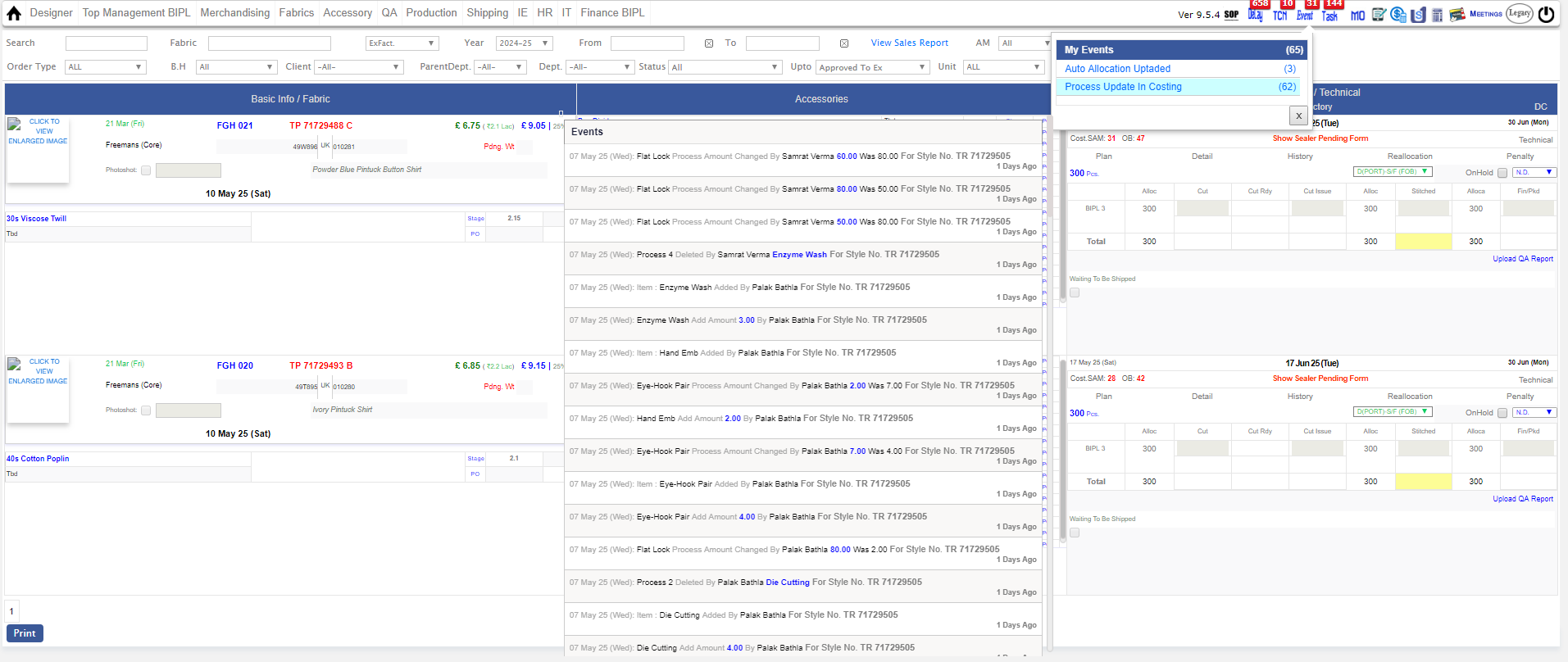
1)A new notification task has been added for users under the "Karan" login within the Events module.
-
Task Name: Process Update In Costing
-
Key Highlights:
-
* This notification will trigger only when there is a change in the Costing Process details.
-
* The notification will be displayed only for those Style Numbers where an order has been placed, ensuring relevance and clarity.
-
Impact:
-
* This update enhances visibility into critical costing updates, helping ensure timely awareness and action on affected styles.
-
-
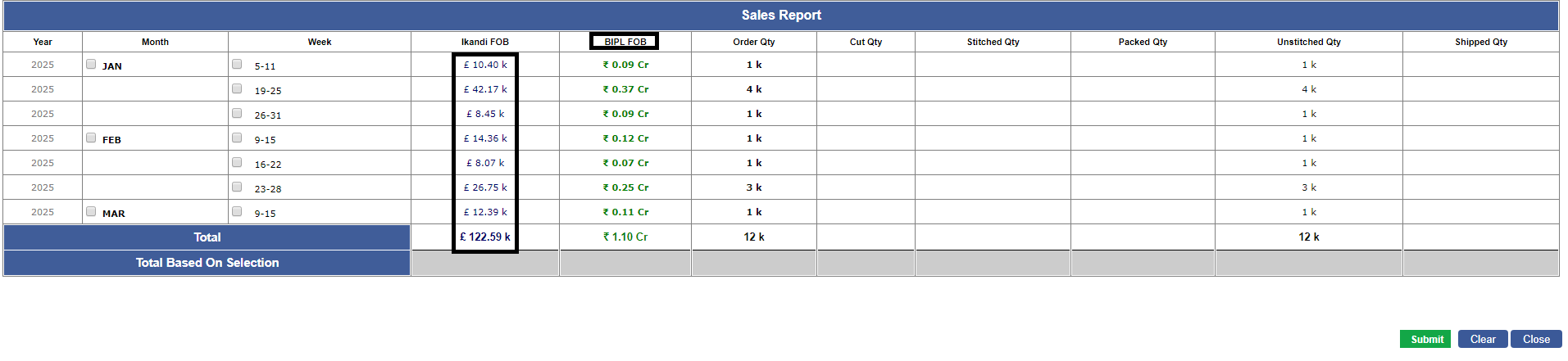
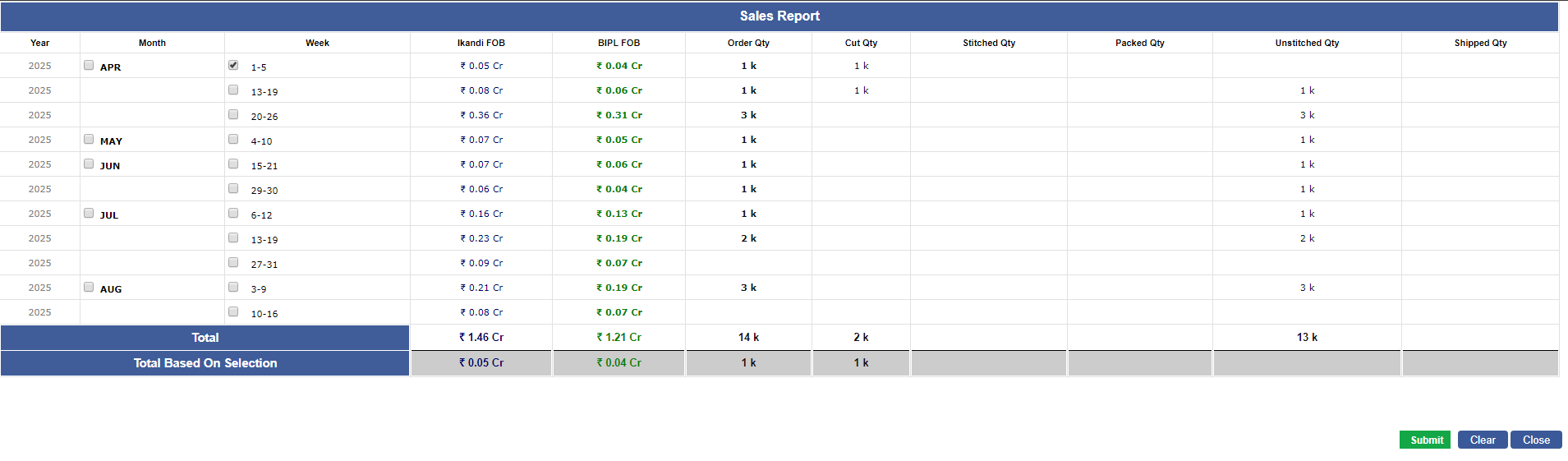
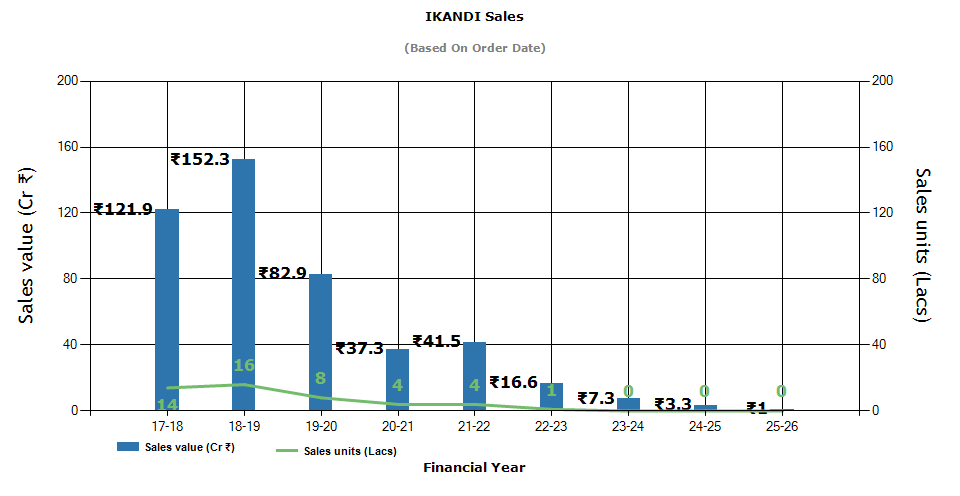
2)The Sales Report on MO has been updated to improve the readability and accuracy of revenue figures.
-
Update Details:
-
* iKandi revenue is now displayed in Crores (₹ Cr).
-
* Values are shown up to 2 decimal places to provide precise financial insights.
-
Impact:
-
* This enhancement allows users to quickly interpret large revenue figures with improved clarity and detail, aiding in better analysis and decision-making.
-
-
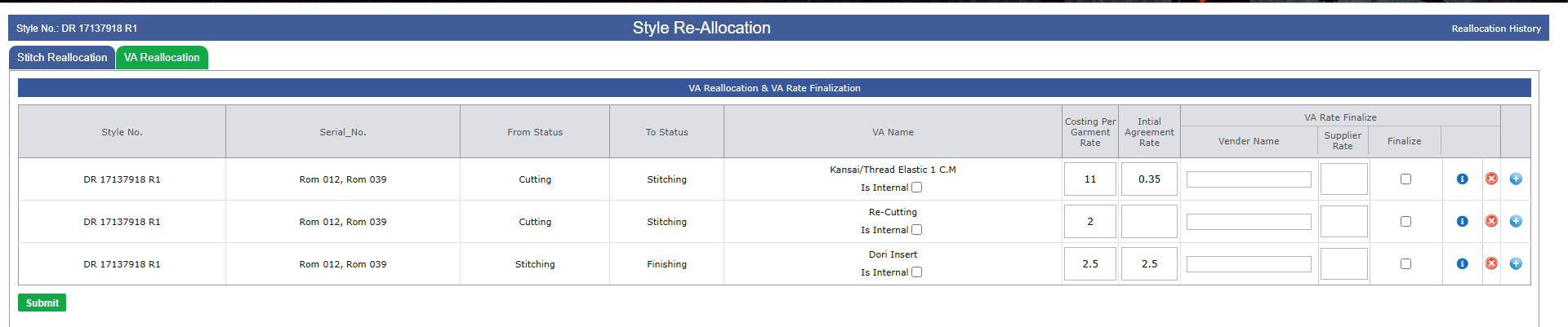
3)An enhancement has been made to the Reallocation page to streamline the handling of Internal Value Addition.
-
Details of the Update:
-
* A new amendment ensures that if a transaction is marked as Internal under Value Addition, it will now be treated as Internal throughout the process.
-
* As a result of this change, Internal Value Additions will no longer be considered at the time of Shipping.
-
This update aims to improve process accuracy and prevent unintended value addition impacts during shipment processing.
-
Impact:
-
* Applies to all users managing Reallocation with Internal Value Addition.
-
* Ensures clear distinction between Internal and External value additions during shipping operations.
-
-
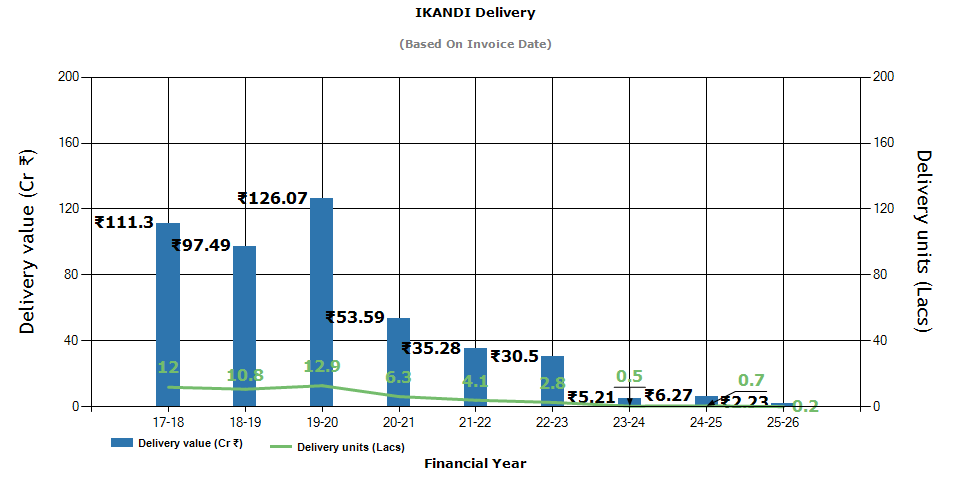
4)The Sales Revenue Report has been updated in line with the recent enhancements made to the Sales Report on MO, focusing on improved readability and accuracy of revenue figures.
-
Key Changes:
-
* iKandi Revenue Display: Revenue figures are now presented in Crores (₹ Cr).
-
* iKandi Revenue Display Charts: Revenue Charts figures are now presented in Crores also(₹ Cr).
-
Precision: Values are now shown up to 2 decimal places to ensure greater financial accuracy.
-
Impact:
-
* These improvements enable users to interpret large revenue figures more clearly and make informed decisions with enhanced financial insights.
-

-
-
|
Version 9.5.4
|
Released Date (29th Apr 2025)
|
-
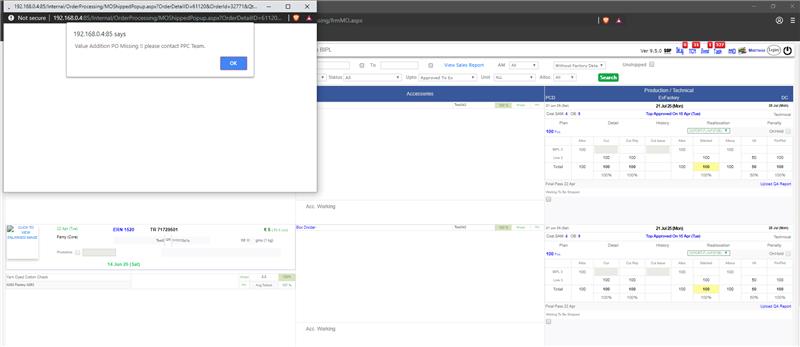
1)A new validation rule has been implemented to ensure Contract during the shipping process. As per the updated business requirement,
the system will now prevent shipment of contracts if a VA PO (Value Addition Purchase Order) has not been raised.
-
Key Update:
-
* Shipments associated with a contract will not proceed unless a VA PO is present.
-
* Users will receive a clear error notification prompting them to raise the appropriate PO before proceeding with shipment.
-
-
2)An issue was identified where duplicate accessories were appearing on the costing sheet when replacing a particular accessory.
This was causing inconsistencies in costing and data representation.
-
Fix Implemented:
-
* The duplication logic during accessory replacement has been corrected.
-
* The system now ensures only the selected accessory is updated or replaced, without adding duplicate
|
Version 9.5.3
|
Released Date (22nd Apr 2025)
|
-
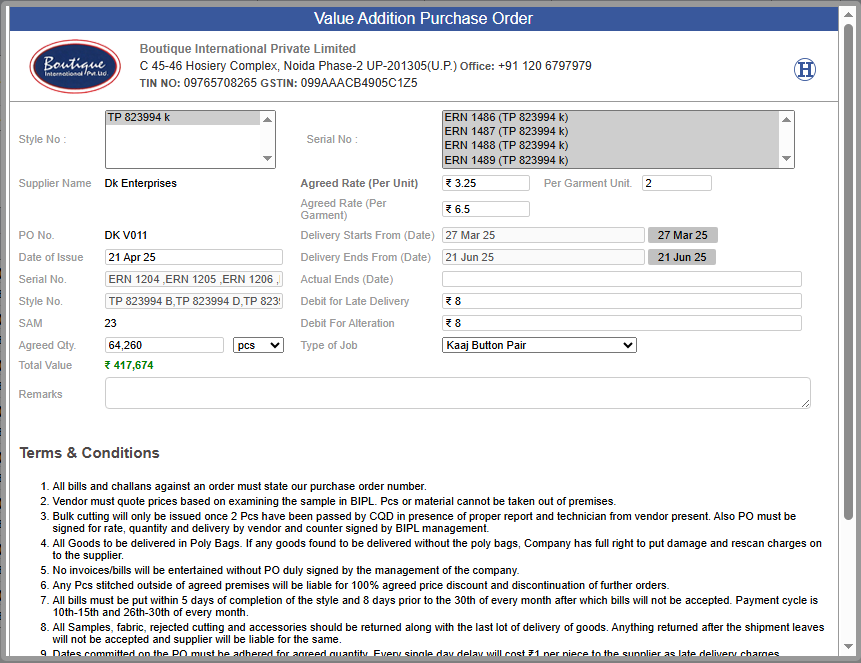
1)As part of the ongoing improvements to streamline supplier rate management and enhance PO value calculation, two new fields have been introduced in the Purchase Order (PO) interface.
-
New Fields Added:
-
1. Agreed Rate (Per Unit):
-
* Description: Captures the initial rate agreed with the supplier per unit.
-
* Purpose: Helps in accurate calculation of per garment cost and total PO value.
-
2. Per Garment Unit:
-
* Description: Denotes the number of units required per garment.
-
* Default Value: ₹1
-
* Purpose: Allows flexibility in unit-based costing.
-
3. New Calculations Implemented:
-
Agreed Rate (Per Garment):
-
* Agreed Rate (Per Unit) × Per Garment Unit
-
Total Value of PO:
-
* Agreed Rate (Per Garment) × Agreed Quantity
-
4. Impact:
-
* More accurate supplier rate tracking.
-
* Clear visibility into unit-based and garment-based cost structures.
-
* Improved financial clarity in PO documentation.
-
-
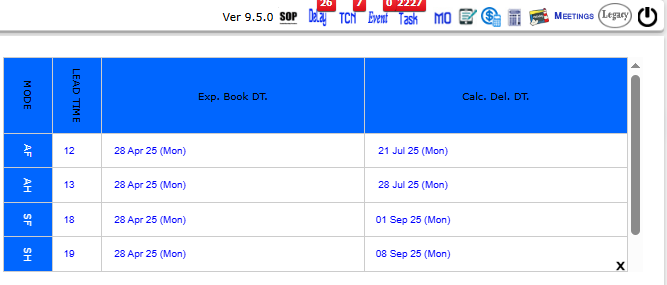
2)To enhance operational efficiency and empower the Merchandising team with better control over booking-related calculations,
permission to access the Booking Calculator has now been granted to all Account Managers.
-
|
Version 9.5.2
|
Released Date (01st Apr 2025)
|
-
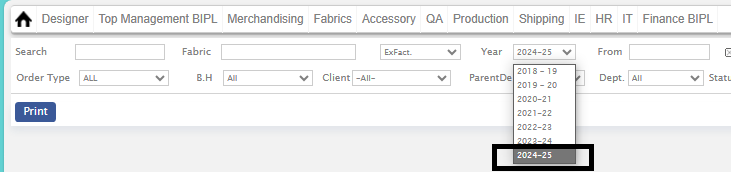
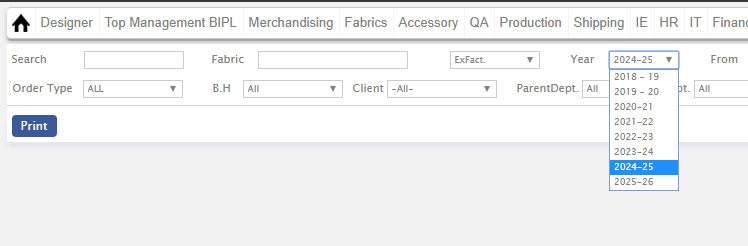
1)Added support for the 2025-26 Financial Year in the ERP system.
-
* Users can now manage transactions, reporting, and financial operations for the new fiscal year seamlessly.
-
* Enabled for all relevant modules, including accounting, taxation, and financial reporting.
-
-
2)Added currency symbol display in the Currency Conversion Rate (Admin) section.
-
* Enhances clarity by displaying the corresponding currency symbol alongside conversion rates
-
* Applied across all relevant financial modules where currency conversion is managed.
-

-
3)Resolved various issues in the Supplier Admin module to improve stability and performance.
|
Version 9.5.1
|
Released Date (27th Feb 2025)
|
-
1)Updated Allowed Delay Limit: The allowed delay limit for In Time in the Staff Attendance Report has been revised to 15 minutes.
-
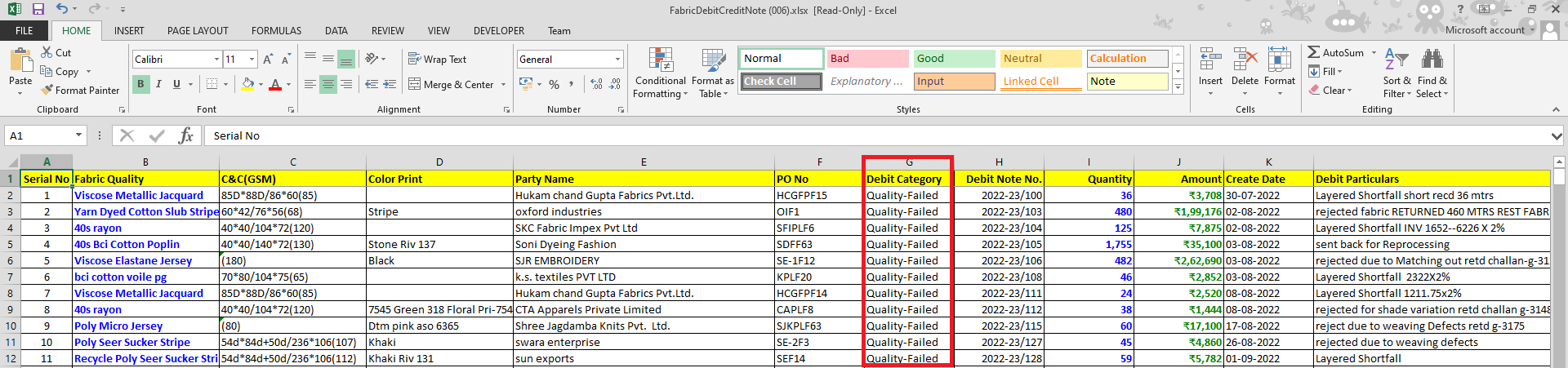
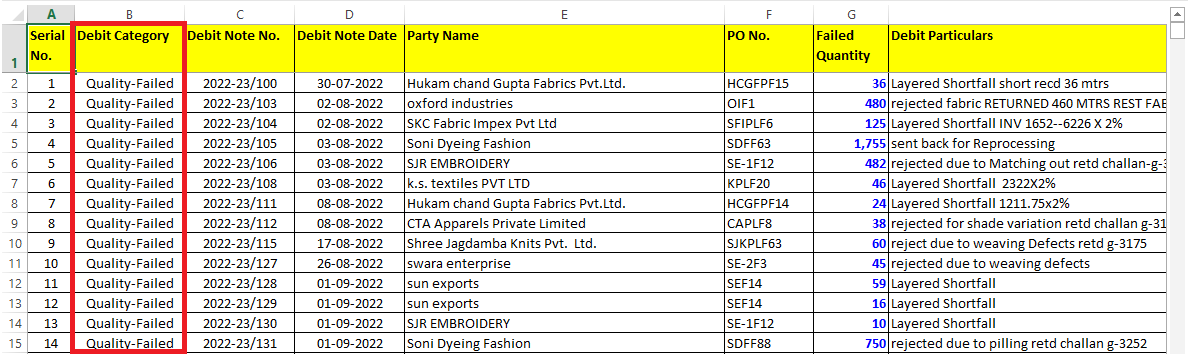
2) Debit Note Excel Enhancements:
-
* Added a new column: "Debit Category"
-
* Other modifications for improved data representation.
-
Note:-
In FabricDebitCreditNote.xlsx Excel Total amount, GST percent not included.
-
-
-
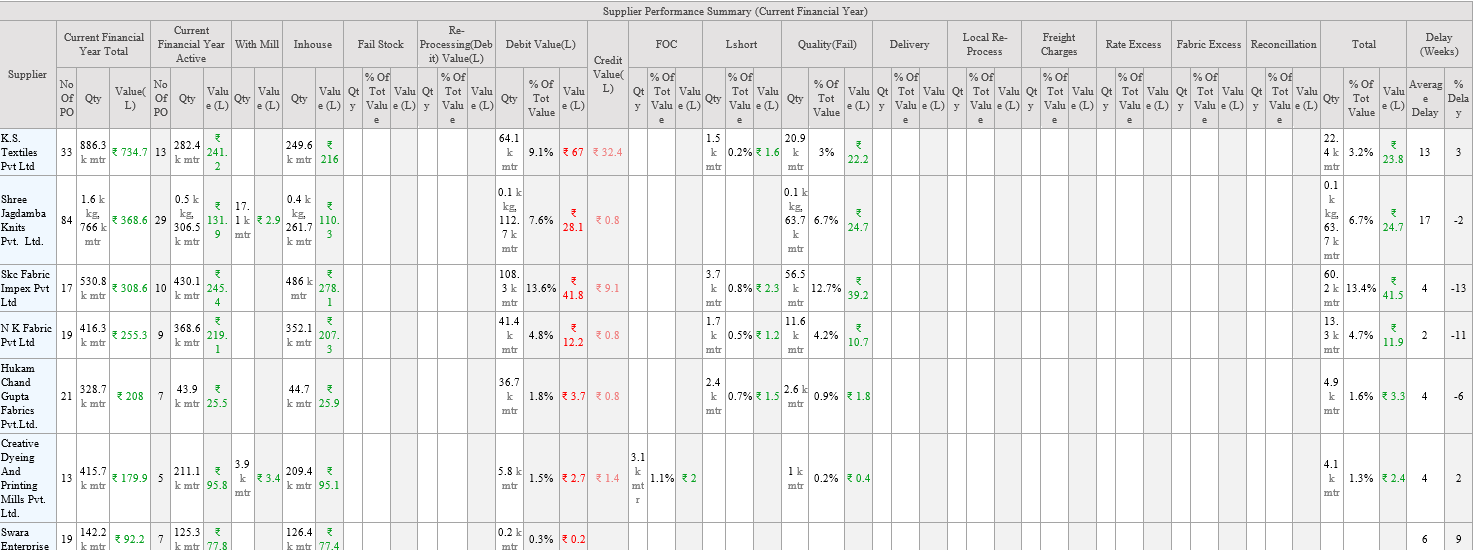
3) Fabric PO Details Update:
-
* In Supplier Performance Summary, the Total Value is now displayed in Crores
-
* The Total Value is highlighted in Blue Bold for better visibility,
-

-
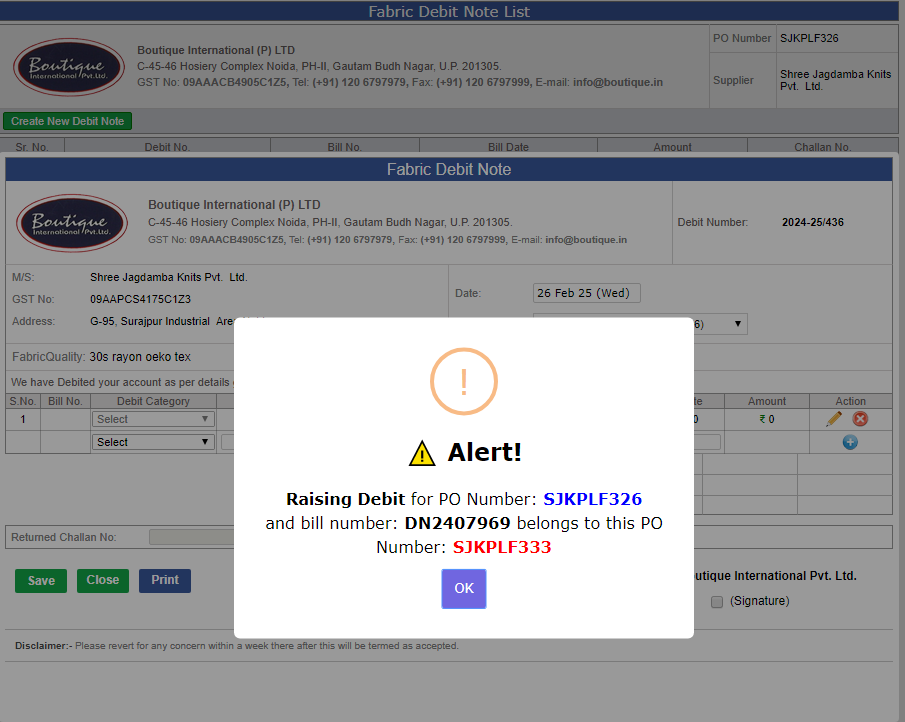
4.) Debit Note Enhancement:
-
* While selecting a Bill Number during debit note creation, an alert will now be displayed if the selected bill contains different PO numbers to ensure accuracy.
-
-
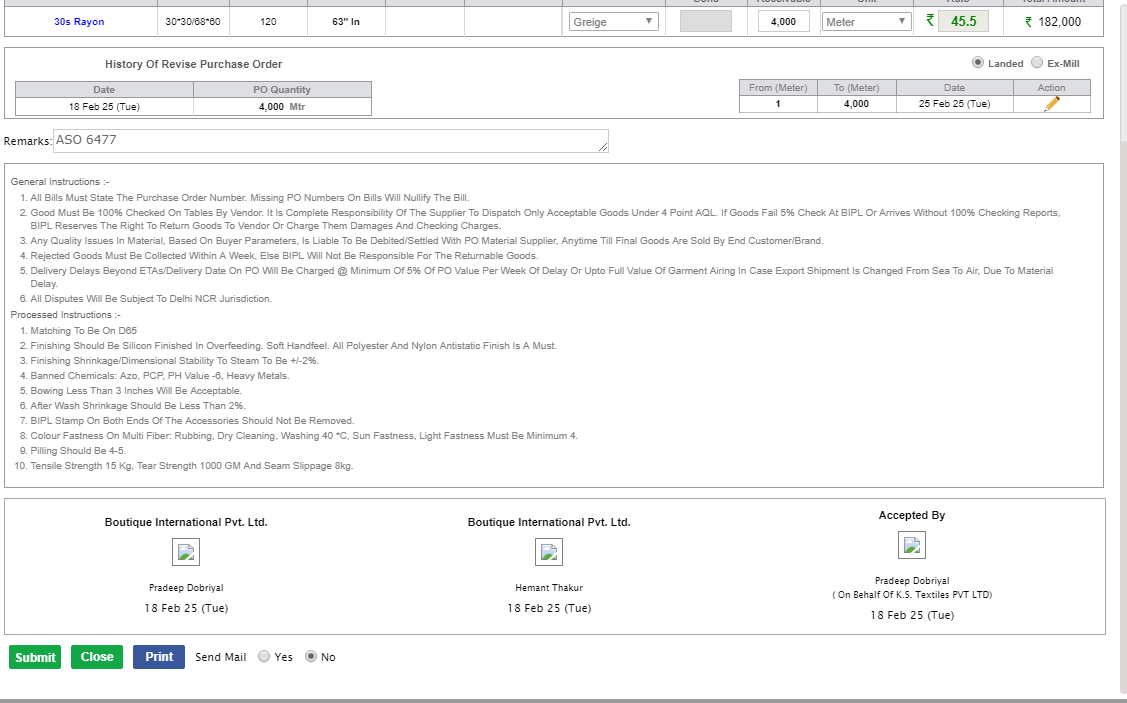
5.) PO Mail Sending Enhancement:
-
* After all signatures are completed in the PO, users from the Fabric Department with the "Assistant" role can now send the PO mail.
-
|
Version 9.5.0
|
Released Date (10th Feb 2025)
|
-
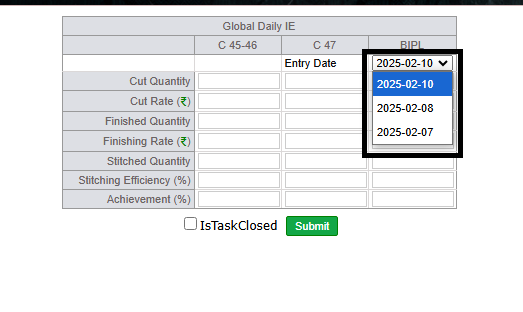
1)This Feature allows users to edit entries made in the last 3 days on the Global IE Entry page,
improving flexibility and data accuracy.
Users can now easily update recent entries directly, streamlining the process and ensuring more accurate records.
-
-
2) As requested by Vikrant Sir and approved by Karan Sir,
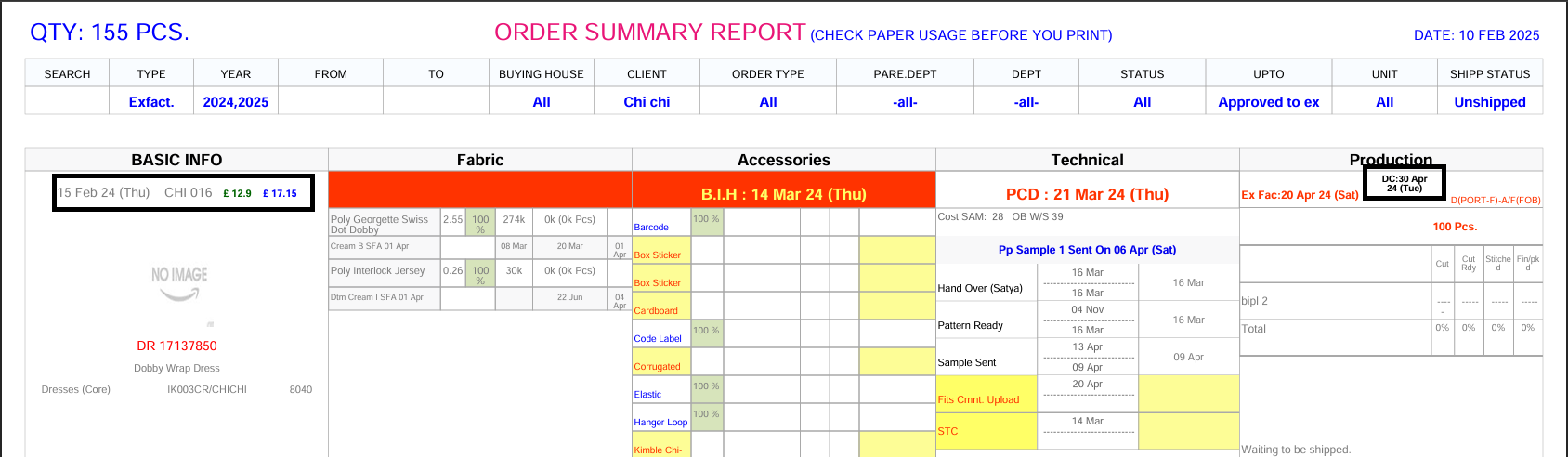
the order summary now includes additional details for Ikandi orders.
Specifically, the DC, Bipl Price, and Ikandi Price will be displayed for Ikandi orders only.
-
Key Changes:
-
* Ikandi Orders: DC, Bipl Price, and Ikandi Price will be shown in the order summary for Ikandi-specific orders.
-
* Improved Clarity: Provides clearer pricing and related information for these orders.
-
-
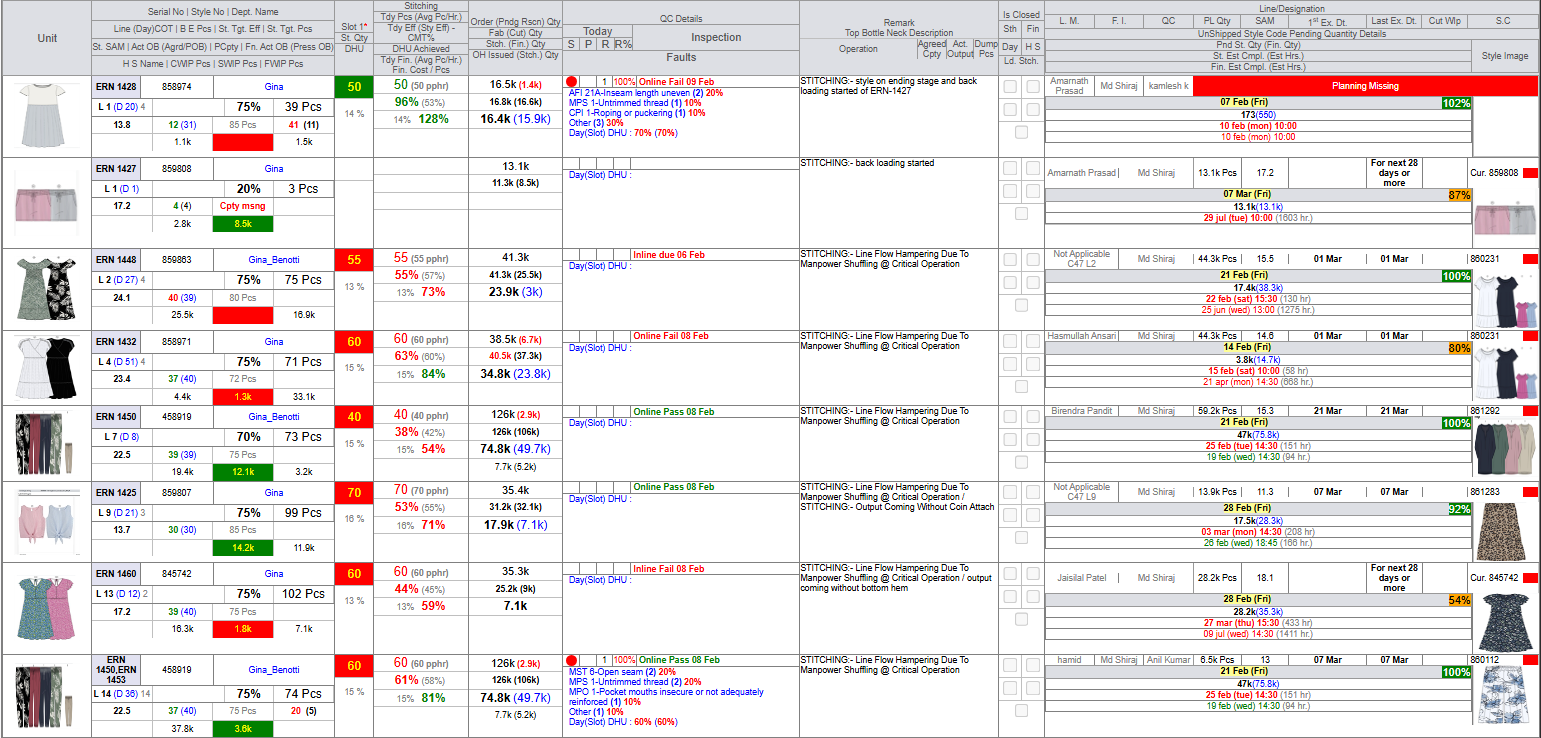
3) In the Hourly Report, the projection is now based on overall hourly productivity
rather than being dependent on line planning.This update ensures more accurate and consistent projections, independent of line-specific planning.
-
Key Changes:
-
* Projection Update: Projections are now driven by overall hourly productivity, not by line planning.
-
|
Version 9.4.9
|
Released Date (03rd Feb 2025)
|
-
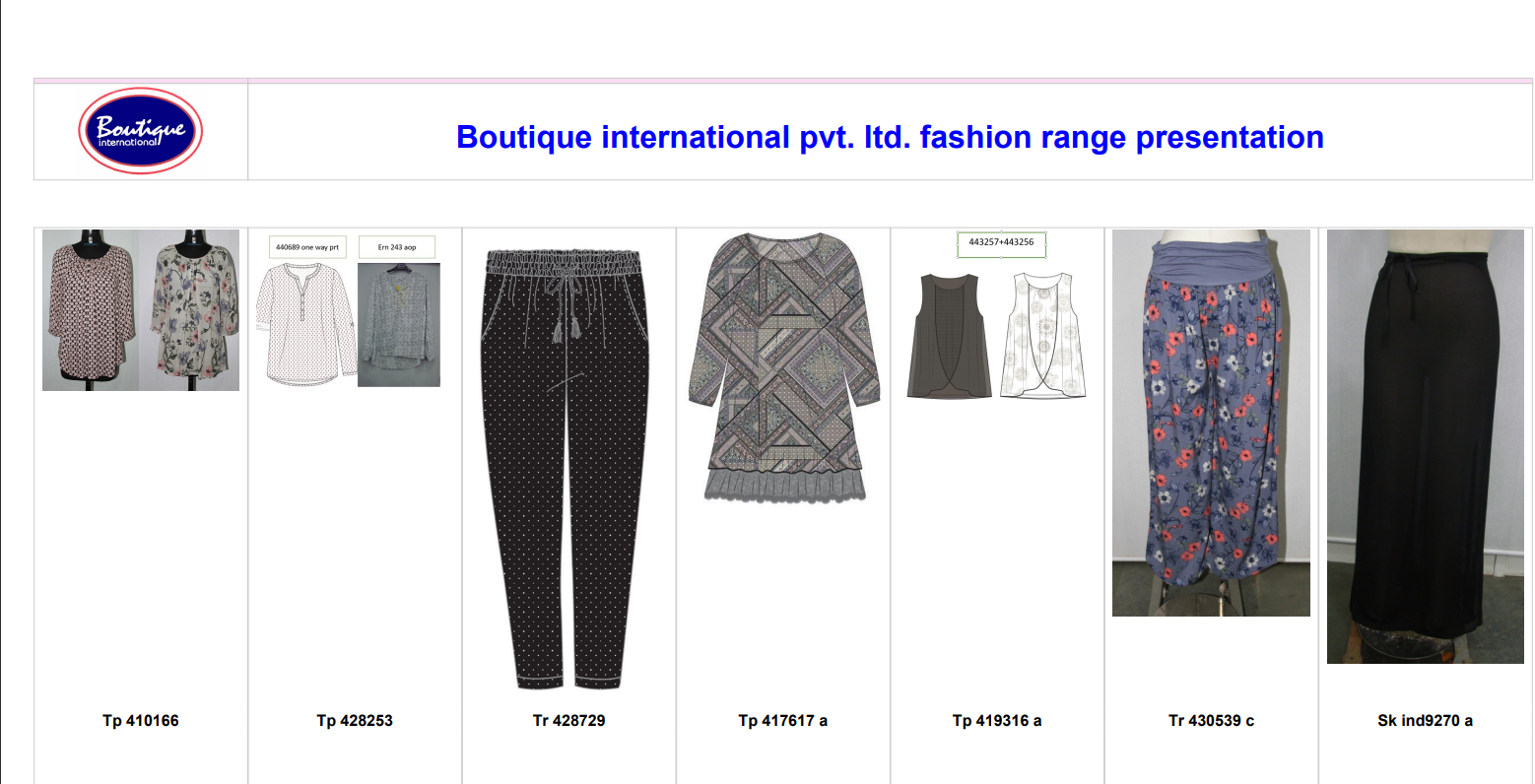
1)Feature Update: Virtual Showroom Admin PDF
-
We have made the following changes to the Virtual Showroom Admin PDF:
-
* Removed Fabric Name
-
* Removed Price
-
* Removed Minimum Order Quantity (MOQ)
-
* These changes ensure a cleaner and more streamlined PDF for administrative purposes.
-
-
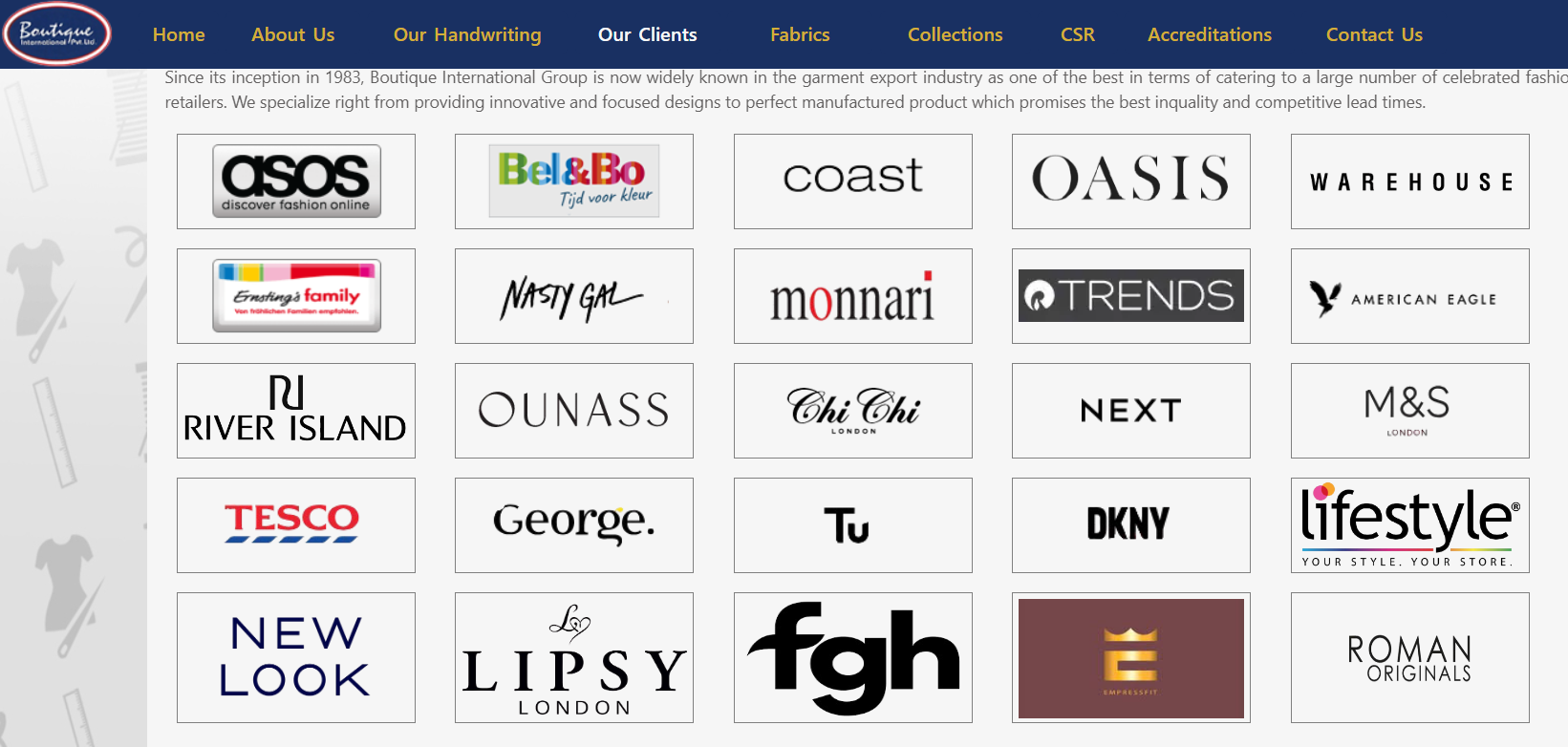
2) Company PDF Update: Added new client logos to the Company PDF on the website.
-
* Our Clients Page Update: Added a new buyer logo to the Our Clients page.
-
|
Version 9.4.8
|
Released Date (22nd Jan 2025)
|
-
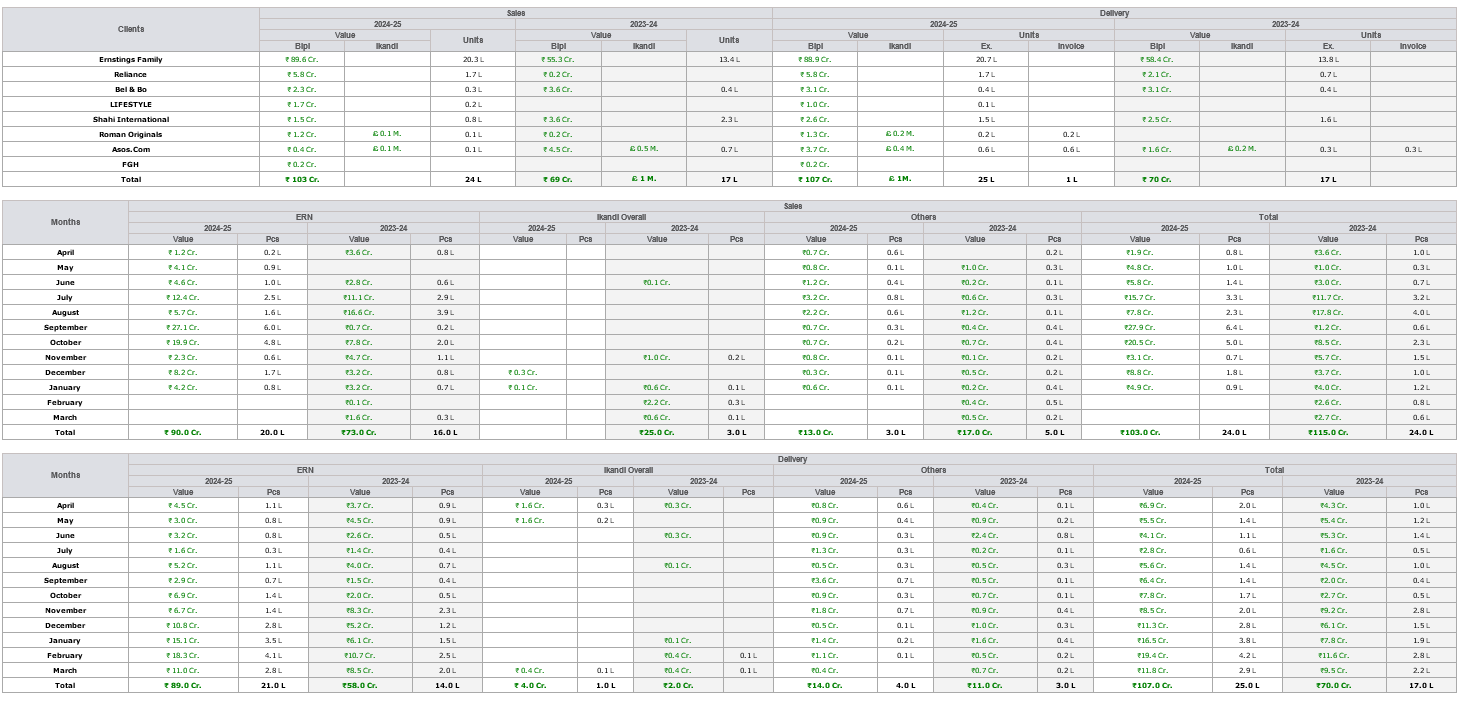
1) Daily Sales Report Update Summary of Changes:
-
Sales and Delivery Sections:
-
* The Sales and Delivery sections are now bifurcated based on financial years.
-
* Instead of having separate sections for financial years, values will be presented in the existing Sales and Delivery sections.
-
* The format will display the current financial year values followed by the previous financial year values.
-
Example:
-
* Old Format: Separate sections for Financial Years
-
* New Format: Integrated Sales and Delivery with bifurcation within the same section.
-
ASOS Replacement:
-
* The name "ASOS" has been replaced with "Ikandi Overall."
-
* Similar updates will be applied to other sections as per the example provided.
-
Consistency in Updates:
-
* Updates will follow the format outlined in point (iii).
-
-
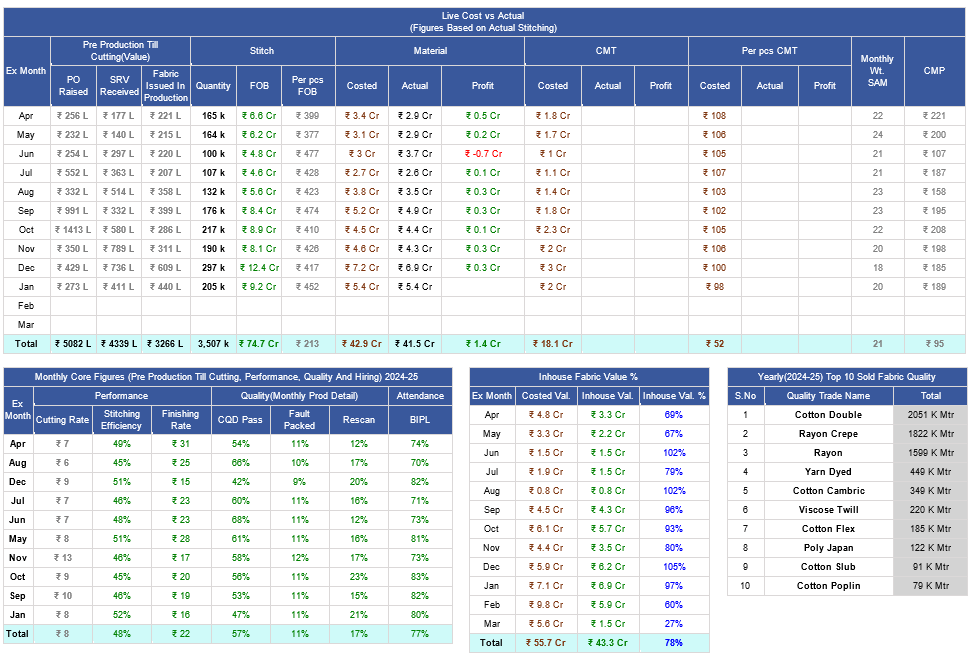
2) BIPL Core Report Update Summary of Changes:
-
Monthly Fabric Movement Data:
-
* Additional columns introduced:
-
a) Total PO Raised: Based on PO creation date, independent of fabric quality or stage.
-
b) Total SRV Received: Based on SRV creation date, independent of fabric quality or stage.
-
c) Total Fabric Issued in Production: Derived from Internal Challan records.
-
d) Total Pieces Cut: Calculated using the percentages from the summary report.
-
Integration with Production Performance Report:
-
* Monthly data from the Production Performance Report will be stored and merged into the grid.
-
* Relevant data sections have been identified for integration.
-
MMR Report Data Integration:
-
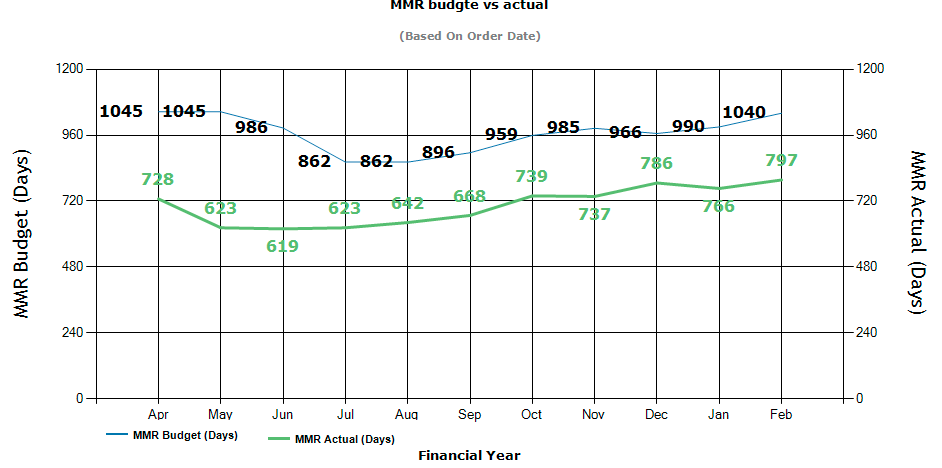
* Monthly summaries from the MMR Report will be stored and reflected in the grid.3
-
Yearly Top 10 Sold Fabric Quality:
-
* Summary section added to display the top 10 sold fabric qualities annually.
-
* Only the main trade names will be considered, excluding C&C, GSM, and other subcategories.
-
* Example: "40s Rayon," "40s Rayon ecovero," and "40s Rayon ocs" will all be consolidated as "40s Rayon."
-
Report Format:
-
* The updated report format ensures clear presentation of monthly and yearly data as per the defined structure.
-
-
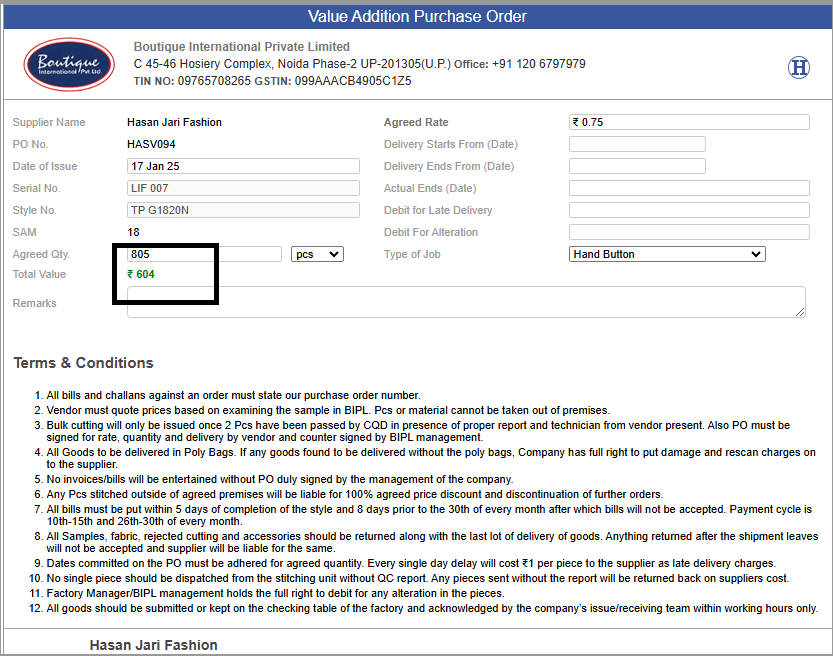
3) Updated the VALUE Addition section for OUTHOUSE PO to ensure the Total Value is displayed in bold green text
without decimal points.
This enhancement improves clarity and aligns with user feedback for a more visually intuitive representation.
-
|
Version 9.4.7
|
Released Date (6Th Jan 2025)
|
-
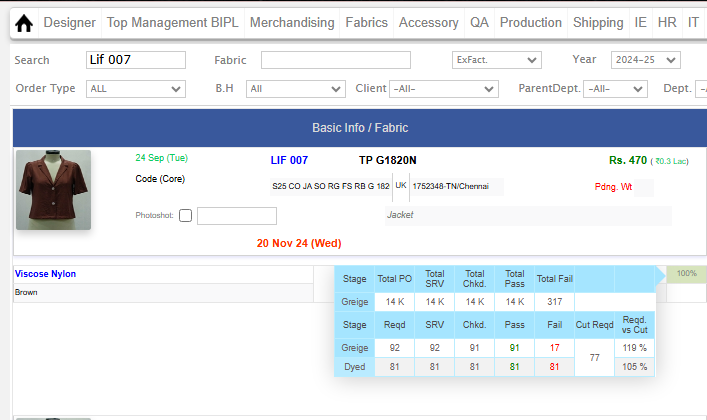
1) Improved MO Tooltip for Fabric Allocation Details
-
* Updated the MO tooltip to display detailed allocation information based on the source of the received quantity.
-
* If the fabric quantity has been received from a Purchase Order (PO), the tooltip will show the quantity checked, passed, or failed for the respective PO.
-
* If the fabric quantity has been received from stock, the tooltip will show the allocated quantity sourced from stock.
-
This enhancement provides greater clarity and traceability for fabric allocation within the MO.
-
-
New Headers:
-
2) New headers and formulas in the Fabric Reconciliation Excel sheet to enhance the accuracy and efficiency of fabric
tracking and reconciliation.
The updated Excel now includes critical columns, such as "PO Type," "Quality," "Count & Construction," "GSM,"
"Color Print," "Current Stage," "Greige Shrinkage," and "Balance to Receive."
- * PO Type: The type of Purchase Order associated with the fabric.
- * Quality: The quality classification of the fabric.
- * Count & Construction: The count and construction details.
- * GSM (Grams per Square Meter): The weight measurement of the fabric.
- * Color Print: The color printing details on the fabric.
- * Current Stage: The current manufacturing or processing stage of the fabric.
- * Greige Shrinkage: The shrinkage calculation for the greige fabric.
- * Balance to Receive: The balance quantity of fabric yet to be received.
-
-
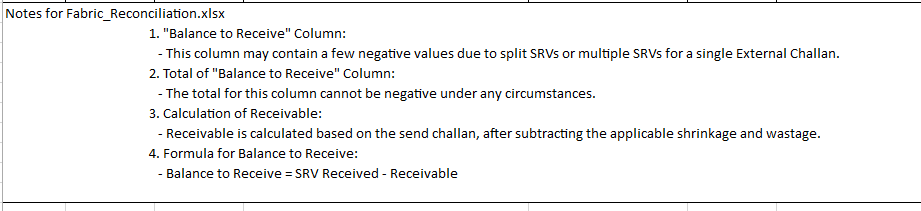
3) Formula for "Balance to Receive":
-
The formula for the "Balance to Receive" column has been implemented as:
Balance to Receive = SRV Received - Receivable
This calculation ensures that the balance reflects the actual fabric quantity that needs to be received after considering the SRVs (Store Receiving Vouchers) and applicable receivables.
Negative values may appear in this column due to split SRVs or multiple SRVs for a single External Challan.
-
4) Receivable Calculation:
-
* Receivable is calculated by considering the sent challan and adjusting for applicable shrinkage and wastage.
-
5) Total of "Balance to Receive" Column:
-
* The total of the "Balance to Receive" column will never be negative under any circumstances. This ensures that the reconciliation process is accurate and that no discrepancies arise in fabric tracking.
|
Version 9.4.6
|
Released Date (16Th Dec 2024)
|
|
|
Version 9.4.5
|
Released Date (28Th Nov 2024)
|
-
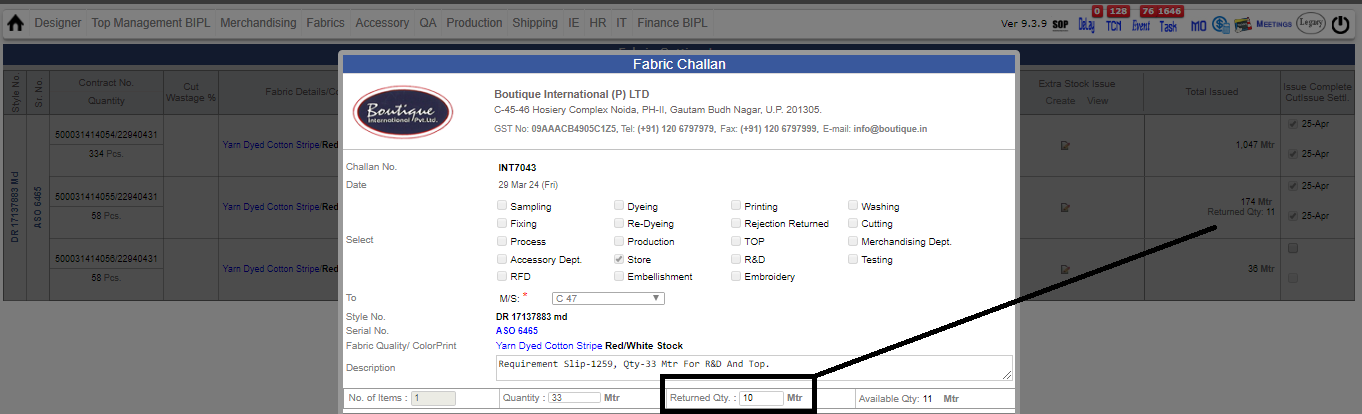
1) New Features and Enhancements for Certified Fabric Handling in Internal Challan
- C47 Address Priority:
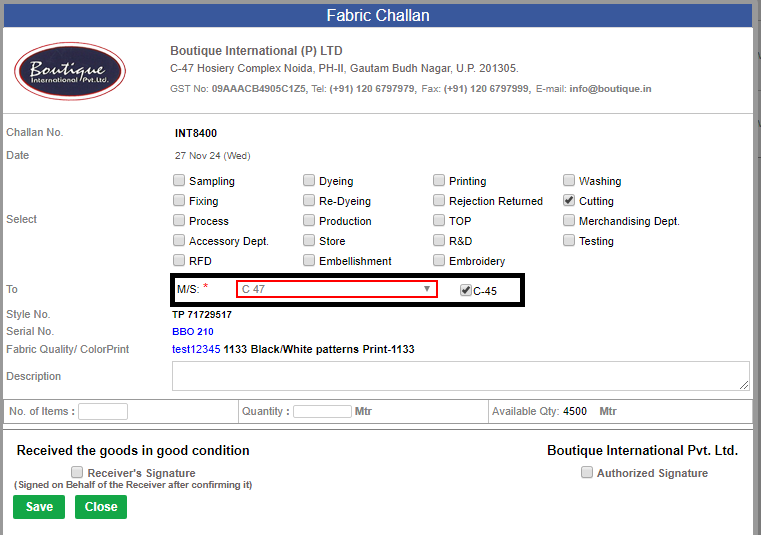
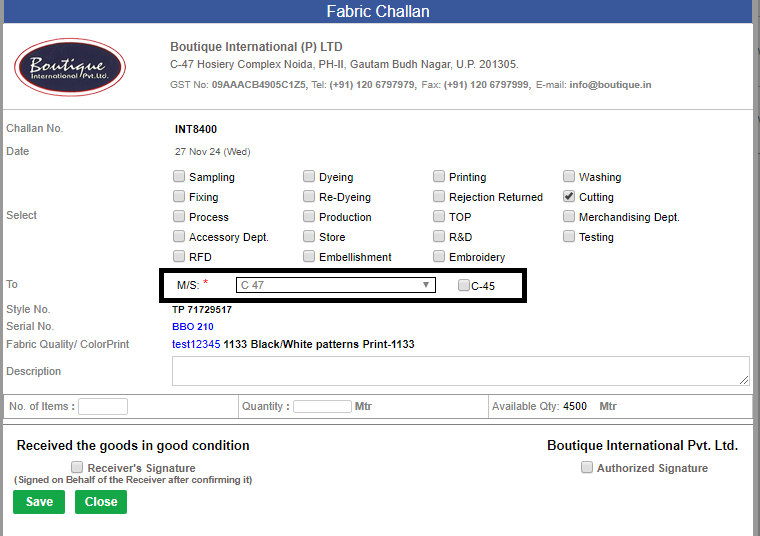
- * For certified fabrics (e.g., OCS-certified), the default unit address on the internal challan is set to C47. The dropdown for address selection is frozen to prevent manual changes to this field for certified fabrics.
- Issuance from C45 Visibility:
- * If a certified fabric is issued from C45, a checkbox will be displayed beside the unit address dropdown. This checkbox will highlight the dropdown field to make this discrepancy visible. In printouts, this checkbox will be hidden but its value will be stored in the backend for traceability.
- Material Tag Admin Updates:
-
New Column in Material Tag Table:
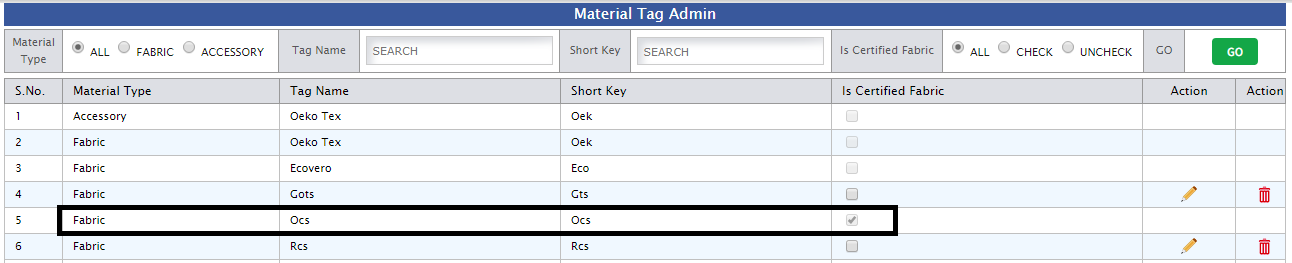
* A new column, IsCertifiedFabric, is added to the Material Tag table to track whether a fabric is certified.
- Admin Interface Update:
- *The Manage Tag Admin interface now includes a checkbox to mark a fabric as certified. The IsCertifiedFabric flag will be updated based on the selection and stored in the corresponding record in the database.
- The footer on the internal challan printout has been updated to include the following note:
- * “Signed on Behalf of the Receiver after confirming it.” This will appear below the receiver's signature section for improved clarity.
-
-
2) The Order Summary PDF generation process has been optimized to take less time, providing users with a faster experience.
This enhancement ensures quicker access to order details, improving overall efficiency for users.
-
-
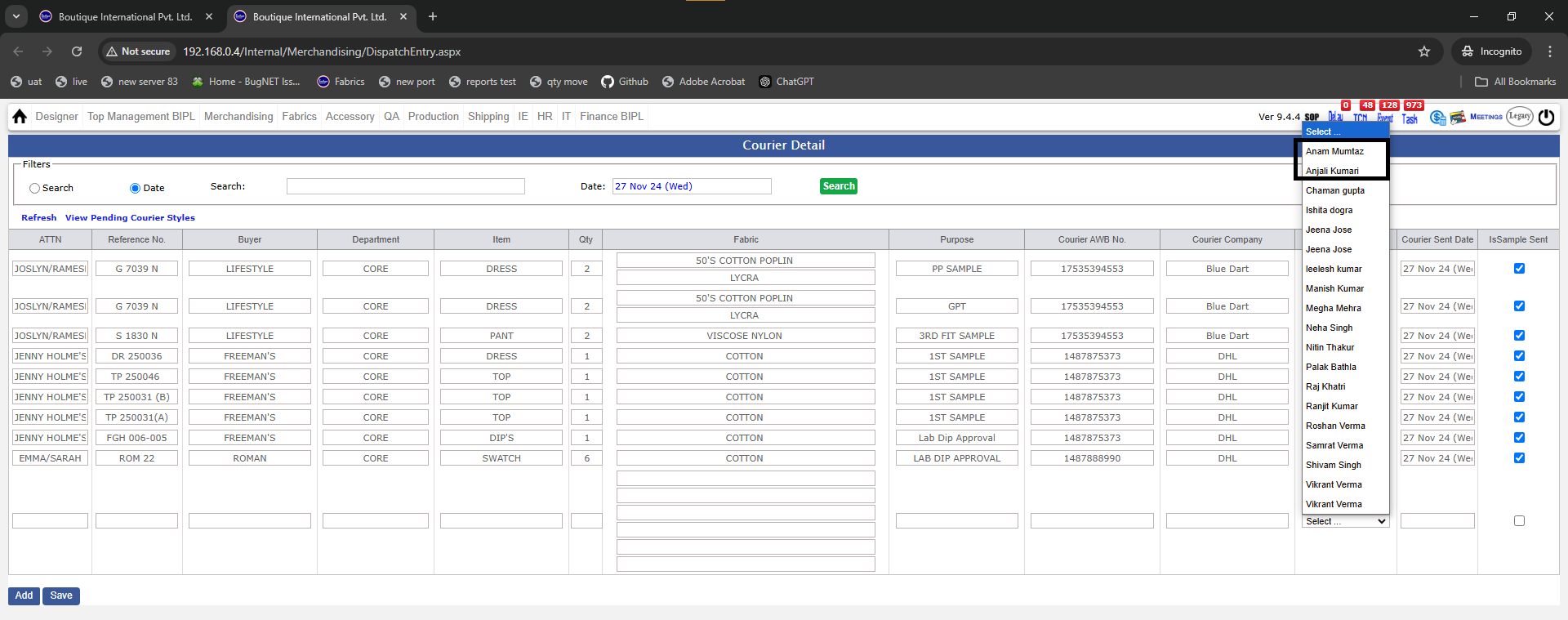
3) A Designer field has been added to the Courier Sent page, allowing users to select a designer when sending a courier.
-
-
4) For MIR Export Orders too now the Order confirmation sales task will be created to the Top Management (Updated on Dated 6th Dec 2024)
|
Version 9.4.4
|
Released Date (18Th july 2024)
|
-
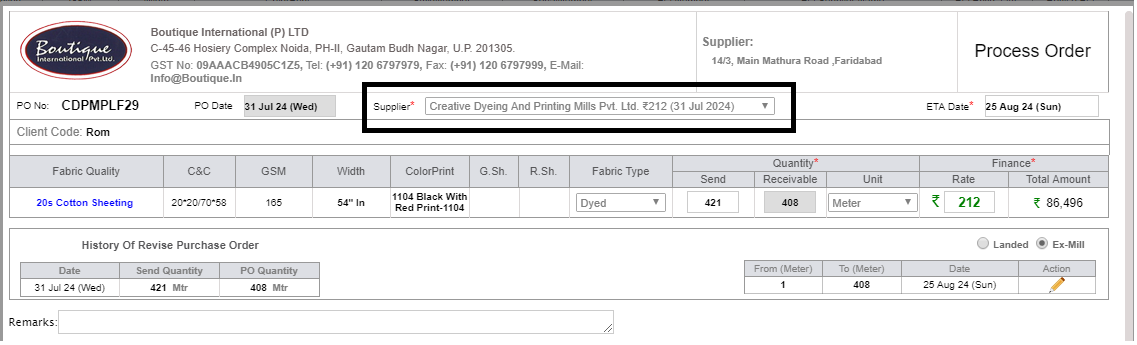
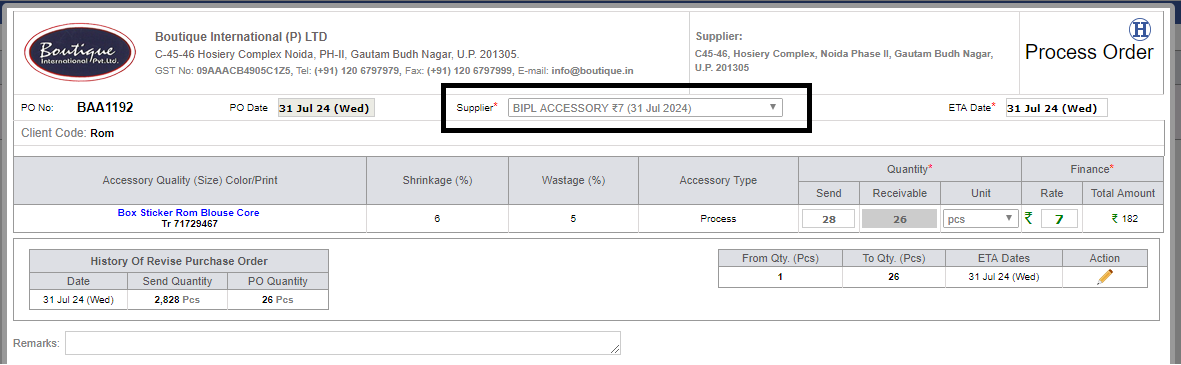
* In response to Material GM's request, we have made the following update to the Purchase Order (PO) system:
-
Modification to Supplier Lists: The "Days" column, which previously indicated the lead time or delivery timeline
from suppliers, has been removed from both Fabric Purchase Orders (POs) and Accessory Purchase Orders (POs).
This is because the suppliers get assumption as days for the payment term.
-
-
1)
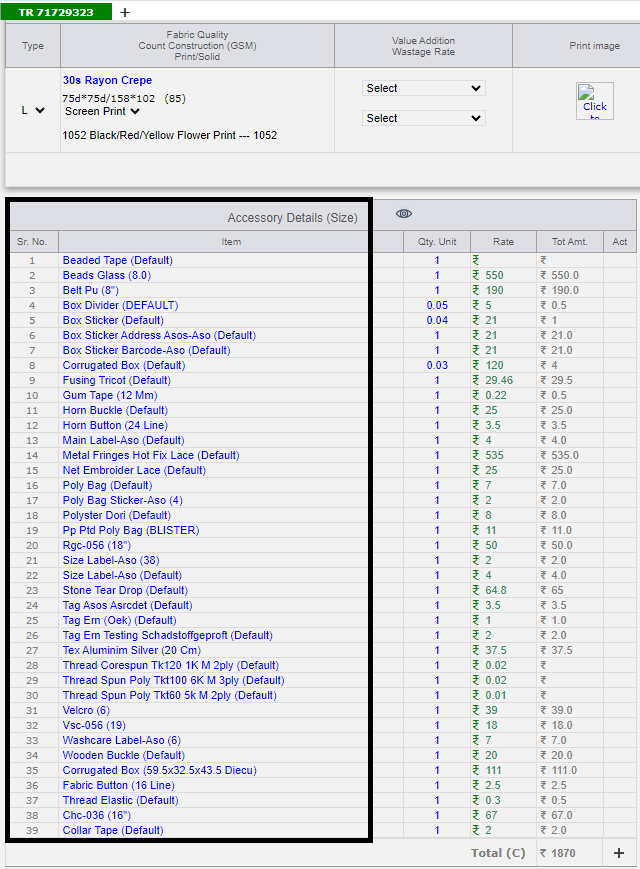
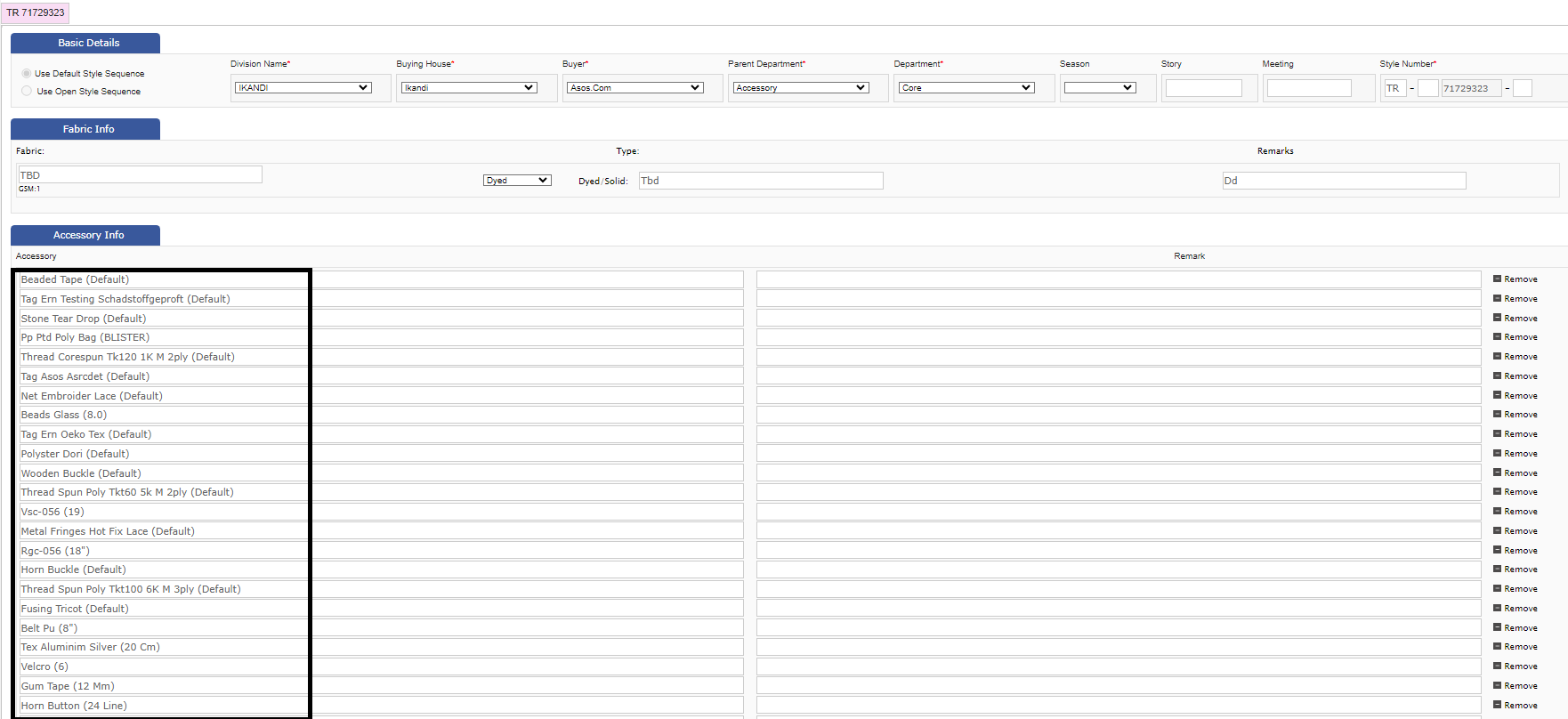
* Implemented dynamic barrier through CMT admin for maximum limit of accessories
in the style.
-
2)
* Updates include changes in design forms to reflect new limits.
-
3)
* Costing modules adjusted to accommodate dynamic accessory limits.
-
-
4)
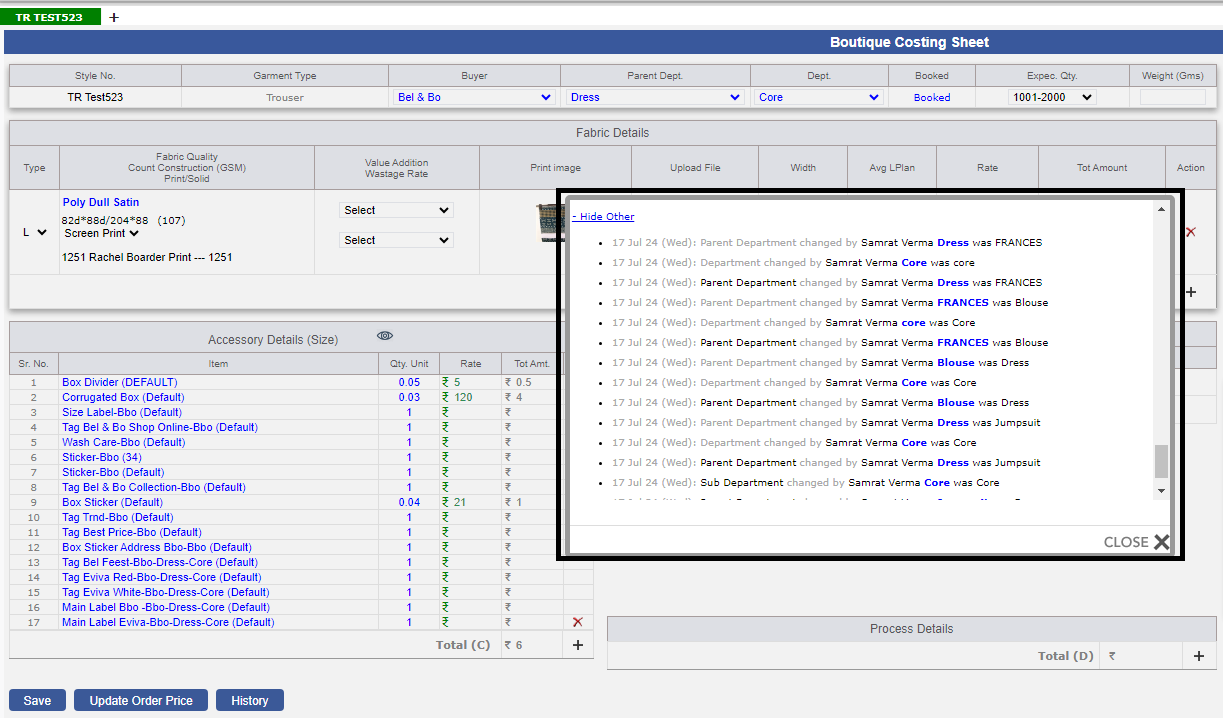
* Updated functionality to retain stored defaults when changing departments.
-
5)
* Collaborated with merchant team to refine and implement changes for seamless default
management during department transitions.
-
6)
* Introduced department change history tracking for transparency and audit trail.
-
|
Version 9.4.3
|
Released Date (16Th May 2024)
|
-
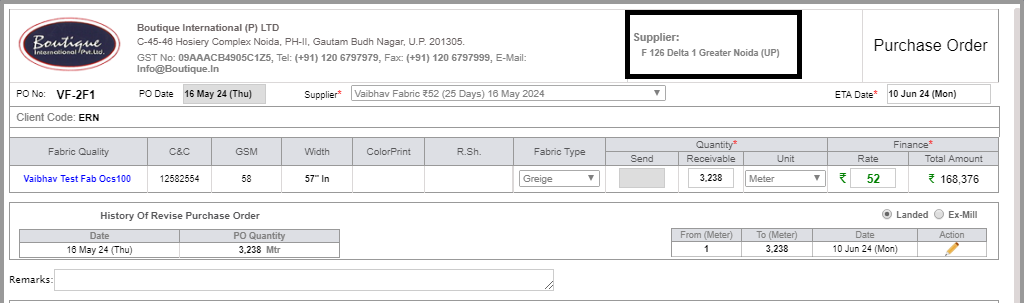
1)
* In Fabric PO and Accessory PO, adding the supplier address too to fulfil gots
and other Certification norms.
-
-
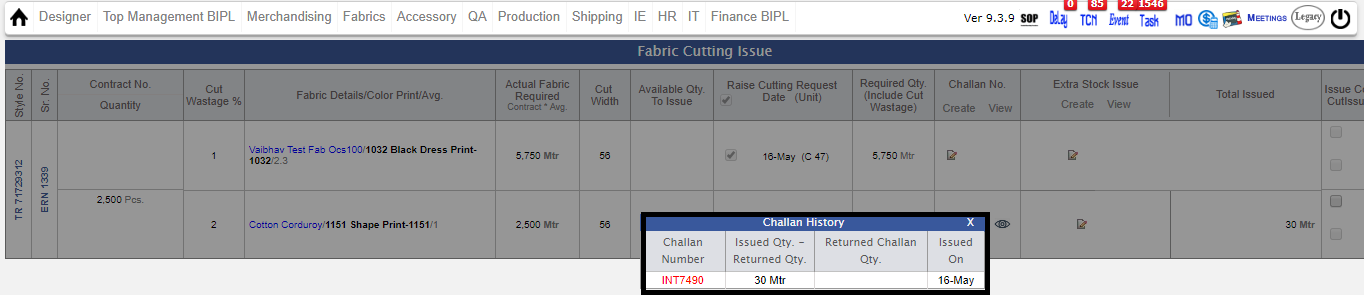
2) * A new validation has been added, if there is no signature
on the challan then it will not allow further challan to be created and the color
of the challan will turn red.
-
|
Version 9.4.2
|
Released Date (3rd May 2024)
|
|
|
Version 9.4.1
|
Released Date (9th Apr 2024)
|
-
1)
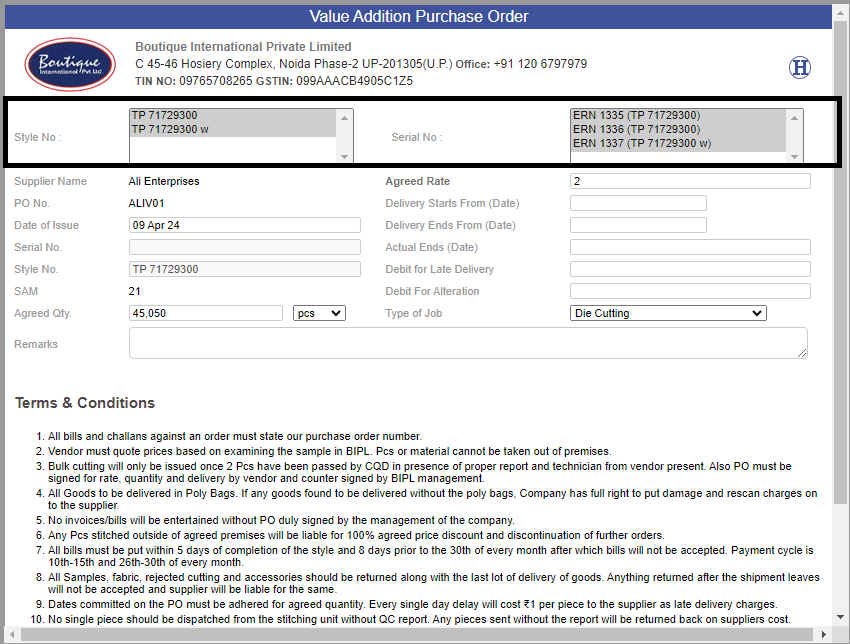
Value Addition PO and Stitch Reallocation Page:-
-
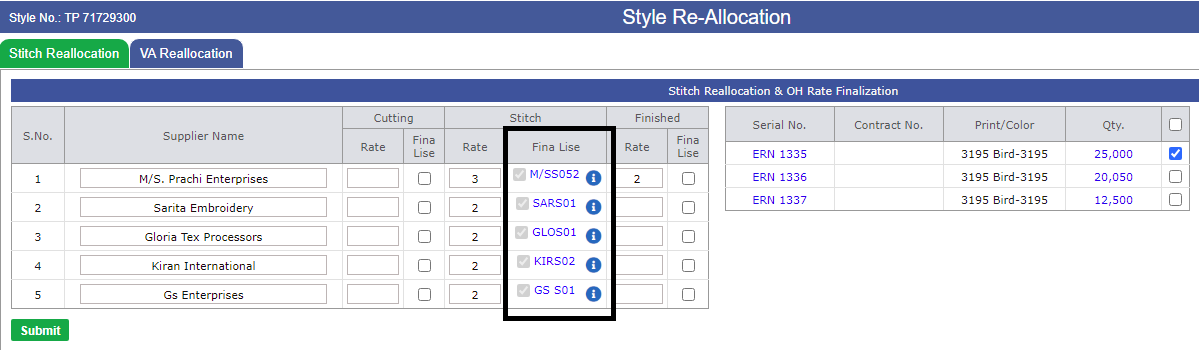
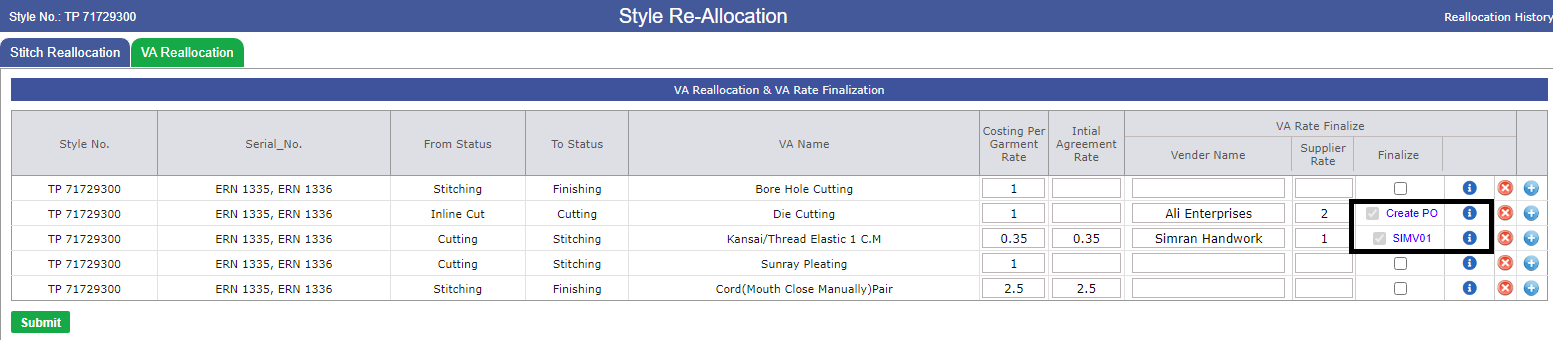
* Now you can also see the old PO in Stitch Reallocation and Value addition PO by
clicking on the eye button which is on the reallocation page. But only those which
will start get created now onwards.
-
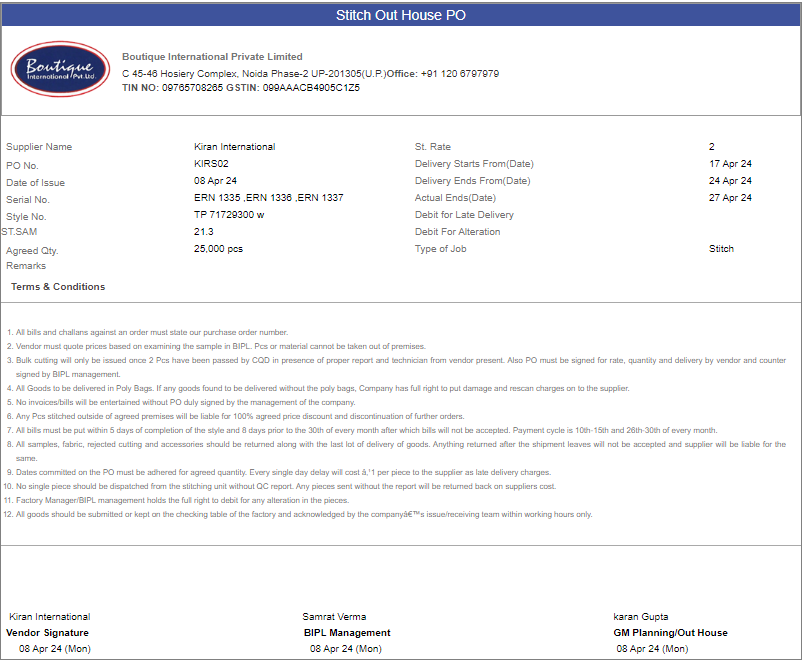
* Stitch Reallocation PO mapped on Stylecode, stylenumber and serial numbers dynamically.
-
* Value addition PO mapped on stylenumber, serial numbers and Value Addition dynamically.
-
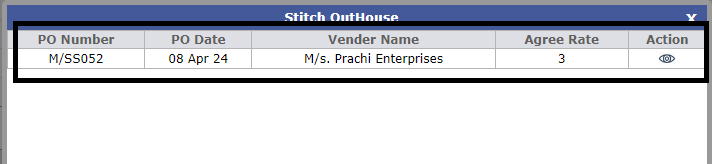
* By clicking on 'i' button on reallocation page in the corresponding sections of
Out House stitch and Value addition, you can see the old PO of that supplier in
HTML format.
-
* On Vijay's login, the selection box of Style number and Serail number will open,
in which he can select the serial and style number as per requirement.
-
* Selection box will not be visible on login of Samrat Sir and Karan Sir, as no
need to be done by management these stuffs.
-
* HTML for Stitch Reallocation PO and Value addition PO will generated after Samrat's
Sir signature.
-
-
2) As discussed with management, In costing the value addition
section is freezed, after order confirmed from date 1st march 2024, before 1st march
2024 you can add Value Addition in costing.
-
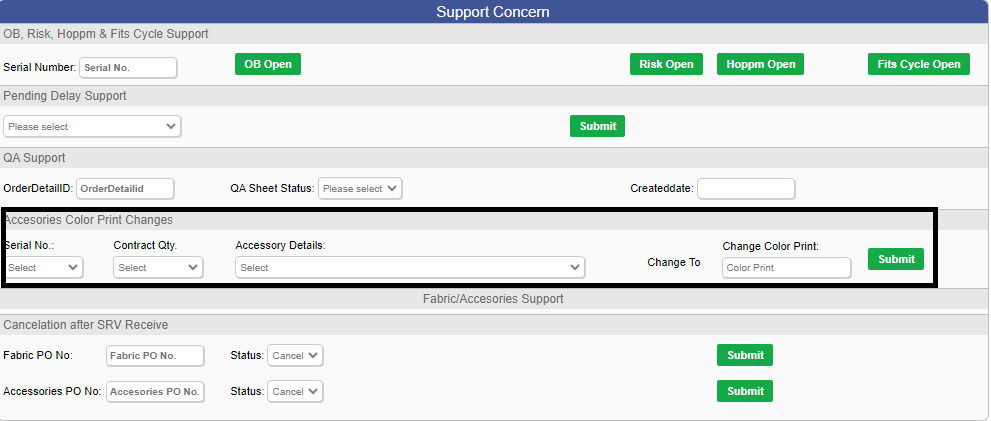
3) In support issue update page, option to change color print
for accessory is available.
-
-
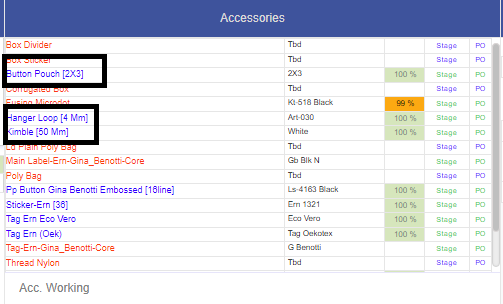
4) As of now, the size of the accessory will be in square
brackets [] and the tag will be in round brackets ().
-
-
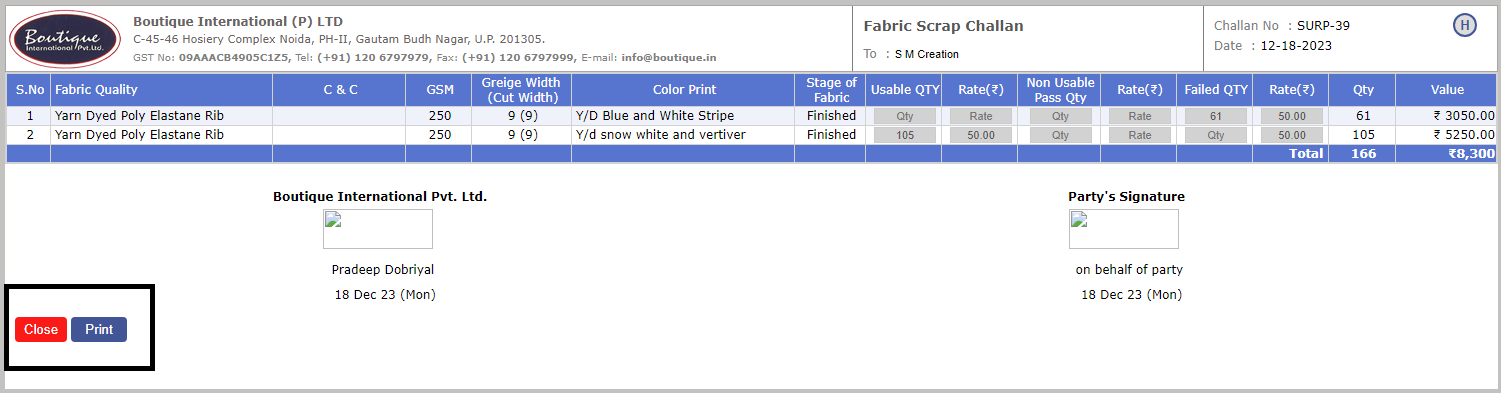
5) Print Functionality is available on Fabric Surplus challan.
-
-
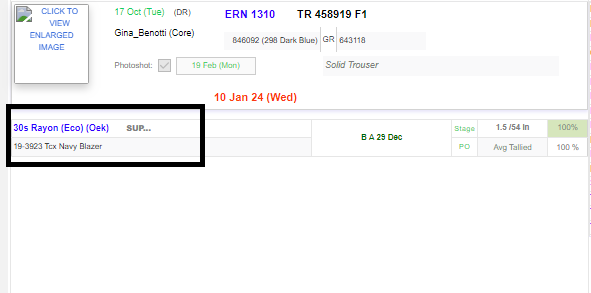
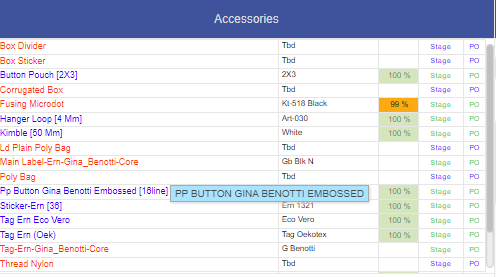
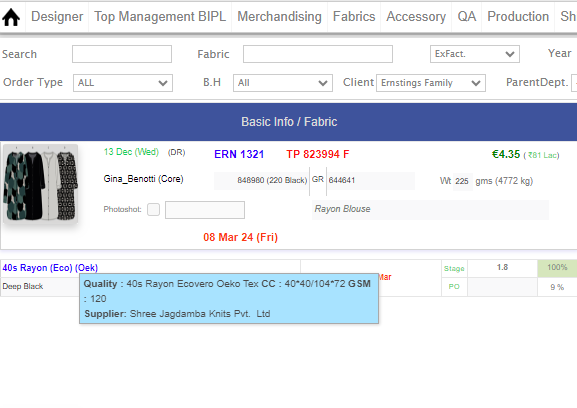
6)'SUP' symbol has been removed and from now on supplier
details and fabric details will appear on mouse over of fabric on MO.
-
-
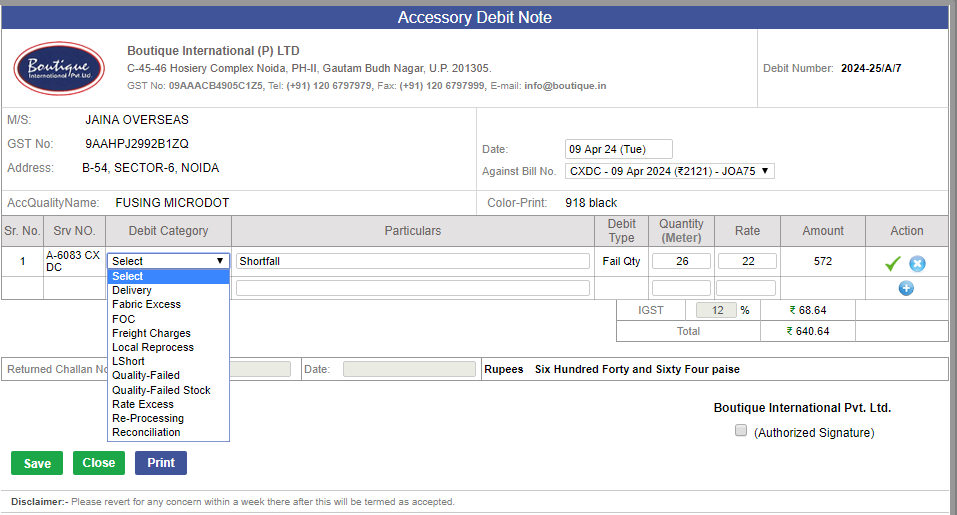
7) Now implemented the Main type (Category) of the debits.
This need to be selected in the debit note of the Accessory. Finalised in the discussion.
-
-
Note:
Training : Given to PPC Department.
Vijay
Training : Given to IE Department.
Padam
|
Version 9.4.0
|
Released Date (6th March 2024)
|
|
|
Version 9.3.9
|
Released Date (13th Feb 2024)
|
-
1)
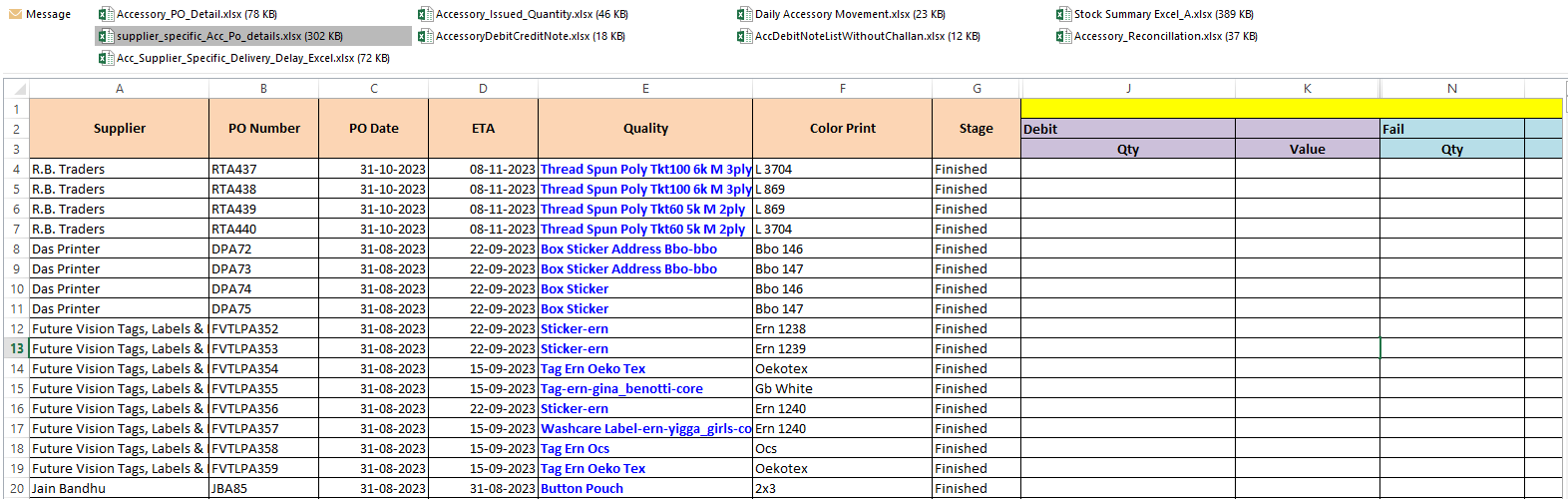
Updates in the accessory PO Detail Report
-
i) We have created the report named as "Supplier-Specific Quality Control". This
is currently based on Fabric report implementation. Both the reports will get modified
based on the Debit category implementation soon.
-
ii) This will have the supplier-specific internal metrics info in Excel format.
-
iii) This will help the Material (Accessory) team to take the decision for future
orders with genuine suppliers.
-
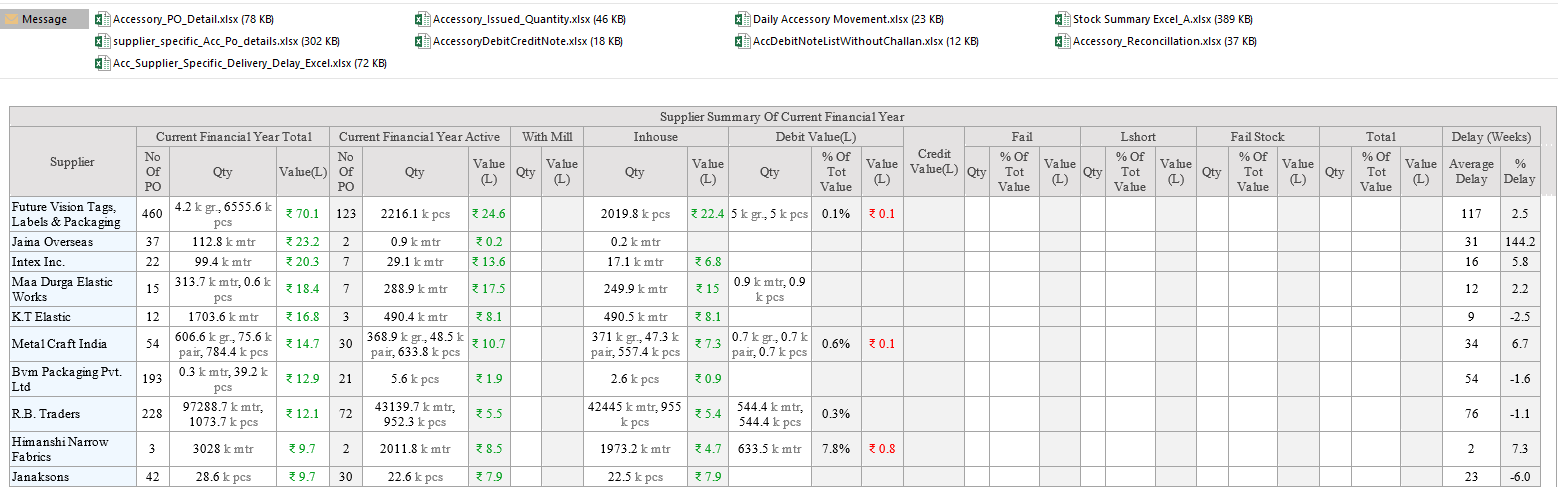
iv) The Mail body show the supplier-specific summary in the mail named as Accessory
PO Mail accordingly.
-
v) The Excel is also attached with complete detail of the summary visible in mail
body. Name of the excel is "supplier_specific_Acc_Po_details.xlsx".
-
-
2)
Tag admin is modified again as follows:-
-
i) We have refined the validations in case of Add , Edit and Delete scenerios.
-
ii)Duplicate Tagname and shortcode cannot be added.
-
iii) The Tag type cannot be chaged after created. Means Fabric Type tags cannot
be updated as Accessory type tags and Vice versa.
-
iv) If the particular tag is used with any quality then it cannot be deleted.
-

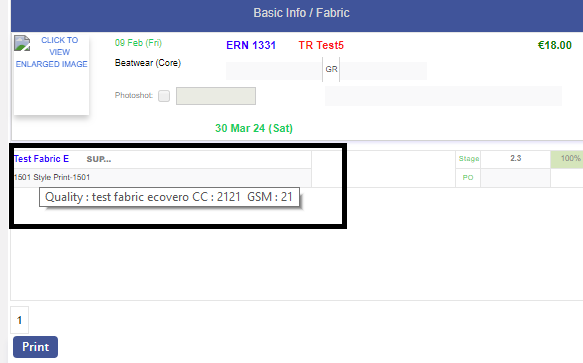
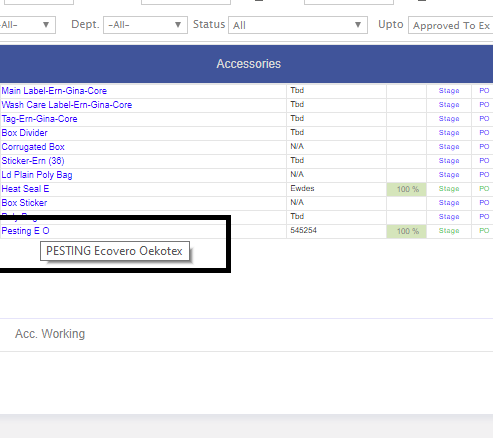
-
3)
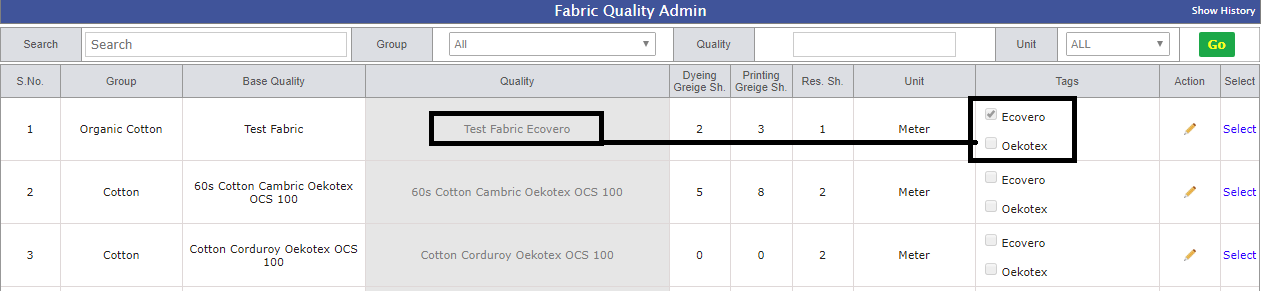
Fabric Quality Admin
-
i) Now from this admin Tags can be added as defined for fabric in tag admin.
-
ii) When adding the fabric quality then the tags may be selected from check box
list of Tags, this is not mandatory.Based on the selection we maintain the Base
quality name, Quality with short tag and Quality with full tag names.
-
iii) Quality with full tag name will be visible in the PO cycle of the material
other wise in order form, Costing and MO we show the Quality with short tags will
full name tooltip. e.g.: As for the 40s Rayon tag selected Ecovero and Oeko the
Name should be followed by Ecovero and Oeko the name would be “40s Rayon Ecovero
Oeko”. But on MO it will be shown as “40s Rayon E O” and full name shown as tool
tip.
-
iv) If Stage is selected for particular Fabric Quality is done then, Team will not
able to change fabric quality Name or Tag name.
-
-
4)
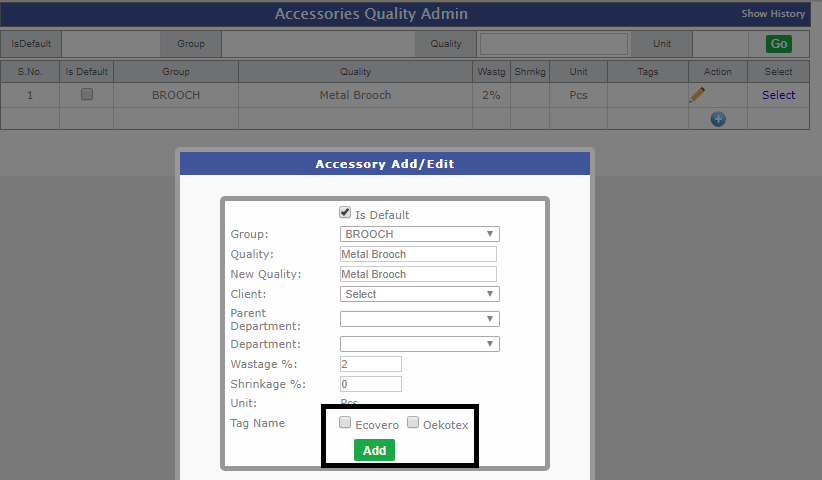
Accessory Quality Admin
-
i) Now from this admin Tags can be added as defined for Accessory in tag admin.
-
ii) When adding the Accessory quality then the tags may be selected from check box
list of Tags, this is not mandatory.Based on the selection we maintain the Base
quality name, Quality with short tag and Quality with full tag names.
-
iii) Quality with full tag name will be visible in the PO cycle of the material
other wise in order form, Costing and MO we show the Quality with short tags will
full name tooltip. e.g.: As for the Tag Riv tag selected Ecovero and Oeko the Name
should be followed by Ecovero and Oeko the name would be “Tag Riv Ecovero Oeko”.
But on MO it will be shown as “Tag Riv E O” and full name shown as tool tip.
-
iv) If Stage is selected for particular Accessory Quality is done then, Team will
not able to change Accessory quality Name or Tag name.
-
-
5) As discussed with Management there are no technologist
in Ikandi right now so we are allowing to select the 10 days back date in the fit
sent date in fit cycle.
|
Version 9.3.8
|
Released Date (4th Jan 2024)
|
-
1."
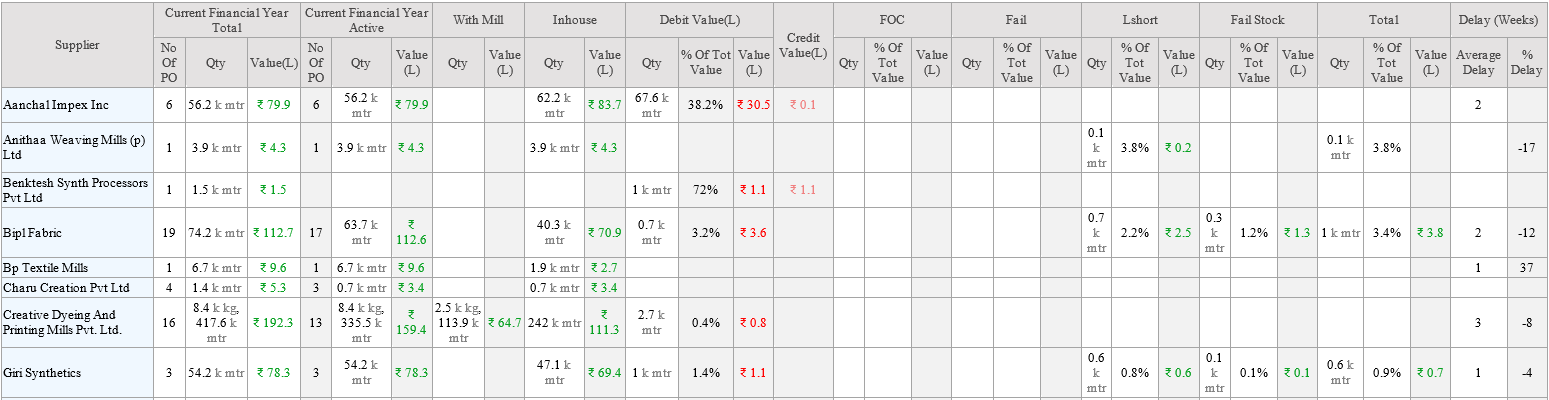
Supplier-Specific Quality Control " -- For Fabric Only
-
* This will be the supplier-specific internal metrics info in Excel format.
-
* This will help the Material team to take the decision for future orders with genuine
suppliers.
-
* We are showing the supplier-specific current Year summary in the mail body of
Fabric PO Mail.
-
* We have Created a separate excel too in support of the newly added columns in
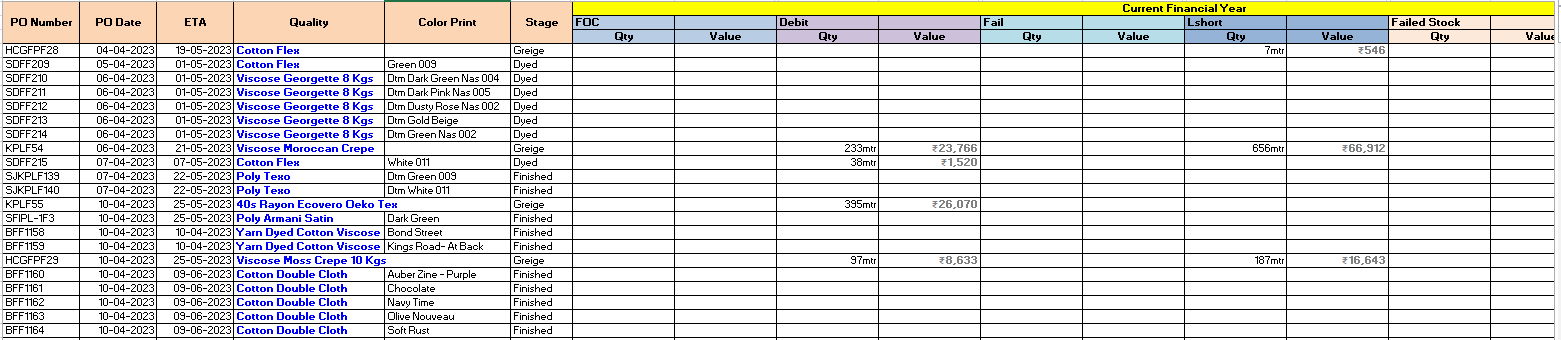
the above report as FOC, Fail, Lshort and Fail Stock etc. This Excel is attached
with fabric po detail named as "supplier_specific_Po_details.xlsx".
-
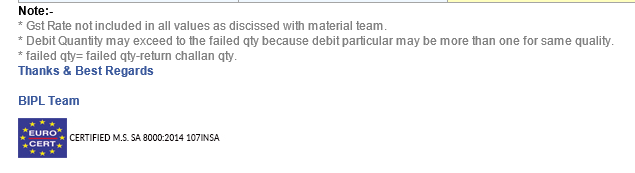
* In Fabric PO Details Report these line added as note for more clearity in Quantities.
-
==> As discussed we are not considering the gst in any report -- discussed with
material team
-
==> Debit Quantity may exceed to the failed qty because debit particular may be
more than one for same quality.
-
==> failed qty= failed qty-return challan qty.
-
-
2.Tag
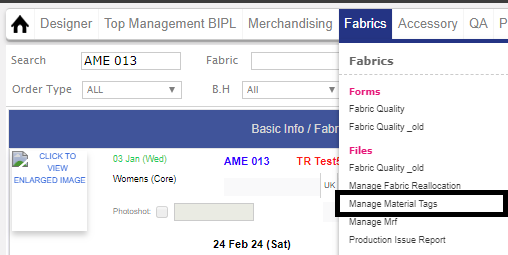
admin Implementation:-
-
* Add, edit delete and all types of validation for edit add and delete Duplicate
Tagname and shortcode cannot be added
-
* Type (Fabric or accessory) cannot be changed
-
* If the particular tag is used with any quality then it cannot be deleted.
-

-
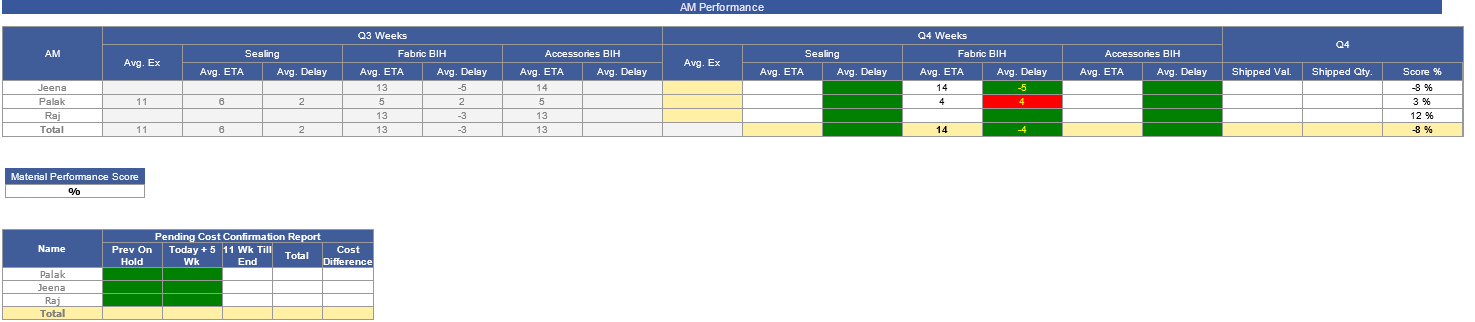
3.Removed
Tanya and Leelesh in all the reports of the merchandising and performance report
as discussed with Management.
-
-
4.MO
Order Sequencing should be based on Exfactory in place of first fabric BIH
-
5.Few Live concerns fixed
-
* Dyed should not be selected after Dyed similarly for others
-
* If RFD in second stage the its shrinkage get reduced in third stage.
-
* As discussed with Fabric Team - If RFD is in Second stage color Print is not considered
allocation is done according to order qauntity or Ex-Factory.
-
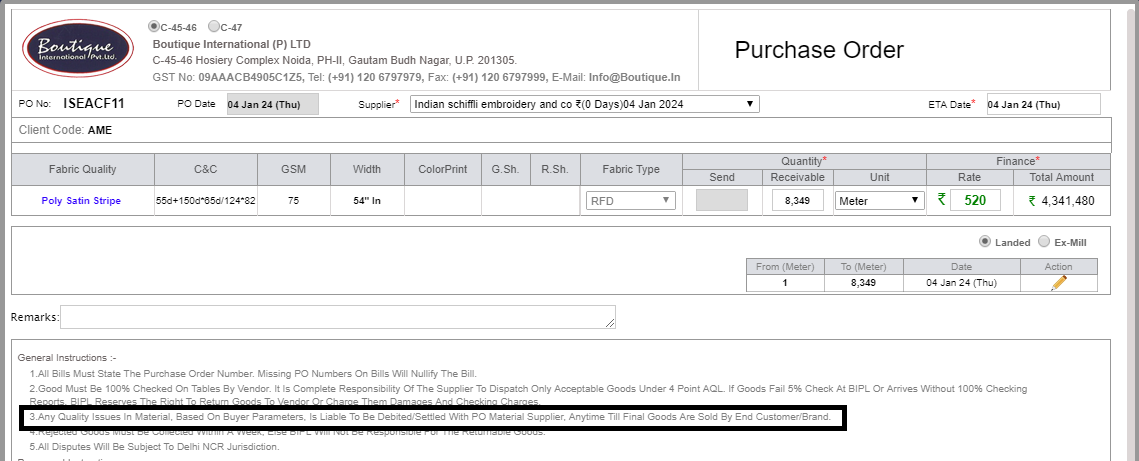
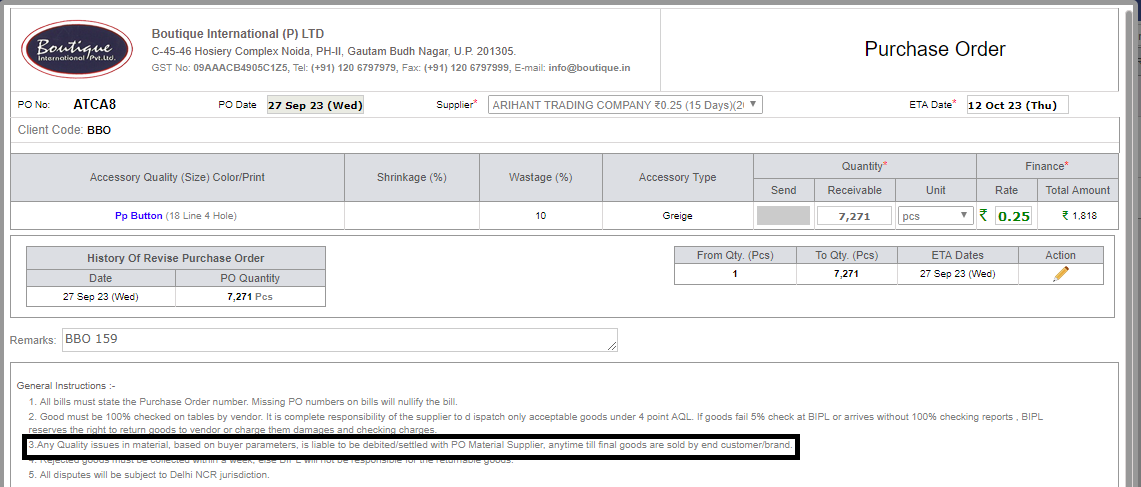
6.The 3rd point in all the Material PO is revised as per
SAM sir.
-
* Revised Point (Any Quality issues in material, based on buyer parameters, is liable
to be debited/settled with PO Material Supplier, anytime till final goods are sold
by end customer/brand.)
-
|